Question

update to macOS Tahoe

  • September 17, 2025
  • 56 replies
  • 3601 views

Show first post

56 replies

AjTrek1
  • December 29, 2025

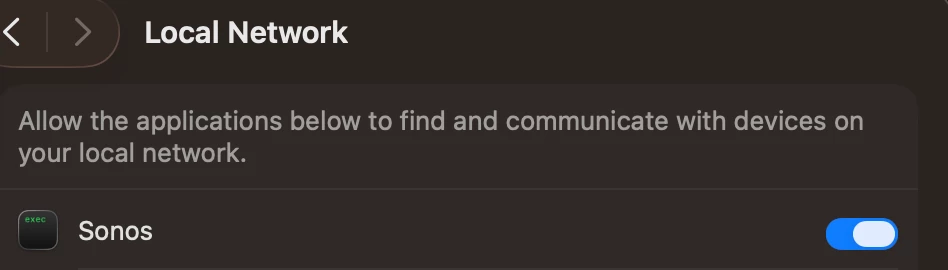
I just went into System Settings..etc... and toggled off/on the Sonos tab….It works now….go figure...

this helped - not entirely sure what I did in the end.

mmm

You essentially rebooted the setting.  Just basic first line troubleshooting. Works in many scenarios 😊


  • Lyricist I
  • January 13, 2026

confirmed that all you have to do is turn Sonos OFF and back ON in Privacy & Security - Local Network


  • Lyricist II
  • January 16, 2026

doogm is 100% correct - toggling Privacy & Security / Local Network on and off - TOTALLY fixed it - spent way too much time on this for this ridiculous and obscure fix.  THANK YOU GUYS though, spared sonos from winding up in the garbage (again).  


  • Lyricist I
  • February 7, 2026

Having no issues with the Sonos desktop app in MacOS Tahoe 26.0

Mac / Processor

  • MacBook Pro 16 inch / Intel i9
  • Mac Studio / M1
  • MacBook Pro 16 inch / M2
  • MacBook Pro 13 inch / M3
  • Mac Mini / M4

Mac System Settings

  • Firewall > Sonos > Allow Incoming Connections
  • Privacy & Security > Location Services > Sonos > On
  • Privacy & Security > File Vault > On 
  • Privacy & Security > Lockdown Mode > Off

Additional settings in my Mobile App for iOS and Android *

Profile > Privacy & Security > Connection Security

  • Authentication > Off 
  • UPnP > On (Must be enabled as it has a direct correlation to the Desktop App)
  • Guest Access > Off 

 * Primary device is iPhone iOS 26.0

Thank you! This worked for me. The only setting I changed was Firewall > Options > Sonos > Allow Incoming Connections


Forum|alt.badge.img+1
  • Avid Contributor III
  • March 4, 2026

Same here. Recent problem just started a few weeks back.

26.3 tahoe.

Toggle off/on. Fixed the issue.


Forum|alt.badge.img
  • Trending Lyricist I
  • March 4, 2026

Same here: in privacy: turn network off and on.