Question

update to macOS Tahoe

  • September 17, 2025
  • 54 replies
  • 3209 views

Show first post

54 replies

AjTrek1
  • December 29, 2025

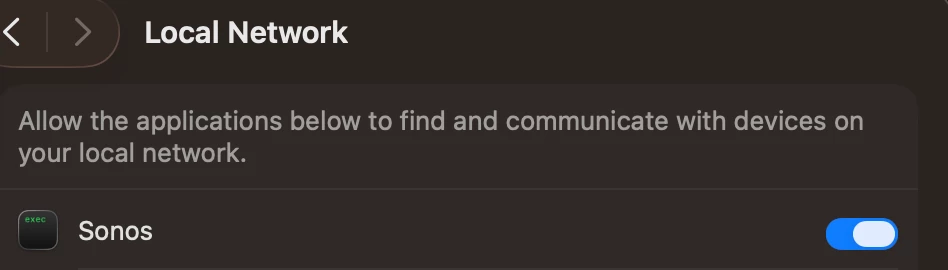
I just went into System Settings..etc... and toggled off/on the Sonos tab….It works now….go figure...

this helped - not entirely sure what I did in the end.

mmm

You essentially rebooted the setting.  Just basic first line troubleshooting. Works in many scenarios 😊


  • Lyricist I
  • January 13, 2026

confirmed that all you have to do is turn Sonos OFF and back ON in Privacy & Security - Local Network


  • Lyricist II
  • January 16, 2026

doogm is 100% correct - toggling Privacy & Security / Local Network on and off - TOTALLY fixed it - spent way too much time on this for this ridiculous and obscure fix.  THANK YOU GUYS though, spared sonos from winding up in the garbage (again).  


Having no issues with the Sonos desktop app in MacOS Tahoe 26.0

Mac / Processor

  • MacBook Pro 16 inch / Intel i9
  • Mac Studio / M1
  • MacBook Pro 16 inch / M2
  • MacBook Pro 13 inch / M3
  • Mac Mini / M4

Mac System Settings

  • Firewall > Sonos > Allow Incoming Connections
  • Privacy & Security > Location Services > Sonos > On
  • Privacy & Security > File Vault > On 
  • Privacy & Security > Lockdown Mode > Off

Additional settings in my Mobile App for iOS and Android *

Profile > Privacy & Security > Connection Security

  • Authentication > Off 
  • UPnP > On (Must be enabled as it has a direct correlation to the Desktop App)
  • Guest Access > Off 

 * Primary device is iPhone iOS 26.0

Thank you! This worked for me. The only setting I changed was Firewall > Options > Sonos > Allow Incoming Connections