Unable to add Music Library on new Windows 11 PC

  • December 22, 2025
  • 13 replies
  • 356 views

Hi

I have Sonos since around 2017. Since two weeks I have a new computer with Windows 11 and now I am unable to use the Sonos Music Library on the Windows App (Sonos Controller for PC). Error messages:
Sonos was unable to add the music folder. Please check that the path to the folder, and the username and password if needed, are correct. Reason: Access to the shared folder "\\XY" is denied.

or

"\\XY" is no longer available. The device where the music files are stored may not be powered on, or the path may have changed.

What I would like to achieve is to incorporate two folders in my Sonos Music Library (as was before):
C:\Music\01-Music
C:\Music\02-MusicNew

The folders are 121 GB and 210 GB in size respectively and shared with a dedicated local Windows user account (no microsoft online account).

I am able to access the paths via UNC (e.g. \\MyComputer\01-Music) in Windows Explorer locally as well as from a different computer in the network.

The cable-based network is set to private. The firewall has all the specified ports forwarded:
UDP:
136-139, 1900, 1901, 2869, 10243, 10280-10284, 5353, 6969

TCP:
80, 443, 445, 3445, 1400, 1410, 1443, 1843, 3400, 3401, 3500, 4070, 4444, 7000

Anything else I am missing? I have spent hours on this already and it is quite frustrating to get some simple mp3s running in 2025...

Any help would be appreciated.

13 replies

bockersjv
Forum|alt.badge.img+21
  • Local Superstar
  • December 22, 2025

You’re the second person to report this today.  It looks like it’s cause by the latest Windows 11 update.  Not seen a fix for it yet but someone from Sonos might suggest how to resolve or raise a ticket for it.


But have you considered a Network Attached Storage Device (NAS)?   Far more efficient than leaving your PC on all the time as well as divorcing you from Microsoft's latest whim!  


Stanley_4
  • Grand Maestro
  • December 22, 2025

Are you sure any of the ports you are forwarding aren't interfering with Sonos? 

I have no ports forwarded and mine works fine, I do use a SMB server, not Windows though.

I went the NAS route to avoid the constant Windows update related issues, much less frustrating.


Pools-3015
Forum|alt.badge.img+17
  • Prodigy I
  • December 22, 2025

As ​@bockersjv has stated, a NAS would be the best solution. 
 

A lot of users have had issues Sonos getting disconnected or simply not being able to connect to a shared folder on Macs and Windows PCs. With so many security updates being pushed out by both Microsoft and Apple, things will break. 
 

I have a Synology NAS where I store all my media. But you can choose any NAS that is available to you. I would stay away from WD MY Cloud devices though.


  • Author
  • Contributor I
  • December 22, 2025

Thanks for the input. I won’t buy a NAS though since it has worked before on my PC, my PC is on most of the time (due to work, video games etc.) and the file sharing works fine and is accessible from other computers on the network.

Could it have something to do with the total size of the library? I have read something like there is a meta data file limit in Sonos.

@Stanley_4 The ports should be fine. They are specified by Sonos in their official documentation:
https://support.sonos.com/en/article/configure-your-firewall-to-work-with-sonos


Stanley_4
  • Grand Maestro
  • December 22, 2025

Got confused by your "forwarded" where Sonos says "open." 

Curiosity question, what firewall are you running that needed the added configuration?


  • Contributor I
  • December 31, 2025

Did you change the password on the NAS shared folder which you are adding to W11?

I had to change password of my NAS account due to a security issue.  Sonos was unable to connect to the libraries thereafter.  Removing the library from Sonos app worked, but they could not be re-added with the new password.  Reverting the password to the old password on the NAS allowed the libraries to be reattached.  The app gets one of the Sonos items in the system to do the connection to the NAS to create the music library.  During the add library process with the new password, Nas logs showed that connection was successfully made to the share with SMB3, but then three failed SMB1 accesses were recorded.  When the password was reverted, the share access was the only item logged.  I infer that the Sonos system devices retain a cached username/password combination for an SMB file share and that this is not removed when the library is removed.  If right, this needs to be sorted.

This may not help in your case, but might be found by others!


caroline-harper
Forum|alt.badge.img+1
  • Trending Lyricist II
  • January 2, 2026

This is usually caused by Windows 11 security and sharing settings.

Make sure the music folders are shared using SMB 1.0/2.0, as Sonos does not support newer authentication methods.
On the Windows 11 PC, enable SMB 1.0/CIFS File Sharing Support in Windows Features.
Use a local Windows user account with a password, not a Microsoft account, and grant that user full access to the shared folders.
When adding the library in Sonos, enter the path using the PC name (for example \\PCNAME\Music) and log in with that local username and password.
Also confirm that password-protected sharing is enabled and the PC is not set to sleep or power down drives.

After changing these settings, restart the PC and Sonos app, then try adding the Music Library again.

Moderator edit: Likely AI-Generated and would be removed if not quoted below.


Airgetlam
  • January 2, 2026

SMB v1 is only for Sonos S1 sharing. SMB v2 or higher is for Sonos S2 systems. 


jgatie
  • January 2, 2026

This is usually caused by Windows 11 security and sharing settings.

Make sure the music folders are shared using SMB 1.0/2.0, as Sonos does not support newer authentication methods.
On the Windows 11 PC, enable SMB 1.0/CIFS File Sharing Support in Windows Features.
Use a local Windows user account with a password, not a Microsoft account, and grant that user full access to the shared folders.
When adding the library in Sonos, enter the path using the PC name (for example \\PCNAME\Music) and log in with that local username and password.
Also confirm that password-protected sharing is enabled and the PC is not set to sleep or power down drives.

After changing these settings, restart the PC and Sonos app, then try adding the Music Library again.


Sorry to be frank, but your instructions are completely wrong.  S2 systems can only access SMB v2.0/3.0.  They aren’t compatible with SMB v1.0.


caroline-harper
Forum|alt.badge.img+1
  • Trending Lyricist II
  • January 3, 2026

This is usually caused by Windows 11 security and sharing settings.

Make sure the music folders are shared using SMB 1.0/2.0, as Sonos does not support newer authentication methods.
On the Windows 11 PC, enable SMB 1.0/CIFS File Sharing Support in Windows Features.
Use a local Windows user account with a password, not a Microsoft account, and grant that user full access to the shared folders.
When adding the library in Sonos, enter the path using the PC name (for example \\PCNAME\Music) and log in with that local username and password.
Also confirm that password-protected sharing is enabled and the PC is not set to sleep or power down drives.

After changing these settings, restart the PC and Sonos app, then try adding the Music Library again.


Sorry to be frank, but your instructions are completely wrong.  S2 systems can only access SMB v2.0/3.0.  They aren’t compatible with SMB v1.0.

Moderator edit: [AI-generated post removed]


  • Contributor I
  • February 9, 2026

Hi I have the same issue . Nothing i try seems to work. Of course i originally had the unable to access error but thats fixed. 


I have two questions re your reply 

you state ‘When adding the library in Sonos, enter the path using the PC name (for example \\PCNAME\Music) and log in with that local username and password.vAlso confirm that password-protected sharing is enabled”

Log in to what ? I do not login  I just start sonos on my pc  and just boot up my PC.

Where di i find password sharing because i cant find it?


PS i have spend over 3 hours on phone with sonos support and your answers sound hopeful


Regards Ian


jgatie
  • February 9, 2026

Hi I have the same issue . Nothing i try seems to work. Of course i originally had the unable to access error but thats fixed. 


I have two questions re your reply 

you state ‘When adding the library in Sonos, enter the path using the PC name (for example \\PCNAME\Music) and log in with that local username and password.vAlso confirm that password-protected sharing is enabled”

Log in to what ? I do not login  I just start sonos on my pc  and just boot up my PC.

Where di i find password sharing because i cant find it?


PS i have spend over 3 hours on phone with sonos support and your answers sound hopeful


Regards Ian


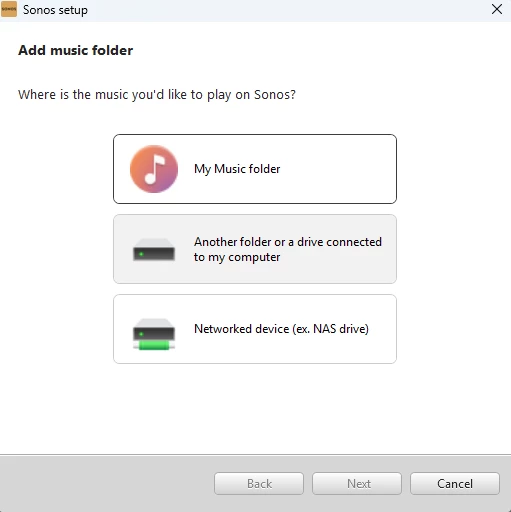
If you aren’t getting a prompt to enter the network path or login username/password, then you are choosing the incorrect choice when using the PC app to add your library.  You MUST choose the #3 choice below (Networked device (ex. NAS drive)):  


The other choices are deprecated because they use the now defunct HTTP sharing.  They are only still there on the menu because the PC app is no longer updated.  Note: Before choosing #3, you must first add your folder as a share and assign it to a user in Windows.  This is all described in the new instructions on how to add a music library in the links below:

https://support.sonos.com/en-us/article/add-your-music-library-to-sonos

https://support.sonos.com/en-us/article/share-your-windows-music-folder-with-sonos


  • Contributor I
  • February 10, 2026


Not sure where  the android app comes in cos i don't use it but to play music (occasionality)


my steps:-


ensure share is set up correctly 

rip music using express cd ripper (used it successfully for years ). It creates a folder in music folder with the album’s music (the one I have shared)

I play the music I just ripped  using windows player . it works

I run the sonos music library update. It finishes correctly no error message


I look for the album in sonos not there, i check the artist not there


So what am I doing wrong  (oh I checked  SMB 1 is off)


Regards