Answered

songs not encoded correctly

  • February 7, 2026
  • 11 replies
  • 100 views

Despite over 30 calls and chats with Sonos Support, I cannot play anything from Amamzon Music without songs dropping out because they are " not encoded correctly". This has now been going on for over 3 years. I have reset the apps, systems, speakers, reconnected etc etc and nothing works. So, currently I just bluetooth to my speakers directly from Amazon Music and it works perfectly. My internet is very fast (500mbps) and Support have checked diagnostic reports, packet size, channel etc and have run out of ideas or recommendations. Given its a common problem here, what have others done that has resolved this for them? I simply cannot use the Sonos App without the song dropping out after 1 min! At least Bluetooth works but what is the point of the Sonos app in this situation?!

Best answer by buzz

Network issues leave tracks in the diagnostics that SONOS support should have been able to spot.

Some things to try;

  • Move the 1M speaker a little farther from the router
  • If the 100’s are a stereo pair, physically swap the units
  • If you typically Group players, don’t Group
  • If you Group players, change the order that you build the Group. All network traffic for the Group passes through the first player as the Group is built
  • If the 100’s are a stereo pair, break the pair, use the units individually and fuss with Grouping as above. Note that all network traffic for a pair passes through the left speaker. If the left speaker is struggling for some reason, the pair will suffer.
  • Look at the Connection for each player as suggested by Stanly_4 above. The SNR of 40dB shown is marginal, but he is not having trouble. You would like to have a higher SNR.

How often do you have dropouts? Every song? A few times a day? Certain times of day? Keep a log. At one point I was having lots of issues. After a few days of logging it was obvious that the issues were in the evening and some evenings were clear. Sunday afternoon was nearly hopeless. I slipped a copy of my log under my neighbor’s door, along with a polite note. A couple days later the log returned with annotations. She was out of the house during the day, occasionally worked overnight out of town, and called Mom on Sunday. She was using a cordless phone that interfered with WiFi. I was able to rearrange my system to avoid her base station with my wireless players.

We can’t rule out a hardware issue at this point. The tests above will help isolate a hardware issue, if any. I hope you were working with SONOS phone support, they are more effective than the chat. Avoid Factory Reset without further consult. While it might accidentally improve something (briefly), it rarely cures fundamental issues, trashes diagnostic data, and results in a lot of unnecessary extra work.

Note that diagnostic detail begins to scroll out of sight after about 10 minutes. Don’t wait too long before submitting a diagnostic.

11 replies

Stanley_4
  • Grand Maestro
  • February 7, 2026

First, you do not use the Sonos app to play music any more than you use the TV remote to watch TV, it is simply a remote control. Once you have selected something and pressed play the app is no longer involved. 

Internet speed is rarely an issue, the slowest connections these days have more than enough speed.

Where the problem exists is almost always an incompatibility between Sonos and your local network. If you tell us more about your network and how your Sonos are connected we might be able to help.


controlav
Forum|alt.badge.img+24
  • Lead Maestro
  • February 7, 2026

This error message is wrong: it is not an encoding issue, it is a streaming failure. As Stanley says, tell us about your local network, as it is not working correctly.


  • Author
  • Contributor I
  • February 8, 2026

Thank you both for your replies. I am using Amazon Music with a Nethawk router, which is positioned about 1m and 8m respectively from the 2x Era 100 speakers, and typically about 15m from my Move speaker.

There are no obvious sources of interference and I have tried different channels on sonosnet and my wifi without improvement. I changed routers about a year ago to take advantage of improved internet speed andagain no difference.

The issue is clearly a streaming problem and I am open to any suggedtions ad to hoe I might check/resolve given both I and the Sonos help team have tried all of the usual resets, reinstalls etc!


AjTrek1
  • February 8, 2026

Is the nighthawk router connected to a box with a router/modem provided by your internet service provider (ISP)?


Stanley_4
  • Grand Maestro
  • February 8, 2026

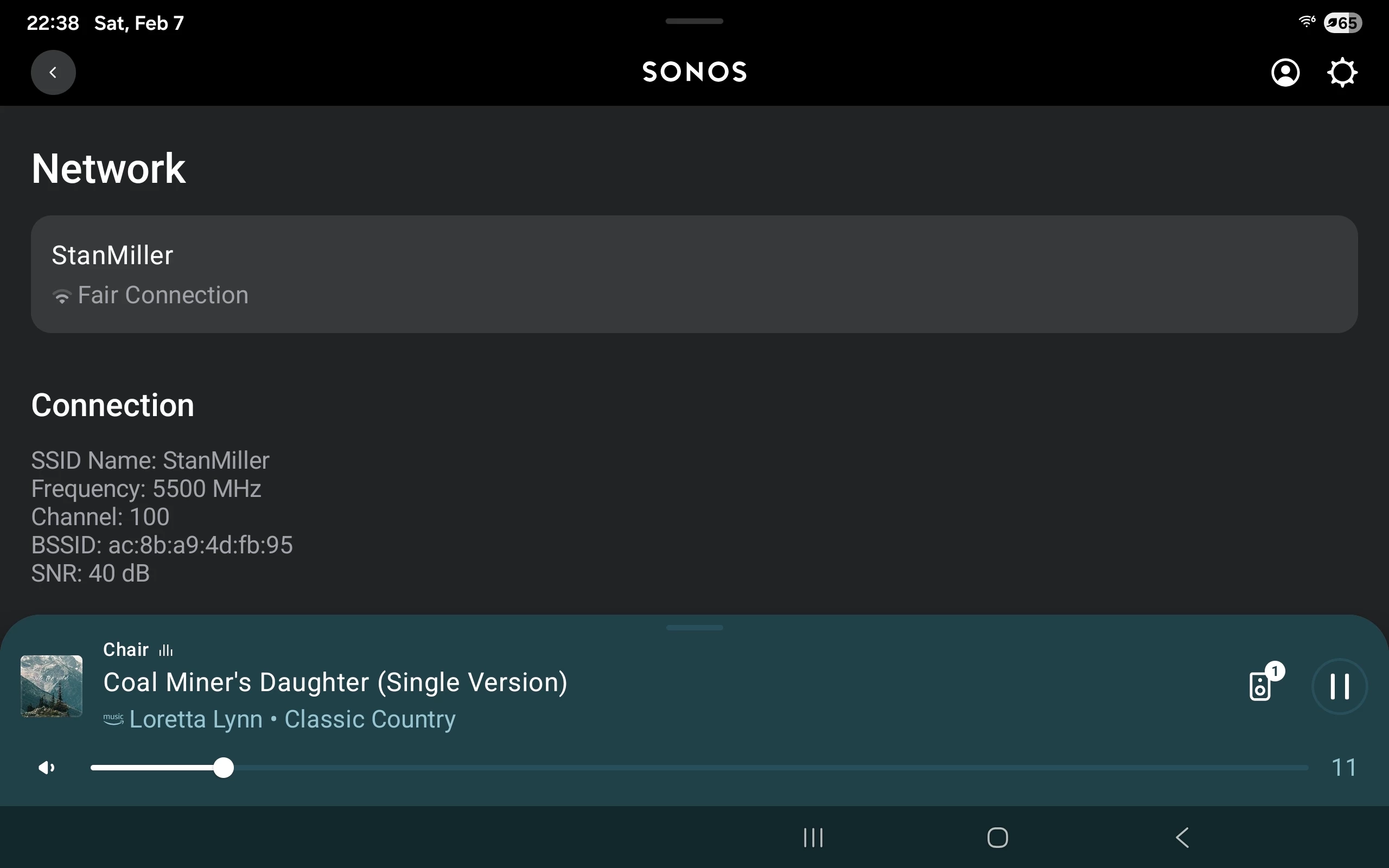
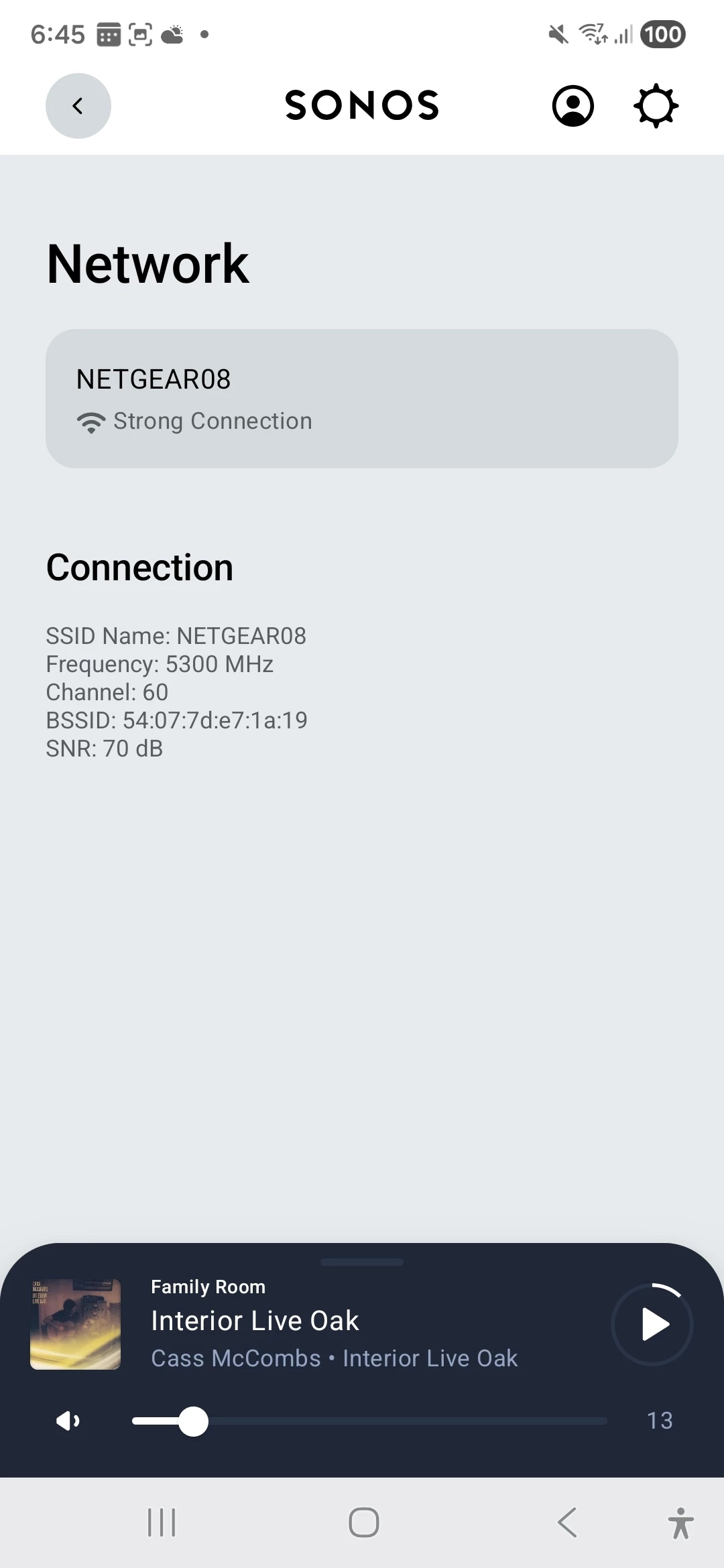
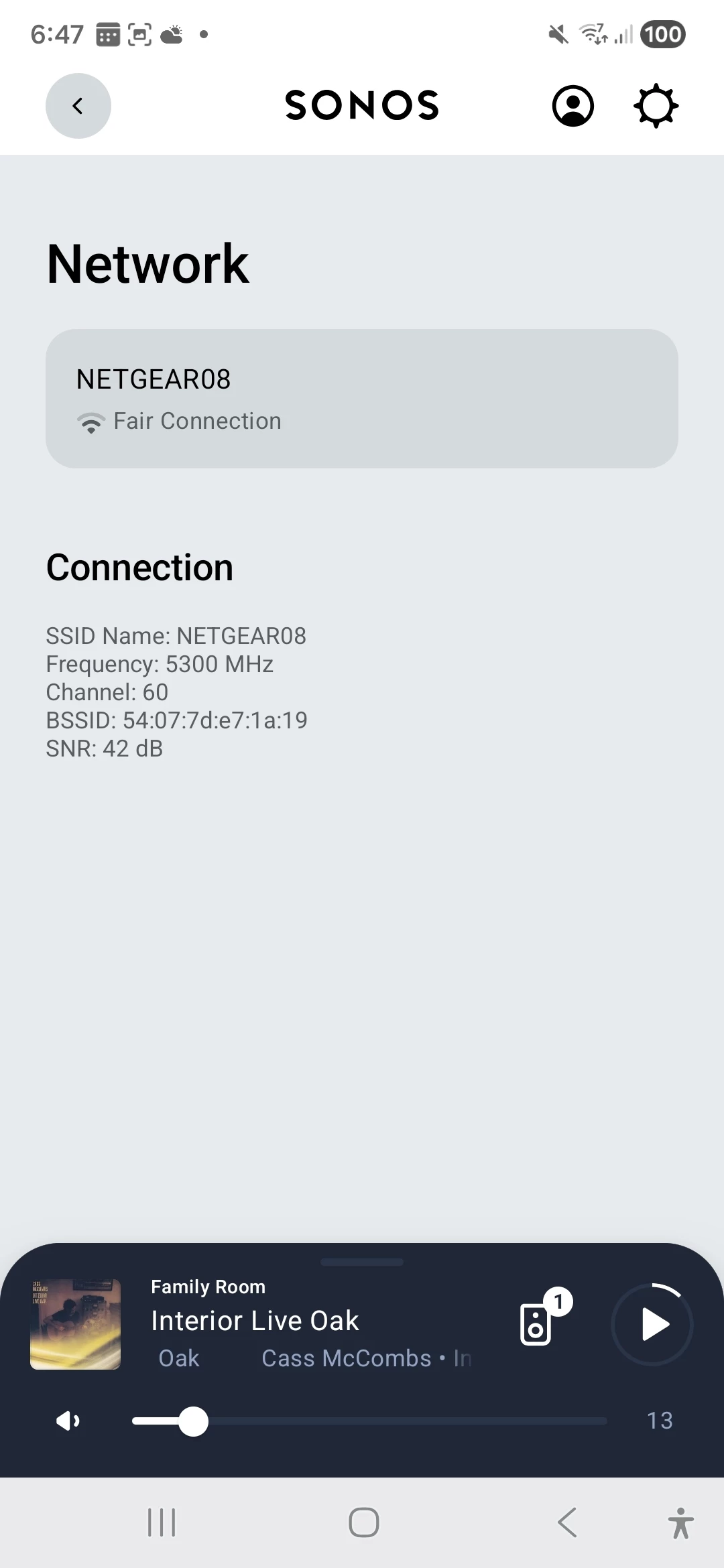
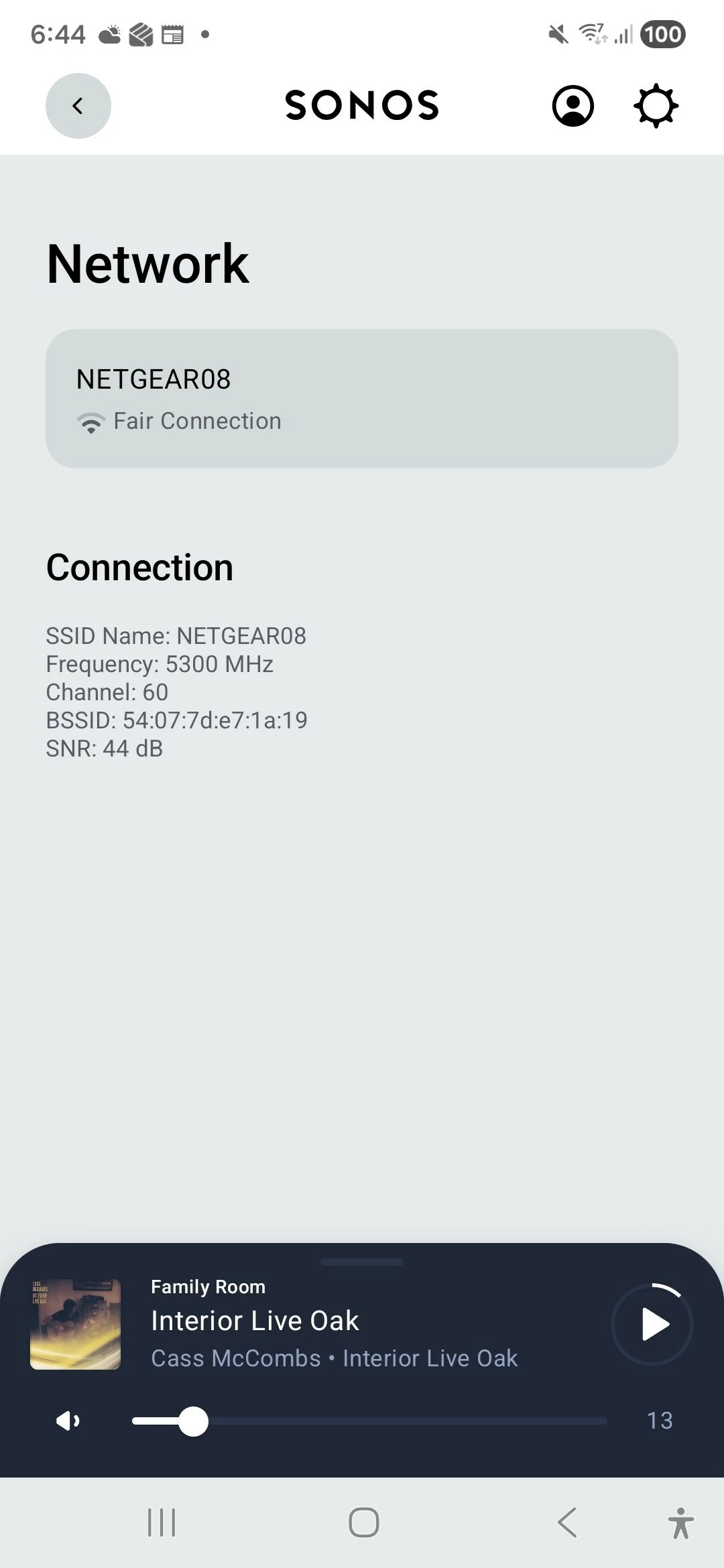
If you look at the Room, Product, Speaker, Network page for the 100s you can see the connection information, quality  channel and SNR. I think the Move will have similar info. Post that info or screenshot it.


buzz
  • Answer
  • February 8, 2026

Network issues leave tracks in the diagnostics that SONOS support should have been able to spot.

Some things to try;

  • Move the 1M speaker a little farther from the router
  • If the 100’s are a stereo pair, physically swap the units
  • If you typically Group players, don’t Group
  • If you Group players, change the order that you build the Group. All network traffic for the Group passes through the first player as the Group is built
  • If the 100’s are a stereo pair, break the pair, use the units individually and fuss with Grouping as above. Note that all network traffic for a pair passes through the left speaker. If the left speaker is struggling for some reason, the pair will suffer.
  • Look at the Connection for each player as suggested by Stanly_4 above. The SNR of 40dB shown is marginal, but he is not having trouble. You would like to have a higher SNR.

How often do you have dropouts? Every song? A few times a day? Certain times of day? Keep a log. At one point I was having lots of issues. After a few days of logging it was obvious that the issues were in the evening and some evenings were clear. Sunday afternoon was nearly hopeless. I slipped a copy of my log under my neighbor’s door, along with a polite note. A couple days later the log returned with annotations. She was out of the house during the day, occasionally worked overnight out of town, and called Mom on Sunday. She was using a cordless phone that interfered with WiFi. I was able to rearrange my system to avoid her base station with my wireless players.

We can’t rule out a hardware issue at this point. The tests above will help isolate a hardware issue, if any. I hope you were working with SONOS phone support, they are more effective than the chat. Avoid Factory Reset without further consult. While it might accidentally improve something (briefly), it rarely cures fundamental issues, trashes diagnostic data, and results in a lot of unnecessary extra work.

Note that diagnostic detail begins to scroll out of sight after about 10 minutes. Don’t wait too long before submitting a diagnostic.


  • Author
  • Contributor I
  • February 8, 2026

Thanks everyone. In answer to AjTrek1's quedtion, my Nighthawk is connectrd to the black box provided by the NBN but is otherwise standalone. Unfortunately I am away from home for a few days but will follow the helpful suggestions from Stanley4 and buzz on my return. I really appreciate you all taking the time to post your experience, help and advice.


  • Author
  • Contributor I
  • February 10, 2026

Hi everyone

With apologies for the delay I attach screenshots of the connection details for my Era 100s and Move speakers.  Does this help identify any potential issues?!

Best wishes

Craig


MoPac
Forum|alt.badge.img+18
  • Headliner III
  • February 10, 2026

 Are any of your speakers Ethernet wired?  I noticed you mentioned SonosNet.  I must admit I don’t fully understand what wireless is used in a stereo configuration.  Is it SonosNet?  I do know it is not a good idea to have both your WiFi & SonosNet being broadcast at the same time.  I recently connected my Port to Ethernet.  I made sure I checked “Disable WiFi” in the Port settings. 

 I don’t understand how the left speaker communicates with the right speaker.  So I have no idea if the stereo pair in close proximity to your router could cause interference.


Stanley_4
  • Grand Maestro
  • February 10, 2026

The "Fair" connections are a bit lower than you'd like to see but should still be adequate. I have speakers in that range that give me no problems.

They are all seeing the same BSSID so that isn't an issue.

Maybe look to see if you can find a quieter 5 gHz channel?


buzz
  • February 10, 2026

In Stereo, the left speaker takes charge and sends to the right channel. In Group, the first player defined in the Group becomes the Group’s “Coordinator”. All network traffic for the Group flows through the Coordinator.

SonosNet is frozen in time. Modern WiFi is more effective, however, the older players cannot take full advantage of the modern WiFi. Modern SONOS players will ignore SonosNet. I know that some users are suggesting SONOS players should no longer be wired to the network. I’m still anal about wiring anything that is practical to wire. That said, my desktop computer and NAS drives are wired, but it is not practical to wire anything else. Currently, none of my SONOS units are wired (they are all modern) and I’m not having issues, even through a WiFi scanner can discover over 100 nearby access points.

If a SonosNet system depends on using a BRIDGE, there is increasing risk that the BRIDGE will fail. And, its WiFi is ancient. A BOOST is slightly more effective, not as likely to fail, but is still less effective than modern WiFi. It’s a good idea to eliminate BRIDGE or BOOST. You can wire another SonosNet unit or simply go wireless. Before powering down BRIDGE or BOOST make sure that the SONOS system is configured for the WiFi.