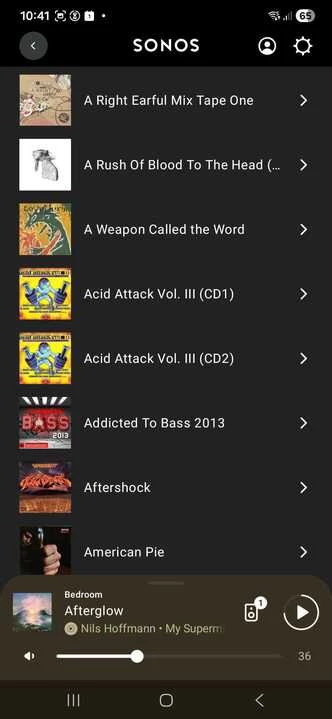
Is it just me? I have complained to Sonos several times that the music player app on my Mac does not scroll long titles etc properly.
IWhat you expect to happen is the text string scrolling off to the left, so the start of it disappears and the bit you couldn’t see before slides over from the right.
What happens is the whole string disappears and the left part of the string slides in from the right until you can see exactly the same bit as you could see before. You never see the right hand end of the string.
Every other app in the world scrolls properly, why on earth can’t Sonos sort it out?
This topic has been closed for further comments. You can use the search bar to find a similar topic, or create a new one by clicking Create Topic at the top of the page.
Yes, the Mac has to be powered-on and not sleeping to play music that is stored on it. I am not sure what you mean by having to keep your phone running - isn’t that quite normal?
I am not sure why you do not see album art - I certainly do on my Android device:
I do see in a diagnostic report that you submitted about 2 months ago that your Sonos system was having some trouble with connecting to your music share - perhaps this is why you do not see album art, as it is not stored on the speakers and needs loading from the source each time it is viewed in the app.
I do take your point about needing to keep your computer on. This is why I have my Sonos system connecting to a Raspberry Pi for the Music Library - it is cheaper to run than a computer, and cheaper to buy than a NAS. It does take some skill to configure, however. There are many other options, including uploading your content to an online service such as Apple Music, YouTube Music or iBroadcast.com - none of which require you to keep a computer powered on at all.
I recommend you get in touch with our technical support team who have tools at their disposal that will allow them to give you advice specific to your Sonos system and what it reports to resolve the issues I see in the old diagnostics report - I am confident that we can improve matters for you.
I hope this helps.
"Common sense is the collection of prejudices acquired by age eighteen." - Albert Einstein
The Desktop apps (for Windows and for macOS) have both been in a state of suspension, as far as actually working on them goes, for a while now. Once the mobile apps can do everything that the desktop apps can do, and once the Web App has caught up a bit, the Desktop apps will be made no longer be available. We will not be working on improving them at any point - only to replace them.
This is why your feedback for the Desktop apps has gone unanswered so far - we are basically concentrating our efforts elsewhere.
I hope this helps.
"Common sense is the collection of prejudices acquired by age eighteen." - Albert Einstein
So, Sonos discontinued the ability to play music from my phone’s memory (which is what I bought then system for). I adapted to using my Mac app playing music from my iTunes library. Now you tell me that will soon not be an option either.
You misunderstand - the Desktop app is not needed to be able to play music files stored on your Mac on your Sonos system - only the SMB (network file sharing) share to the files on the network needs to be available.
If you open the Sonos app on your Android or iOS phone (or the Web App, for that matter), you will find the Music Library section present on the Home Screen, where your content can be browsed and played.
I hope this helps.
"Common sense is the collection of prejudices acquired by age eighteen." - Albert Einstein
Yes, I can see my music library on my Android phone, but it is a poor display with no album art. And, surely, only if my Mac is also running and has not gone to sleep. So that means keeping both devices running?
Yes, the Mac has to be powered-on and not sleeping to play music that is stored on it. I am not sure what you mean by having to keep your phone running - isn’t that quite normal?
I am not sure why you do not see album art - I certainly do on my Android device:
I do see in a diagnostic report that you submitted about 2 months ago that your Sonos system was having some trouble with connecting to your music share - perhaps this is why you do not see album art, as it is not stored on the speakers and needs loading from the source each time it is viewed in the app.
I do take your point about needing to keep your computer on. This is why I have my Sonos system connecting to a Raspberry Pi for the Music Library - it is cheaper to run than a computer, and cheaper to buy than a NAS. It does take some skill to configure, however. There are many other options, including uploading your content to an online service such as Apple Music, YouTube Music or iBroadcast.com - none of which require you to keep a computer powered on at all.
I recommend you get in touch with our technical support team who have tools at their disposal that will allow them to give you advice specific to your Sonos system and what it reports to resolve the issues I see in the old diagnostics report - I am confident that we can improve matters for you.
I hope this helps.
"Common sense is the collection of prejudices acquired by age eighteen." - Albert Einstein
Thank you for taking the trouble to send such a full reply. I will indeed have to contact Technical, but I fear my engagement with Sonos is coming to an end. You should not need to be a tech wizard to play music and I have struggled to keep up with Sonos’s changes recently. Not a tech wizard, but not a total beginner - I wrote my first program in 1964.
And the point about the phone is that you don't need to have the phone on at all when playing music from the laptop
I do see you point, and I agree - but, as a former technical support agent myself, I have to point out the the number of permutations of possible routers used and other networking considerations, not to mention all the sources, is enormous, and not everything can work perfectly on the first attempt, in all situations, even if it does for many. This is why we have a technical support department in the first place. And, to be clear, the issue may well be due to how your computer or router is configured, and have little to do with your Sonos system, specifically.
All (Sonos-written) apps that are able to instruct a Sonos speaker to play from the Music Library can be turned off immediately afterwards without affecting playback. It is the speaker that fetches the music, not the controller, so once the queue has been filled, the controller is superfluous to playback. This would not be the case if the music were stored on the phone, and to be clear, we did not want to remove the On This Device feature - we were forced into it by Google’s and Apple’s app store rules. An alternative is to play via Bluetooth or AirPlay, if you have a compatible phone and speaker.
I hope the support team is able to assist you.
"Common sense is the collection of prejudices acquired by age eighteen." - Albert Einstein