Question

S1 - having to press buttons twice iPhone/iPad

  • January 26, 2026
  • 10 replies
  • 68 views

Forum|alt.badge.img+12
  • Chromatic Producer I

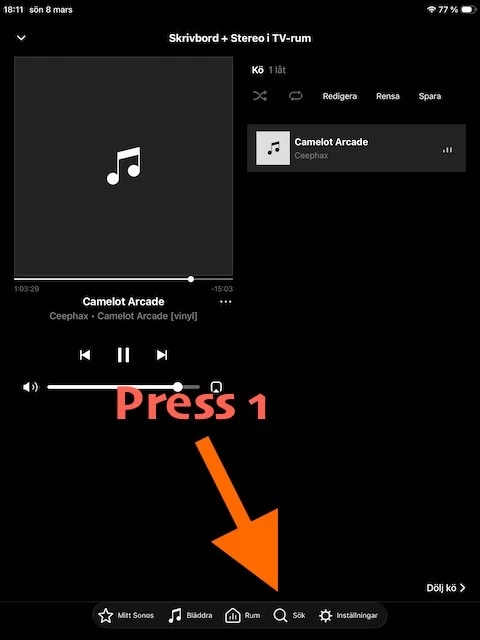
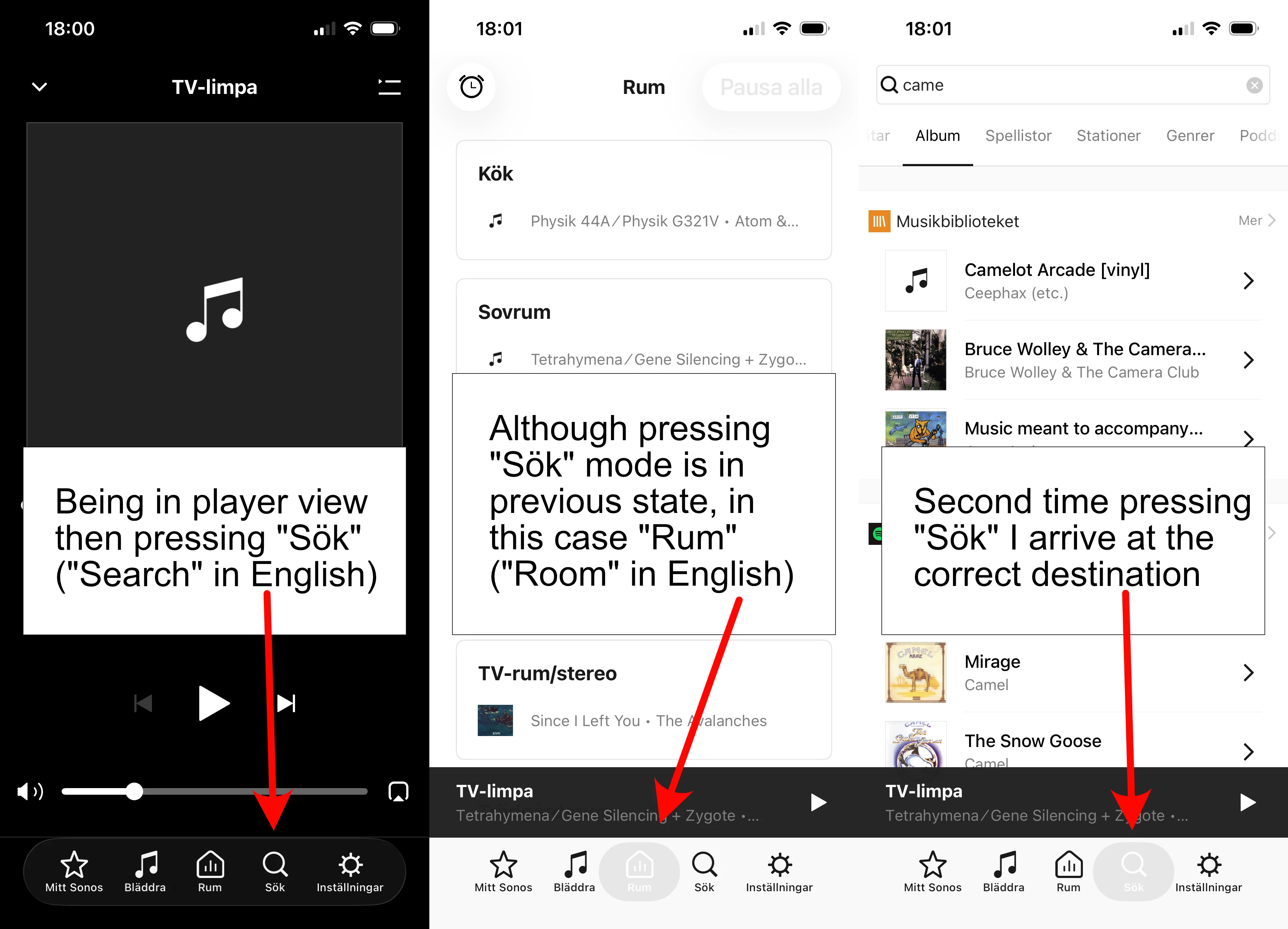
I’m not sure if I can do anything about this strange behavior in some settings or if it’s a bug. It’s present on both iPhone and iPad. If I’m in player mode like shown on left picture and want to go somewhere else the first time I press an icon, it doesn’t change to that mode but some previous mode. I’m pretty sure it did not work like this a couple of updates ago. Not sure when it changed.

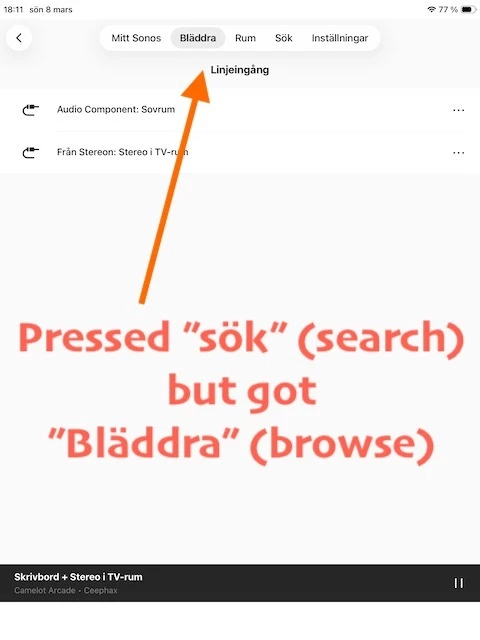
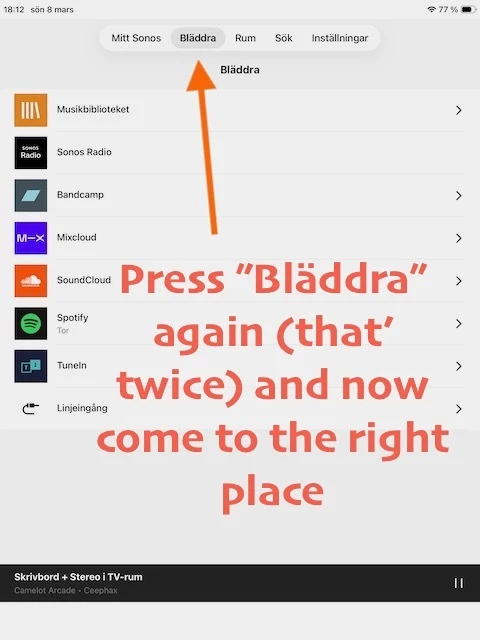
On iPad it’s even worse because the controls jump from bottom to top when going from player mode in the same way as shown in the pictures. Seems like a minor bug to fix to me. If it’s not some obscure setting I haven’t found.

 

10 replies

AjTrek1
  • January 26, 2026

Your best course of action is to call Sonos Tech Support and discuss the issue as it appears to be software related and not hardware.


Forum|alt.badge.img+12
  • Author
  • Chromatic Producer I
  • February 8, 2026

So no one else has this problem on Sonos S1?


Airgetlam
  • February 8, 2026

Apparently not. It sounds a lot like you may have some network issues with the commands getting sent to and back from your speakers. But as ​@AjTrek1 suggested, confirming the data with Sonos Support seems to be indicated, and they would be able to determine if the assumption is correct…on either side, 


Forum|alt.badge.img+12
  • Author
  • Chromatic Producer I
  • March 8, 2026

No it’s not network related. How on earth would network issues change the graphics in the app? Maybe it’s clearer if I screenshot iPad where (as mentioned) it’s even more stupid. The behaviour is the same only difference is that the graphic first is at the bottom then jumps to the top with another look.


Airgetlam
  • March 8, 2026

So, what did Sonos Support say, when you contacted them and supplied the data?


  • March 8, 2026

Just so you know you’re not alone. Yes, the S1 app is working like that. If the playing screen is displayed, the first press on any selection causes the playing screen to drop and display the screen behind it. The second press goes to where you are trying to go. The screen displayed when the playing screen drops, is what ever was there previously.

And, yes, it didn’t use to work like that.


Forum|alt.badge.img+12
  • Author
  • Chromatic Producer I
  • March 9, 2026

So, what did Sonos Support say, when you contacted them and supplied the data?

What do you mean? This is a bad UI nothing else. Sloppy programming. There’s no “data” involved other than the source code which I’m pretty sure they already have.


Forum|alt.badge.img+12
  • Author
  • Chromatic Producer I
  • March 9, 2026

Just so you know you’re not alone. Yes, the S1 app is working like that. If the playing screen is displayed, the first press on any selection causes the playing screen to drop and display the screen behind it. The second press goes to where you are trying to go. The screen displayed when the playing screen drops, is what ever was there previously.

And, yes, it didn’t use to work like that.


Can yoyu remember when this changed, because I’m pretty sure it was not always like this? It’s like the “link” between the buttons and what they are supposed to do is bypassed at the first press. In the iPad variant it’s also as if those who program the UI simply forgot there actually is a bar at the bottom in play mode screen. When it’s not shown the field is unused, blank.


Airgetlam
  • March 9, 2026

The ‘data’ supplied is your concern with the issue. 


  • March 9, 2026

Just so you know you’re not alone. Yes, the S1 app is working like that. If the playing screen is displayed, the first press on any selection causes the playing screen to drop and display the screen behind it. The second press goes to where you are trying to go. The screen displayed when the playing screen drops, is what ever was there previously.

And, yes, it didn’t use to work like that.


Can yoyu remember when this changed, because I’m pretty sure it was not always like this? It’s like the “link” between the buttons and what they are supposed to do is bypassed at the first press. In the iPad variant it’s also as if those who program the UI simply forgot there actually is a bar at the bottom in play mode screen. When it’s not shown the field is unused, blank.


I’m not sure when it changed. There was an update about a week ago, 11.16.1, but I’m not positive that was the one. I don’t use the iOS S1 controller very often. I mostly use an android controller for S1.

The iPad S1 moving the selections from the bottom to the top is just crazy. Mine does that too. The android tablet app doesn’t. Again, I use an android tablet for S1 instead of my iPad.