Question

grouping by album artist - Android

  • February 14, 2026
  • 7 replies
  • 49 views

Forum|alt.badge.img+13

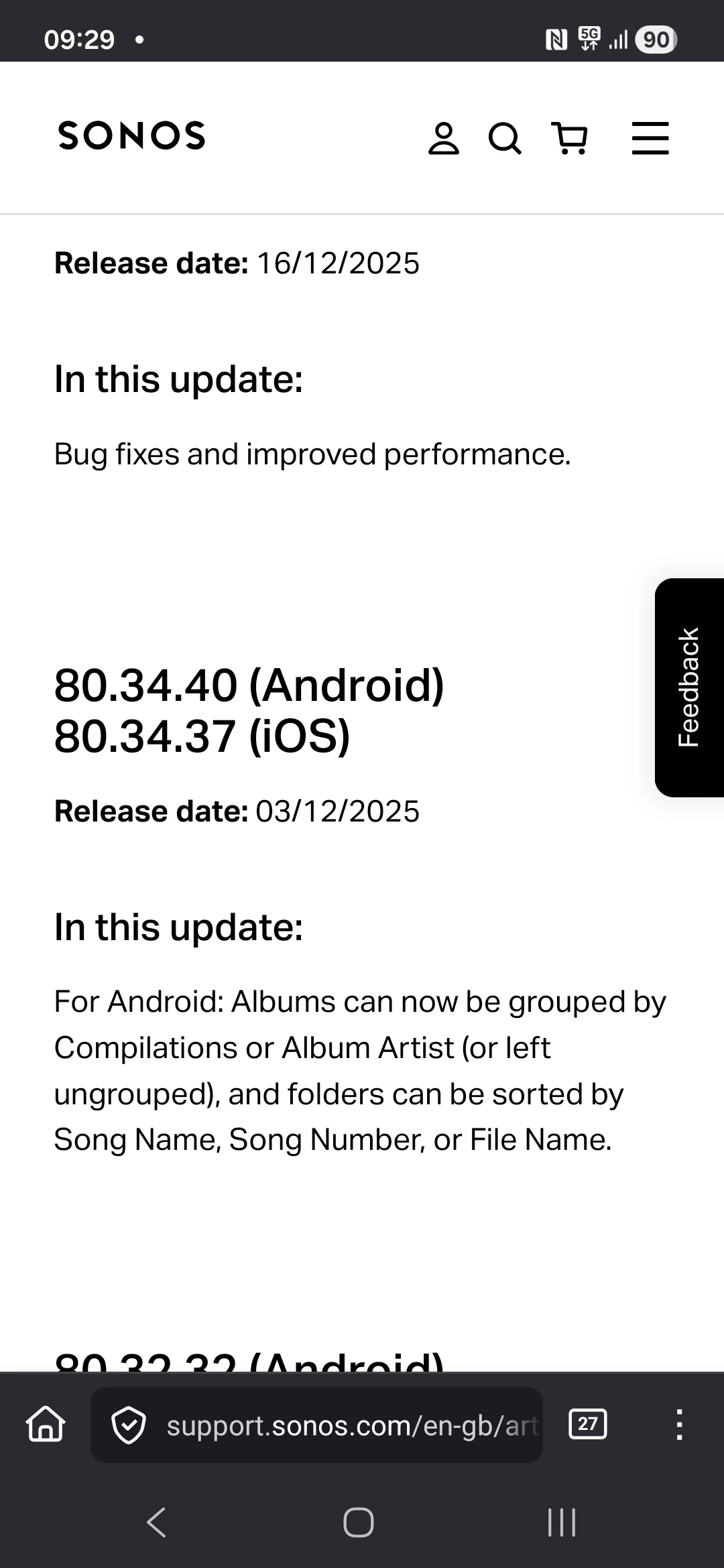
The app on my phone is up to date and I can now save the queue to a playlist but I still cannot  configure the app to sort my music library by album artist (which was supposedly reintroduced in the early December update).

Any thoughts on why this seems to be missing?



7 replies

Corry P
Forum|alt.badge.img+19
  • Sonos Staff
  • February 16, 2026

Hi ​@Ralpfocus 

Thanks for your post!

Sorry to hear about the trouble you’re having with sorting your Music Library content.

The “Group albums by” option you refer to is not yet available on Android devices - this may be why you don’t see it yet. If, however, you have an iOS device, please let me know and I’ll look further into it for you.

The Desktop Controller for Windows and macOS also have the option available - you can adjust it on either of those for it to affect other controllers connected to the system. It can be downloaded here, and the option is within Music Library settings.

I hope this helps.


Forum|alt.badge.img+13
  • Author
  • Prodigy III
  • February 16, 2026

Thanks ​@Corry P can I take it then that the release notes for early December are incorrect or I am misreading them.


Corry P
Forum|alt.badge.img+19
  • Sonos Staff
  • February 16, 2026

Hi ​@Ralpfocus 

Thanks for flagging!

I will dig into this a bit and see what I can find out. Our documentation still only indicates iOS has the option, so there is definitely some disparity here.

For what it is worth, I also do not see the option on my Android device.


Forum|alt.badge.img+6
  • Prodigy I
  • February 16, 2026

Thanks ​@Corry P , hate to say it but I have been flagging this in various threads, including all release threads since this supposedly became available, to no avail.…

Apart, that is, from the usual 'ring support', 'power down/up everything' and 'features do not always get released on all devices at the same time' responses from the community... the latter is fair enough but after 2 months it should have been switched on.

Plus, of course, the ongoing indexing/search failures still being discussed here and still being blamed on metadata by support. Even your own solution for compilation tagging does not work (in the apps) ☹️


Corry P
Forum|alt.badge.img+19
  • Sonos Staff
  • February 16, 2026

Hi ​@User117655 

The rolling updates make it tricky to determine if any one particular customer should have a particular feature visible in the app or not, but this is the cost we pay to not have all updates roll out to all customers at once, which has already proven to have its own issues.

In addition to this, if the app cannot connect to optimizely.com, then features may never become available for a particular customer. Whitelisting the domain within Pi-Hole or AdBlock instances if present on the network can help with this.

So, when one or two customers say that they do not see a new feature, we cannot take that as simply as you may like us to take it - there could be factors preventing the feature from appearing.

By this stage, of course, it does seem that all customers should now have the update and the feature roll-out, which is why I have now asked a colleague to investigate.

Plus, of course, the ongoing indexing/search failures still being discussed here and still being blamed on metadata by support. Even your own solution for compilation tagging does not work (in the apps) ☹️

Well, this is entirely off-topic for this thread (so further discussion of it here will not be permitted), but I did spot that while writing my guide, which is why there is now an investigatory ticket open for that behaviour - I pushed for it. Front-line agents may not yet be aware of this investigation, so they may well blame metadata at present. This does not mean that an investigation is not ongoing, just that they are not aware of it as of yet. Once the investigation has been completed, and the issue is better understood, documentation will be written for them - note that this will likely happen before a software fix is put in place. The investigation is not the solution.

I hope this helps.


Forum|alt.badge.img+6
  • Prodigy I
  • February 16, 2026

@Corry P I didn’t mean to offend with my previous post at all, I had read your tagging soloution before additional comments were added and, until now, had not revisited.

It is very frustrating getting things taken seriously sometimes with support, especially around app behaviour that does not seem to have a hardware base. Don’t get me wrong, support can be a thankless task at the best of times. I have generally had very, very positive experiences from them with hardware issues (faults) and additional advice, especially from second level support. However these indexing/searching/software issues fall somewhat outside of that and are difficult to diagnose and pin down at the best of times.

Thankyou for your responses, interest and involvement. It is appreciated and good to know someone at the Sonos end is showing interest in resolving our issues 👍


Corry P
Forum|alt.badge.img+19
  • Sonos Staff
  • February 16, 2026

No offence taken, ​@User117655!

Though, I do sound a bit defensive there, don’t I? I was just trying to explain as much as I can, not just to you and the OP, but to whoever else reads this as well.

Honestly, we don’t normally acknowledge issues publically prior to the current stage in the process, but as this was discovered and discussed in the Community and confirmed by myself as I was writing a guide destined for the Community, I explained here what steps I had taken. I/we would not normally mention an investigation prior to it’s completion as it can set unachievable expectations - only once we confirm that there is something erroneous happening that is not due to misconfiguration or external factors, and once all agents have documentation written for them so we can all be on the same page. Due to the nature of this particular issue - and the aspects that can affect it that simply should not do so - it’s clear that there is an issue in this case.

I completely agree with you - these things can indeed be frustrating. With the Music Library, it is very easy for us to simply assume bad metadata, which I think is what has largely been happening up until now. To be clear, I am not in such discussions - this is just my assumption. I believe the percentage of users who make use of Music Library is tiny, so when such issues are triaged, it is hard for them to accrue the high priority that an issue with the UI of the app or the functioning of Spotify, for example, will gain, but we all do want to get this resolved for you all.

I hope this helps.