
Enthusiast II
May 24, 2024

Fixing the library error code 913 for Windows users!

  • May 24, 2024
  • 91 replies
  • 18114 views

So a big thanks also to “helpingiskind” @HelpingIsKind 

So as far as windows users go, sorry not sure about iOS users here, but the crucial things after updating the windows app for W10+, you need to turn on “Advanced Sharing” in windows, and make sure that your music library whether it’s stored on a NAS or just an ext usb drive, or internal drive is added to your library. So this is the example that helpingiskind gave:

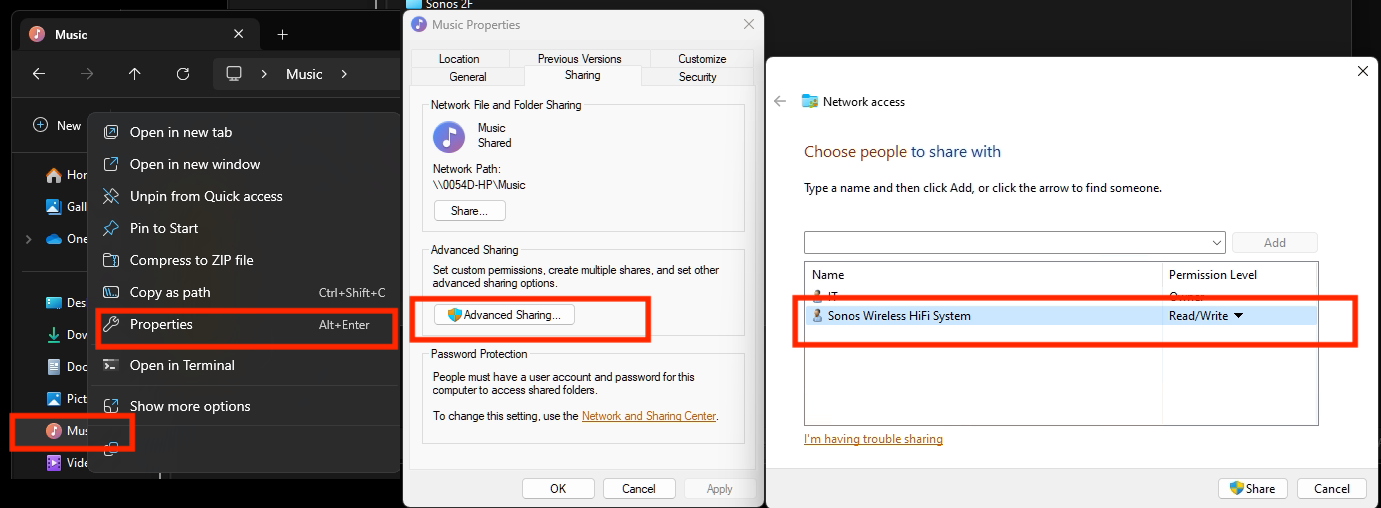
Please right-click on the Music Folder > Properties > Advanced Sharing > Add Sonos Wireless HiFi System to Read/Write:
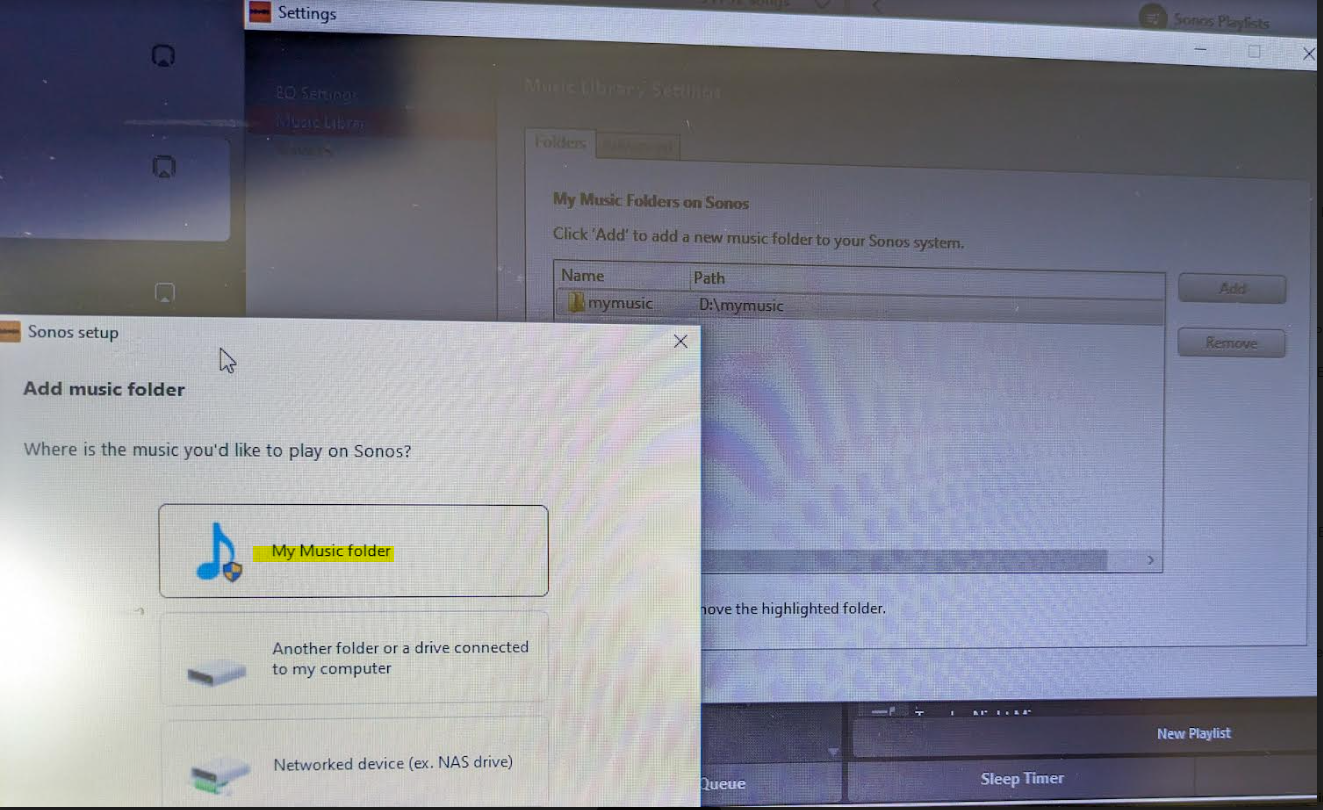
Then go to Sonos settings on your laptop and add “My Music folder” and it will sync.


Because the android app is terrible, I rolled back to the version 78 and found the .apk for that and then the app works like it’s used to and marries to the W10 controller app nicely….which has also caused the update issues along with the apps for android/apple to be very annoying!


Good luck and lets hope the next update from Sonos makes things nice n easy for everyone..

Hope this helps everyone and thanks to everyone elses ideas across this forum!


This topic has been closed for further comments. You can use the search bar to find a similar topic, or create a new one by clicking Create Topic at the top of the page.

91 replies

Trending Lyricist I
May 24, 2024

I’m a computer novice and I don’t understand any of this.  I’m getting the 913 error since the upgrade and I’m hoping to find clear, step-by-step directions to re-connect my music folder to Sonos.  How can they have made this so complicated (at least for me)??

Enthusiast II
May 24, 2024

I know, it isn't easy, unless you have knowledge of windows and sharing.... Hopefully it won't be long until Sonos bring out a fix. 

Are you Apple or Android app based Lee?

Trending Lyricist I
May 24, 2024

I’m Apple.  But I was trying to do this on my Windows 10 computer Sonos app.

Enthusiast I
May 24, 2024

Just sharing the iTunes folder with the Sonos system did not stop the 913 error on mine.  I had to enable folder sharing with a windows user and then add the folder to the Sonos software as a networked drive, not as the My Music folder, even though it’s just a regular folder on my computer.  This is how I did it:

Right-click the iTunes folder, click Properties. 

Click the Sharing tab. In the top section it shows a folder icon with a Network Path just below it. Click Share.  

A "Network Access" window opens with a drop-down menu. Choose the user account you want Sonos to have access to and what level of permission you want them to have. Depending on your main Windows networking settings, you might have to put the password for this user account into the Sonos software later. I made a new local user account in my main Windows settings and then shared with that user with Read-only permission, because I don't want to give Sonos owner-level permission or my administrator password. Once you've picked the user and permission, click Share.

Back at the Properties for the iTunes folder, copy the Network Path. It looks something like: 
\\Computer\Users\Username\Folder\iTunes

In the Sonos desktop software, go to the Manage menu and click Music Library Settings. A window opens with a list of My Music Folders on Sonos. Click Add.

Click the third option called Networked device (ex. NAS drive).

Paste the Network Path and click Next. If it asks for a password, it wants the Windows user account name and password that you chose for sharing. 
 

Mine indexed and reappeared in the app once I did all this.

Trending Lyricist I
May 24, 2024

Thanks.  I didn’t understand all of it and I don’t use iTunes, but I’ll see if I can follow it with a music folder (not My Music)

Enthusiast I
May 24, 2024

 Exact same issue - I think we are approaching class action lawsuit time.

Is it possible to roll back updates?

While I’m griping, I really hate manufacturers who are so disengaged they won’t answer these boards - Kind of like “You guys screwed up, you bought from us, now go figure it out for yourselves.”

Could they possibly be more cynical?

I’m hoping this is just some idiot tech team mistake and not some sort of strategic blackmail to force subscriptions to their services.

I was just commenting to my wife yesterday that since we’re moving to a new house we might want to consider moving away from Sonos for our whole house system. Man, did they make that a no-brainer or what?

Any lawyers out there?

Seriously - Does anyone know the process for launching a class-action lawsuit?

I have a couple of thousand $$$ invested in a music system that might as well be a toaster for all I can get out of it (except the toast part).

If someone has a way to file an action, count me in!

In the meantime, I have a Play 5 and four Play 1's I'm looking to offload.

I'm not a streaming music expert and have zero interest in any app or service other than streaming my own library of mp3's & mp4's from my PC (Windows 10) hard drive.

I do have iTunes (which I loathe) but I store most of my music independently and that's the music library these clowns zapped with their idiotic update.

I'm now actively looking for a solid (S)o-no(S) alternative for my new house - Any thoughts? 

Lyricist I
May 24, 2024

I still can’t get rid of the 913 error thinking that it would take a day to get Sonos to clear and looking for my music folder. I even went to advanced sharing to make sure it was available to share.  I am missing a step or something.

Lyricist I
May 25, 2024

I still can’t get rid of the 913 error thinking that it would take a day to get Sonos to clear and looking for my music folder. I even went to advanced sharing to make sure it was available to share.  I am missing a step or something.

This fix isn’t working for me, either. I’ve changed the sharing settings as described above, restarted my laptop, waited patiently, wash, rinse, repeat, and I still get the 913 error.


Lyricist III
May 25, 2024

Fix doesn’t work for my NAS share :-(

Lyricist III
May 25, 2024

I also found my music library disappeared - mine was on a NAS hanging off my modem to link into the home network. I tried connecting it directly off my PC but that also gave me the dreaded 913 error. I even reformatted my little WD NAS and recopying my music files back into it after it sat there reformatting for 3 hours. Did not fix it - Kept asking for a non existent login and password, and giving me the 913 error

Checking in on the issue - it seems windows 11 disabled/got rid of SMB1 protocols because it is not secure for network shared drives but Sonos ( especially earlier gen products ) NEEDS SMB1 to access the NAS. You can turn it on to try to get it to get it to work but Microsoft strongly suggest you don’t do that and though I tried turning it back on on Windows Features. it did not resolve the issue for me ( I might have missed something ).

Not sure why it took this long for the whole thing to stop working ( I upgraded to windows 11 late last year ) but here we are, no music. The same music library works fine from off a local backup drive on my PC but my NAS might as well be a brick paperweight

And before anyone ask - I have a NAS on the network so that I can use my phone's sonos controller to play music without turning on my PC. So much for that now.