
Avid Contributor I
January 17, 2023
Answered

Resolving dropouts

  • January 17, 2023
  • 20 replies
  • 734 views

Hi all,

For too long, I’ve put up with terrible performance from my Sonos system (frequent drop outs, frequently have to restart the iOS app to get it to connect to the system).

I’ve resolved to connect each speaker via Ethernet in the belief the task would be relatively straightforward to implement - just a question of getting an Ethernet cable to each speaker.

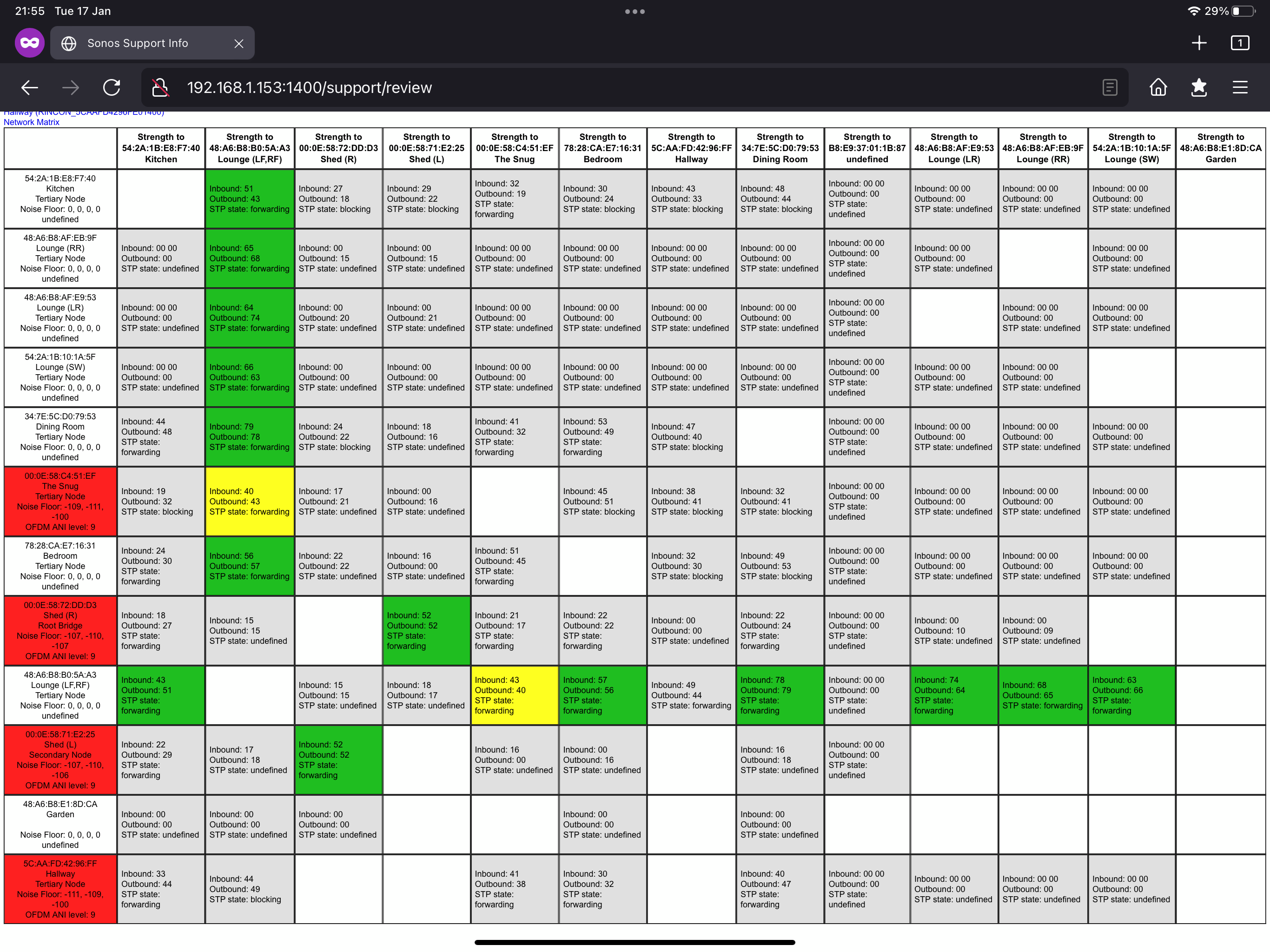
I’m starting by trying to understand the Matrix.

  • Many items come up as ‘undefined.’ Is there a way for me to change that so the Matrix is more useful?
  • The bottom left cell is coloured red, which I believe means an active, but poor wireless connection. Yet it’s hardwired via Ethernet. Am I incorrect to think it should be grey?


For background, I’ve got a Linksys Velop MX5300 router and a couple more of those as nodes. I’ve also got some switches plugged into the MX5300s in order to expand the available network ports.

Thanks very much for any insights you might have!

cheers, Andrew 

This topic has been closed for further comments. You can use the search bar to find a similar topic, or create a new one by clicking Create Topic at the top of the page.
Best answer by Mr. T

I should perhaps have clarified that the satellite nodes in my MX5300 are connected to the primary node by ethernet rather than wirelessly. Does that improve setup #2?

Yes, having the satellites wired is better.

Is there still high levels of interference when you refresh the matrix? Have you ever seen any improvement? Have you talked with Sonos Support for their insight on how your system performs?

20 replies

Mr. T
January 17, 2023
  • Many items come up as ‘undefined.’ Is there a way for me to change that so the Matrix is more useful?
  • The bottom left cell is coloured red, which I believe means an active, but poor wireless connection. Yet it’s hardwired via Ethernet. Am I incorrect to think it should be grey?

The Undefined in the left hand column are unfortunately newer Sonos products that no longer provide data for the matrix.

Undefined in the top row can mean the speaker is unplugged/not connected. It can also mean the private connection of Subs/Surrounds with the soundbar.

The Red boxes in the left hand column indicate a high level of wireless interference around the device.

I would take a look at reducing interference around these. Potentially by changing SonosNet channel to see if the levels then drop. Also check your router’s 2.4GHz network is not broadcasting on the same channel as SonosNet. Ideally set your router to either 1,6, or 11.

The Hallway should not be grey. It should be either green/yellow/orange/red re interference levels around it.

agmAuthor
Avid Contributor I
January 17, 2023

Great, thanks for your reply.


Is my main idea correct still - if I manage to get an Ethernet cable to each Sonos product that’ll give me the best performance?

Mr. T
January 17, 2023

Great, thanks for your reply.


Is my main idea correct still - if I manage to get an Ethernet cable to each Sonos product that’ll give me the best performance?

The main body of the matrix indicates the signal/communication between speakers. As the majority of connections are Green and a couple Yellow, this shouldn’t be a cause for concern.

What you want to do is focus on trying to reduce the wireless interference being encountered. Wiring all would give best performance but should not be necessary if you can reduce the interference levels.

Mr. T
January 17, 2023

This article may also be helpful:


agmAuthor
Avid Contributor I
January 17, 2023

Thanks Mr T. My googling only shows channel overlap from different wifi networks as the cause of interference.

So I’ll experiment with a different channel for Sonos and see if that helps.


Mr. T
January 17, 2023

Thanks Mr T. My googling only shows channel overlap from different wifi networks as the cause of interference.

So I’ll experiment with a different channel for Sonos and see if that helps.

Other possible causes of interference can be found here:

https://support.sonos.com/en-gb/article/reduce-wireless-interference

Mr. T
January 17, 2023

I would also recommend you get in touch with the Sonos technical support team, who have tools at their disposal that will allow them to give you advice specific to your Sonos system and what it reports in full.

Their insight from looking at any diagnostic is most likely quicker than trying to solve issues yourself through trial and error.

agmAuthor
Avid Contributor I
January 18, 2023

Hmm. Plaster is listed as giving high resistance. 
 

This is the hallway speaker. It probably wins a prize for worst ever located Sonos One.


agmAuthor
Avid Contributor I
January 18, 2023

What I don’t yet understand is… if I successfully get an Ethernet cable to it, will it then receive and play sound well?
 

i.e. the plaster won’t then stop it receiving data, it’ll just limit the role it plays strengthening in the wider mesh network?

Mr. T
January 18, 2023
  • The bottom left cell is coloured red, which I believe means an active, but poor wireless connection. Yet it’s hardwired via Ethernet. Am I incorrect to think it should be grey?

When you talked about the bottom left cell in statement above, I thought you were referring to the Hallway speaker in the matrix?!

The Play:1 in the Hallway is certainly in an interesting orientation.

I also thought this was already wired and you had disabled the WiFi on the device. This is due to the Hallway row in the network matrix not showing any active SonosNet connection, so I’m not entirely sure how it’s playing music if at all if it’s not already wired.