
Avid Contributor I
January 17, 2023
Answered

Resolving dropouts

  • January 17, 2023
  • 20 replies
  • 734 views

Hi all,

For too long, I’ve put up with terrible performance from my Sonos system (frequent drop outs, frequently have to restart the iOS app to get it to connect to the system).

I’ve resolved to connect each speaker via Ethernet in the belief the task would be relatively straightforward to implement - just a question of getting an Ethernet cable to each speaker.

I’m starting by trying to understand the Matrix.

  • Many items come up as ‘undefined.’ Is there a way for me to change that so the Matrix is more useful?
  • The bottom left cell is coloured red, which I believe means an active, but poor wireless connection. Yet it’s hardwired via Ethernet. Am I incorrect to think it should be grey?
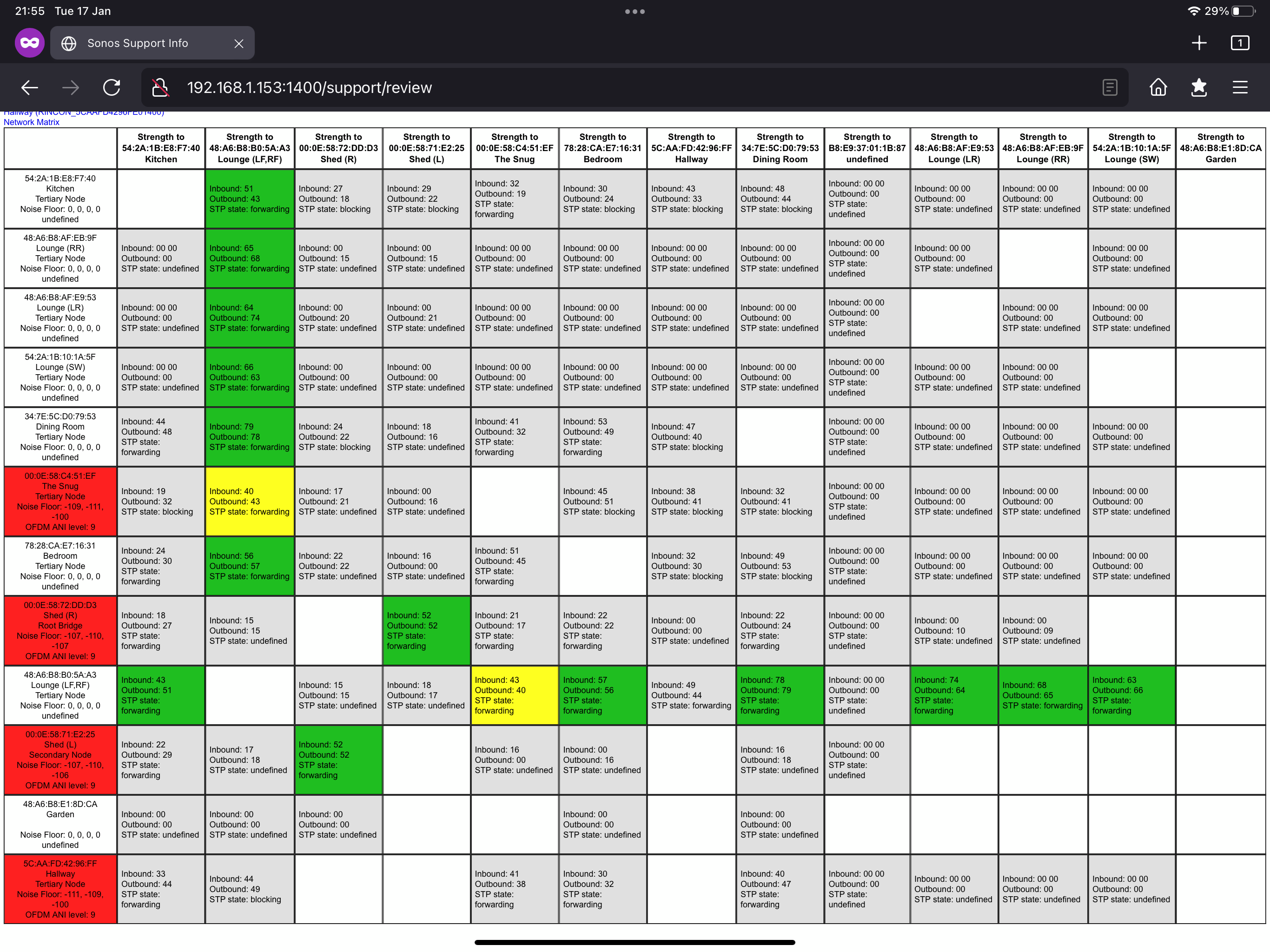


For background, I’ve got a Linksys Velop MX5300 router and a couple more of those as nodes. I’ve also got some switches plugged into the MX5300s in order to expand the available network ports.

Thanks very much for any insights you might have!

cheers, Andrew 

This topic has been closed for further comments. You can use the search bar to find a similar topic, or create a new one by clicking Create Topic at the top of the page.
Best answer by Mr. T

I should perhaps have clarified that the satellite nodes in my MX5300 are connected to the primary node by ethernet rather than wirelessly. Does that improve setup #2?

Yes, having the satellites wired is better.

Is there still high levels of interference when you refresh the matrix? Have you ever seen any improvement? Have you talked with Sonos Support for their insight on how your system performs?

20 replies

agmAuthor
Avid Contributor I
January 18, 2023
  • The bottom left cell is coloured red, which I believe means an active, but poor wireless connection. Yet it’s hardwired via Ethernet. Am I incorrect to think it should be grey?

When you talked about the bottom left cell in statement above, I thought you were referring to the Hallway speaker in the matrix?!

The Play:1 in the Hallway is certainly in an interesting orientation.

I also thought this was already wired and you had disabled the WiFi on the device. This is due to the Hallway row in the network matrix not showing any active SonosNet connection, so I’m not entirely sure how it’s playing music if at all if it’s not already wired.


It’s usually at a normal angle and just connects wirelessly.
 

I had to twist it to fit the ethernet cable In the back (poorly designed bracket). For now I’m just running the cable there like that to test for an improvement. If it works I’ll get a different bracket and hide the ethernet cable.


Of course, if I leave it that corner, it’s surrounded by plaster so there’s no chance to avoid the interference 

Mr. T
January 18, 2023


It’s usually at a normal angle and just connects wirelessly.

I had to twist it to fit the ethernet cable In the back (poorly designed bracket). For now I’m just running the cable there like that to test for an improvement. If it works I’ll get a different bracket and hide the ethernet cable.

Of course, if I leave it that corner, it’s surrounded by plaster so there’s no chance to avoid the interference 

Was it wired when you created your initial post with the matrix? If so, then the wired connection is only serving the Play:1. None of your other wireless speakers are connecting through it, as they favour other routes.

Any joy changing SonosNet channel? If you refresh the matrix, are the red boxes still there or have they changed colour?

agmAuthor
Avid Contributor I
January 22, 2023

Yes, when I created that map, that particular speaker was connected via ethernet.

If I manage to connect all the speakers by ethernet (which I think I can), hopefully that means this speaker not being able to connect to others because of high interference doesn’t matter because each speaker will have its own hard wired connection?

I’ve actually seen a big improvement this week, just from disconnecting both my boost units, which has surprised me. I currently have just one speaker connected by ethernet. Perhaps I had something set up wrong with the boosts.

Mr. T
January 22, 2023

Yes, when I created that map, that particular speaker was connected via ethernet.

If I manage to connect all the speakers by ethernet (which I think I can), hopefully that means this speaker not being able to connect to others because of high interference doesn’t matter because each speaker will have its own hard wired connection?

I’ve actually seen a big improvement this week, just from disconnecting both my boost units, which has surprised me. I currently have just one speaker connected by ethernet. Perhaps I had something set up wrong with the boosts.

It is recommended to wire back to the Primary node in the mesh setup, not any satellite node.

I can’t see any Boost(s) in your original matrix unless you changed the device name, or were they wired to nodes?

agmAuthor
Avid Contributor I
January 22, 2023

Forgive me, I’ll have to go back a step.

By node, you mean each speaker (or boost) right?

and if one of those nodes is somehow designated the primary node I’m not sure how to decide which is the primary one or how I can hard wire so many speakers to one place

Mr. T
January 22, 2023

By Primary Node, I mean your Linksys Velop MX5300 router (or direct path back to router via a switch) and the node refers to the router’s satellites.

agmAuthor
Avid Contributor I
January 22, 2023

Aha, thanks.

1. So the ideal setup would be a switch connected to my router with sufficient ports to directly connect each speaker with ethernet.

2. Next best thing is each speaker having ethernet connections from my other MX5300s which are in node mode.

3. Best after that is likely a mesh network with each speaker getting little or no interference.

———

I think I can achieve setup no.2


Mr. T
January 24, 2023

Aha, thanks.

1. So the ideal setup would be a switch connected to my router with sufficient ports to directly connect each speaker with ethernet.

2. Next best thing is each speaker having ethernet connections from my other MX5300s which are in node mode.

3. Best after that is likely a mesh network with each speaker getting little or no interference.

———

I think I can achieve setup no.2


#2 is not recommended. You should only wire back to the router, not wireless nodes.

As you have a fairly large Sonos system, setting static IP addresses for your Sonos devices is also recommended.

agmAuthor
Avid Contributor I
January 27, 2023

I should perhaps have clarified that the satellite nodes in my MX5300 are connected to the primary node by ethernet rather than wirelessly. Does that improve setup #2?

Mr. T
Mr. TAnswer
January 27, 2023

I should perhaps have clarified that the satellite nodes in my MX5300 are connected to the primary node by ethernet rather than wirelessly. Does that improve setup #2?

Yes, having the satellites wired is better.

Is there still high levels of interference when you refresh the matrix? Have you ever seen any improvement? Have you talked with Sonos Support for their insight on how your system performs?