Contributor I
October 16, 2021
Answered

Odd behaviour when playing albums

  • October 16, 2021
  • 11 replies
  • 193 views

Sonos app on iPhone. Using Amazon Music to stream. 
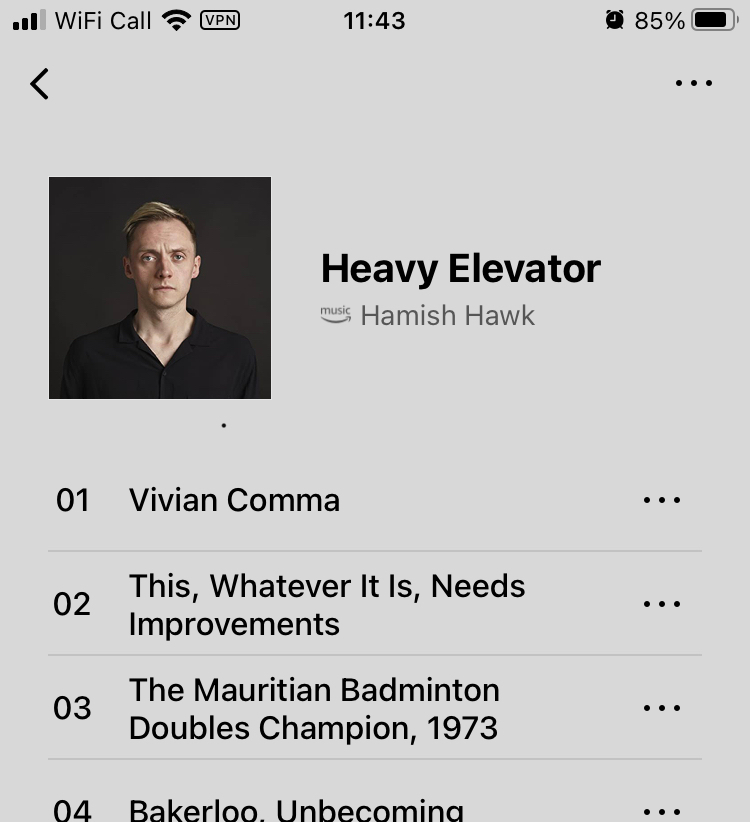
I go into ‘albums’ from the Home Screen. Some albums have a ‘play’ button which enables me to play the whole album. Some albums don’t have a ‘play’ button and you can only play one song at a time. Compare the two images below. It’s really irritating. What’s going on?

 

This topic has been closed for further comments. You can use the search bar to find a similar topic, or create a new one by clicking Create Topic at the top of the page.
Best answer by Ken_Griffiths

Ok, so the problem also exits on my wife’s android phone and when using the Sonos app on my Mac. Does this mean it’s something to do with the Sonos / Amazon Music link, rather than to do with our devices?

You could maybe try removing/reinstalling the Amazon Music Service from the Sonos App/System to see if that resolves it. 

It perhaps might also be something on the local network that’s causing it - some kind of security/antivirus/firewall software on the router, or controller devices, perhaps - those were my other thoughts. It’s not something I’ve seen before with the controller App.

11 replies

Ken_Griffiths
October 16, 2021

Ok, so the problem also exits on my wife’s android phone and when using the Sonos app on my Mac. Does this mean it’s something to do with the Sonos / Amazon Music link, rather than to do with our devices?

You could maybe try removing/reinstalling the Amazon Music Service from the Sonos App/System to see if that resolves it. 

It perhaps might also be something on the local network that’s causing it - some kind of security/antivirus/firewall software on the router, or controller devices, perhaps - those were my other thoughts. It’s not something I’ve seen before with the controller App.