
Contributor I
June 27, 2020
Question

Insufficient Connection Speed for FLAC?

  • June 27, 2020
  • 12 replies
  • 529 views

I have a NAS and a Sonos system with 15 or so components all running on SonosNet (WM:0) on Channel 1. The NAS is hardwired to my Router, as are many of the Sonos units. 

The Router doesn’t provide any WiFi itself but is hard-wired to a separate dual-band mesh WiFi system running on Channel 11 on 2.4Ghz

Playing MP3s from the NAS and internet sources works fine but when playing FLAC files from the NAS we often get "network connection speed insufficient to maintain playback buffer" dropouts and track skipping - even on the most frequently used Sonos units that are all hard-wired to the Router and are all showing Green on the left hand column of the Network Matrix. 

I assume I should be able to play FLAC files and not just MP3 and internet sources, so any idea what is most likely causing this problem?
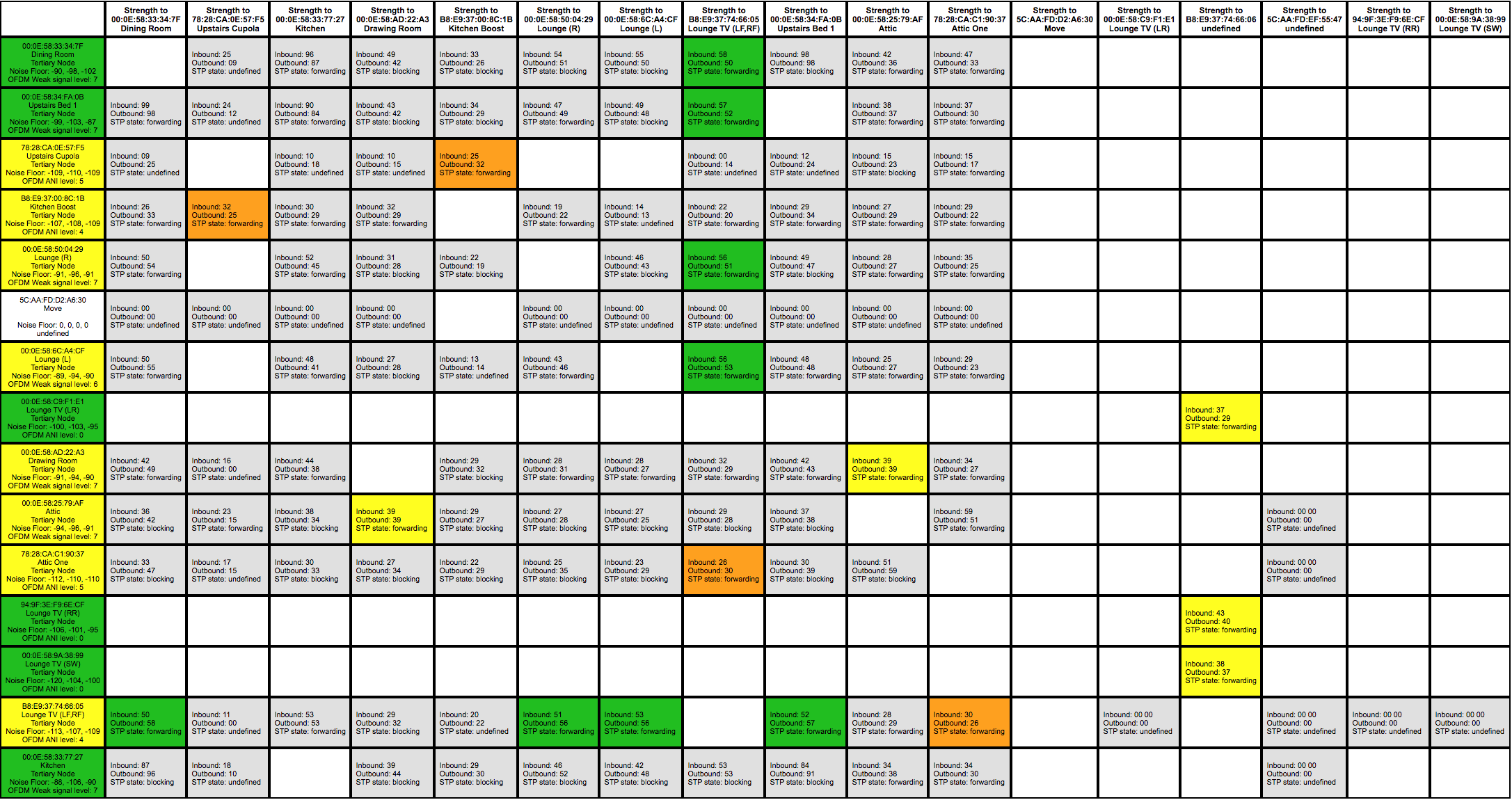
Network Matrix


    This topic has been closed for further comments. You can use the search bar to find a similar topic, or create a new one by clicking Create Topic at the top of the page.

    12 replies

    ratty
    June 27, 2020

    Presumably this is when a number of rooms are grouped. Even wired nodes can drop if the group coordinator (the first room) is wireless on a marginal connection. Start the group from one of the wired nodes and add the others to it. 

    Hicksd1Author
    Contributor I
    June 27, 2020

    Nope … this is when playing FLAC in just one wired room. No other music being played anywhere else :-/

    Local Superstar
    June 27, 2020

    Curious, why are all Sonos devices tertiary nodes? My hardwired are secondary, and the wireless are tertiary.

    ratty
    June 27, 2020

    One wired room, playing local files from the NAS? I can’t imagine the NAS isn’t able to keep up, so perhaps the network connection is flaky. I would run some ping tests and look for a dodgy connection somewhere.

    ratty
    June 27, 2020

    Curious, why are all Sonos devices tertiary nodes? My hardwired are secondary, and the wireless are tertiary.

    Presumably the root bridge is a couple of STP hops away. 

    Hicksd1Author
    Contributor I
    June 27, 2020

    One wired room, playing local files from the NAS? I can’t imagine the NAS isn’t able to keep up, so perhaps the network connection is flaky. I would run some ping tests and look for a dodgy connection somewhere.

    How do I do that?

    Curious, why are all Sonos devices tertiary nodes? My hardwired are secondary, and the wireless are tertiary.

    I have no idea. I don’t know what secondary and tertiary nodes are!

    Curious, why are all Sonos devices tertiary nodes? My hardwired are secondary, and the wireless are tertiary.

    Presumably the root bridge is a couple of STP hops away. 

    You’ve lost me there!

    The NAS is wired directly to the Router with a short single cable. So is the ZonePlayer.

    ratty
    June 27, 2020

    One wired room, playing local files from the NAS? I can’t imagine the NAS isn’t able to keep up, so perhaps the network connection is flaky. I would run some ping tests and look for a dodgy connection somewhere.

    How do I do that?

    A variety of ways, for example:

    • The Fing app for iOS or Android
    • PingInfoView from NirSoft on Windows
    • Also using http://x.x.x.x:1400/tools to get a Sonos node to ping a target directly

    You’d be looking for ping times above a few milliseconds on a wired connection. The first ping typically takes a little longer, for address resolution. 

    Wireless connections are much more variable, but anything consistently in high double figures of milliseconds suggests problems. 


    You can also run some bandwidth tests if you hooked a laptop up to selected wire connections. 


    The NAS is wired directly to the Router with a short single cable. So is the ZonePlayer.

    If the player has two Ethernet ports then connect the NAS to the second port, daisy-chained. Assuming that plays FLAC fine, work out from there changing one thing at a time to identify bottlenecks.

    Hicksd1Author
    Contributor I
    June 27, 2020

    One wired room, playing local files from the NAS? I can’t imagine the NAS isn’t able to keep up, so perhaps the network connection is flaky. I would run some ping tests and look for a dodgy connection somewhere.

    How do I do that?

    A variety of ways, for example:

    • The Fing app for iOS or Android
    • PingInfoView from NirSoft on Windows
    • Also using http://x.x.x.x:1400/tools to get a Sonos node to ping a target directly

    You’d be looking for ping times above a few milliseconds on a wired connection. The first ping typically takes a little longer, for address resolution. 

    Wireless connections are much more variable, but anything consistently in high double figures of milliseconds suggests problems. 

    Thanks. I’ll give that a go.

    Hicksd1Author
    Contributor I
    June 27, 2020

    One wired room, playing local files from the NAS? I can’t imagine the NAS isn’t able to keep up, so perhaps the network connection is flaky. I would run some ping tests and look for a dodgy connection somewhere.

    How do I do that?

    A variety of ways, for example:

    • The Fing app for iOS or Android
    • PingInfoView from NirSoft on Windows
    • Also using http://x.x.x.x:1400/tools to get a Sonos node to ping a target directly

    You’d be looking for ping times above a few milliseconds on a wired connection. The first ping typically takes a little longer, for address resolution. 

    Wireless connections are much more variable, but anything consistently in high double figures of milliseconds suggests problems. 


    You can also run some bandwidth tests if you hooked a laptop up to selected wire connections.


    If the player has two Ethernet ports then connect the NAS to the second port, daisy-chained. Assuming that plays FLAC fine, work out from there changing one thing at a time to identify bottlenecks.

    Do you mean connect the NAS directly to the player, not via the Router?

    ratty
    June 27, 2020

    Do you mean connect the NAS directly to the player, not via the Router?

    Yes, as an experiment. It will simplify the path as much as possible.