
Trending Lyricist I
February 10, 2021
Answered

5G home broadband and Sonos connection issue

  • February 10, 2021
  • 28 replies
  • 2704 views

hi all,

I have just switched home broadband to Three’s 5G service. In switching WiFi services to the new setup I have gone through the requested steps but when I plug one of the Sonos One’s into the router via ethernet cable, it simply doesn’t recognise it. I can see it’s connected when I jump into the router settings on my browser (though this happens sporadically).
I called support who said I should speak to Three about changing the router settings. This included splitting the channels into both 2.4 and 5Ghz with WPA2 security. I’ve done that now but still nothing.

FYI, I have a Playbase and two Ones set up in one room. I have since tried connecting the router to the Playbase as well without any luck.

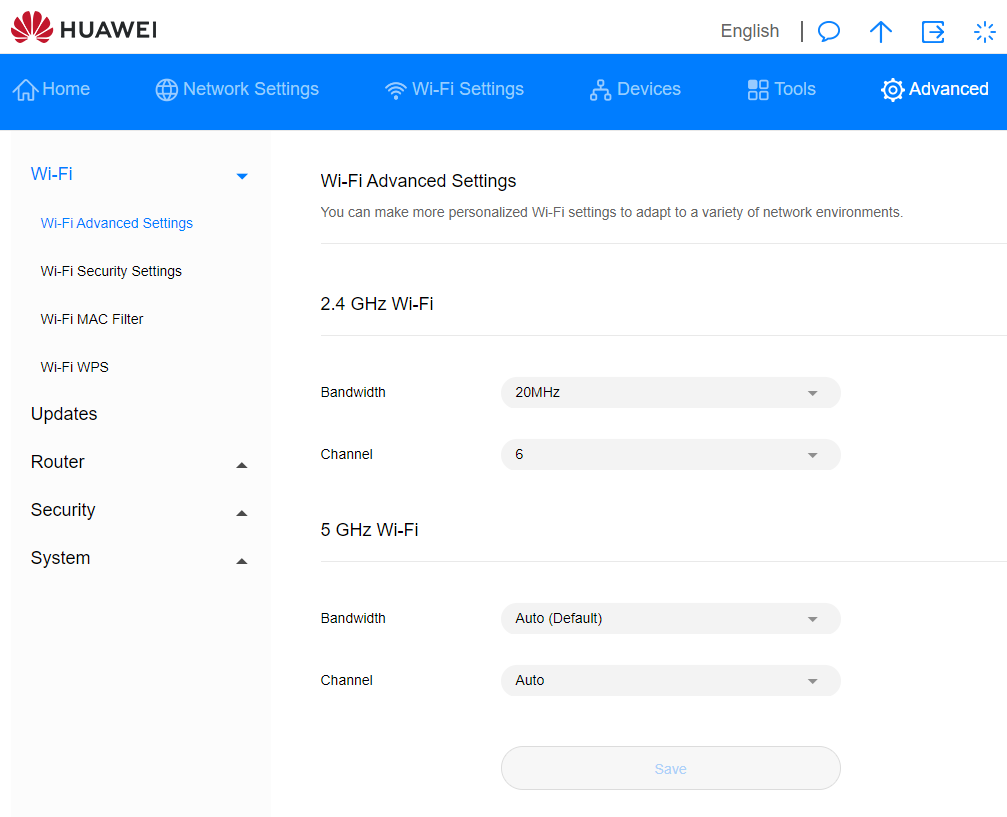
I saw another post about changing the 2Ghz bandwith to 20Mhz and the Channel to 6 (see screenshot) but no dice.

Any help would be enormously appreciated!
 

This topic has been closed for further comments. You can use the search bar to find a similar topic, or create a new one by clicking Create Topic at the top of the page.
Best answer by leobarker

So, it looks like we have an answer!

Spent a long time on a call with Sonos Support, who tried same issues. Also remotely dialled into my laptop to check my wifi settings. Said it was unusual that you couldn’t choose channels 1-4 on 2.4Ghz . Didn’t seem to be making any progress.


Anyway, we eventually tried a factory reset on one of the Ones. Unwired. Starting it up as a new product, new room, new wifi etc. And it appears to have worked.


I am now about to try doing the other two (Playbase and One) the same way and hopefully this will solve it. I will keep you posted!


cc: @STARNES@John B@BMF@Ken_Griffiths @

28 replies

Contributor I
February 10, 2021

I went through exactly the same situation with three’s 5G service in London. We got it as it  our wired internet was so incredibly poor and I thought it would solve all our internet problems...


After a week of trying to solve the problem of why my Sonos wouldn’t connect (going through everything described in the posts above) I eventually spoke to someone at Sonos who explained that Sonos only properly works with a ‘wired’ internet connection… ie... it won’t work with wireless 5G internet.


Sorry to be the bearer of bad news.


I eventually set up a secondary wired internet connection specifically for my Sonos... which was expensive and annoying, using the 5G exclusively for video... and then... finally... moved house! 


Hopefully a solution has been developed since I went through this last summer. Fingers crossed they have as it’s so frustrating... I’m annoyed for you!!

leobarkerAuthor
Trending Lyricist I
February 11, 2021

Very strange, has this only started since moving to the 5G Router?


To be honest, I had problems switching to my previous broadband too, but it just took a few goes. This one hasn’t shown any sign of progress at all. I’m going to call Sonos again later now I was able to make some of the recommended changes.

FWIW, this is what they suggested:


1) 2.4 Ghz enabled


2) Split 2.4Ghz and 5Ghz (separate SSID for each band)
3) Make sure Mode is set to 802.11 BGN
4) Client isolation should be off to ensure wifi devices can communicate with each other
5) Select a manual wifi channel, do not set to auto
6) Security type should be WPA2 with AES Encryption
7) Enable UPNP
 
I was able to do steps 1, 2, 6 and 7. I think step 3 is automatic.
 
Any ideas?

Most of this is irrelevant as an explanation while you have the speaker connected by Ethernet.  Even so, I ask again, which band is your phone connected to please?

Your phone isn’t connecting to a guest network?  You don’t have any access points or extenders?  Your phone is connected to the same subnet as the currently wired speaker?


Phone is connected to the 2.4Ghz band. I have split them both out by different SSID.

I did have an extender that Sonos support suggested I unplug (now done).

Re: subnet, I’m not sure what this is.

leobarkerAuthor
Trending Lyricist I
February 11, 2021

Another question so far unanswered.. what controller device are you running the app on?

Which version of OS is it running?


iPhone 12 + iOS 14.4

leobarkerAuthor
Trending Lyricist I
February 11, 2021

I went through exactly the same situation with three’s 5G service in London. We got it as it  our wired internet was so incredibly poor and I thought it would solve all our internet problems...


After a week of trying to solve the problem of why my Sonos wouldn’t connect (going through everything described in the posts above) I eventually spoke to someone at Sonos who explained that Sonos only properly works with a ‘wired’ internet connection… ie... it won’t work with wireless 5G internet.


Sorry to be the bearer of bad news.


I eventually set up a secondary wired internet connection specifically for my Sonos... which was expensive and annoying, using the 5G exclusively for video... and then... finally... moved house! 


Hopefully a solution has been developed since I went through this last summer. Fingers crossed they have as it’s so frustrating... I’m annoyed for you!!


Ahhhhh, this is what I am fearful of. My only hope was that Sonos would recognise that this is a problem they need to get ahold of fast as I can see a lot of people with 5G home broadband soon.

I can see why too - my ‘200Gb’ cable with Virgin gave me on average around 100Gb most days. My Three 5G home broadband is somewhere around 250Gb easily.

leobarkerAuthor
Trending Lyricist I
February 11, 2021

Another idea. Change the 2.4GHz SSID and password to those from your previous router.  Make sure your phone is connected to that SSID.


Thanks John, I’m going to give this a go if it doesn’t work after I’ve spoken to support this afternoon. Will keep you posted. :thumbsup:

February 11, 2021

It is true that Sonos does not support wireless internet connection but that doesn’t mean it won’t work and I have done it myself. I simply don’t believe that was really the cause of the problems experienced by @STARNES and there is no logical basis for it being so.

leobarkerAuthorAnswer
Trending Lyricist I
February 11, 2021

So, it looks like we have an answer!

Spent a long time on a call with Sonos Support, who tried same issues. Also remotely dialled into my laptop to check my wifi settings. Said it was unusual that you couldn’t choose channels 1-4 on 2.4Ghz . Didn’t seem to be making any progress.


Anyway, we eventually tried a factory reset on one of the Ones. Unwired. Starting it up as a new product, new room, new wifi etc. And it appears to have worked.


I am now about to try doing the other two (Playbase and One) the same way and hopefully this will solve it. I will keep you posted!


cc: @STARNES@John B@BMF@Ken_Griffiths @

BMF
Prodigy III
February 11, 2021

👍