
Trending Lyricist I
February 10, 2021
Answered

5G home broadband and Sonos connection issue

  • February 10, 2021
  • 28 replies
  • 2704 views

hi all,

I have just switched home broadband to Three’s 5G service. In switching WiFi services to the new setup I have gone through the requested steps but when I plug one of the Sonos One’s into the router via ethernet cable, it simply doesn’t recognise it. I can see it’s connected when I jump into the router settings on my browser (though this happens sporadically).
I called support who said I should speak to Three about changing the router settings. This included splitting the channels into both 2.4 and 5Ghz with WPA2 security. I’ve done that now but still nothing.

FYI, I have a Playbase and two Ones set up in one room. I have since tried connecting the router to the Playbase as well without any luck.

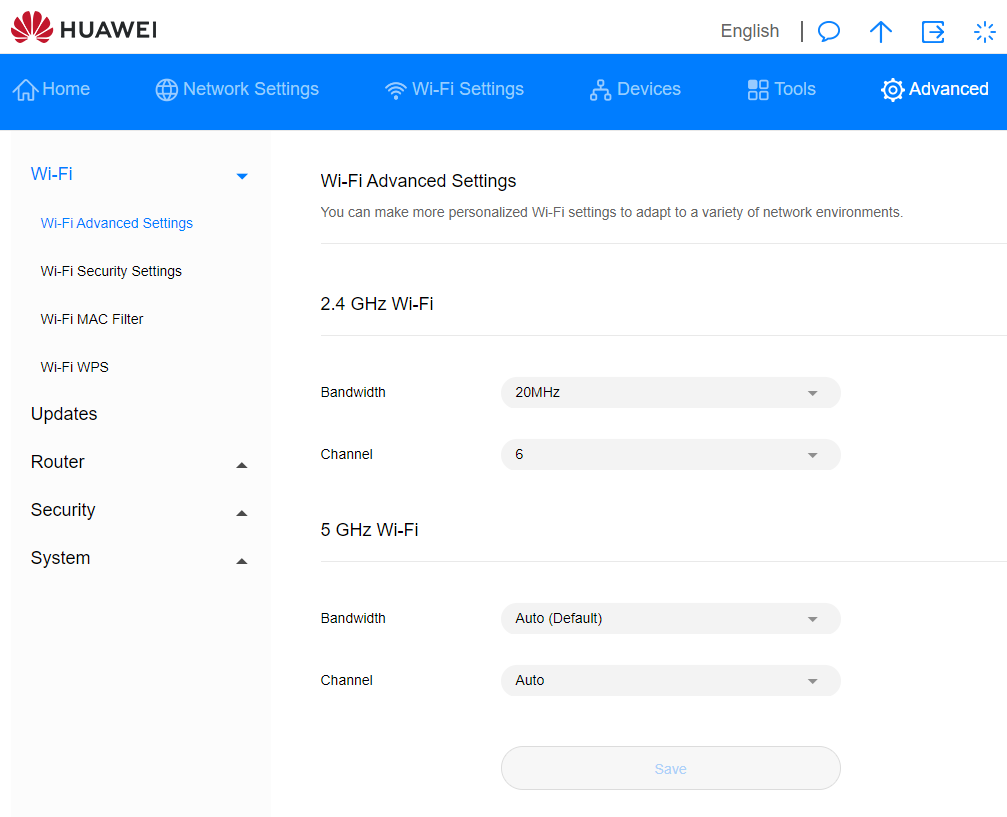
I saw another post about changing the 2Ghz bandwith to 20Mhz and the Channel to 6 (see screenshot) but no dice.

Any help would be enormously appreciated!
 

This topic has been closed for further comments. You can use the search bar to find a similar topic, or create a new one by clicking Create Topic at the top of the page.
Best answer by leobarker

So, it looks like we have an answer!

Spent a long time on a call with Sonos Support, who tried same issues. Also remotely dialled into my laptop to check my wifi settings. Said it was unusual that you couldn’t choose channels 1-4 on 2.4Ghz . Didn’t seem to be making any progress.


Anyway, we eventually tried a factory reset on one of the Ones. Unwired. Starting it up as a new product, new room, new wifi etc. And it appears to have worked.


I am now about to try doing the other two (Playbase and One) the same way and hopefully this will solve it. I will keep you posted!


cc: @STARNES@John B@BMF@Ken_Griffiths @

28 replies

February 10, 2021

Can I just check a couple of things?

  1. You haven’t factory reset any speakers?  If you haven’t that’s good.  Please don’t reset anything
  2. You are using a mobile controller?  If so which device?


BMF
Prodigy III
February 10, 2021

Hi,


are you needing to use Sonosnet for connectivity? Or can you connect all your Sonos speakers to the WiFi directly?


one reason may be interference as Sonosnet uses Channel 6, which would interfere with the above setting.


another thought, is there any mention of “Wireless client isolation” or something along those lines in the security section of the router?

leobarkerAuthor
Trending Lyricist I
February 10, 2021


Hi,


are you needing to use Sonosnet for connectivity? Or can you connect all your Sonos speakers to the WiFi directly?


one reason may be interference as Sonosnet uses Channel 6, which would interfere with the above setting.


another thought, is there any mention of “Wireless client isolation” or something along those lines in the security section of the router?

hi - I’m not sure I know anything about Sonosnet I’m afraid. Is there something else I could be trying?

re: ‘Wireless isolation’ - this was something Sonos support had mentioned, but I couldn’t find anything on my huawei router settings.

February 10, 2021

Hi,


are you needing to use Sonosnet for connectivity? Or can you connect all your Sonos speakers to the WiFi directly?


one reason may be interference as Sonosnet uses Channel 6, which would interfere with the above setting.

Sonos uses 1, 6 or 11, set by user.


another thought, is there any mention of “Wireless client isolation” or something along those lines in the security section of the router?

That is certainly worth checking. 

Also, if there is a Guest network can you temporarily disable it?


February 10, 2021

If you go to:

Advanced > Wi-Fi > Wi-Fi Security Settings > Options and check whether the AP isolation function has been enabled. If so, disable it.

leobarkerAuthor
Trending Lyricist I
February 10, 2021

If you go to:

Advanced > Wi-Fi > Wi-Fi Security Settings > Options and check whether the AP isolation function has been enabled. If so, disable it.


There are no isolation options there (I don’t think). See screenshot…


February 10, 2021

What happens if you click ‘WiFi Advanced Settings’ on that screen?  Is that a clickable link?

leobarkerAuthor
Trending Lyricist I
February 10, 2021

What happens if you click ‘WiFi Advanced Settings’ on that screen?  Is that a clickable link?


You can see a screenshot of that in one of my previous posts.

Two sets of options for both 2.4Ghz and 5Ghz: 

  •  2.4Ghz - Bandwith: Auto / 20Mhz; Channel: Auto / 5 - 13
  • 5Ghz - Bandwith: Auto / 20 / 40 / 80 / 160Mhz; Channel: Auto / 36 - 140
February 10, 2021

Which channel is your phone connected to?  (Although that should not really matter with a speaker wired to your router. )

Do you have any access points or extenders?

BMF
Prodigy III
February 10, 2021


Hi,


are you needing to use Sonosnet for connectivity? Or can you connect all your Sonos speakers to the WiFi directly?


one reason may be interference as Sonosnet uses Channel 6, which would interfere with the above setting.


another thought, is there any mention of “Wireless client isolation” or something along those lines in the security section of the router?

hi - I’m not sure I know anything about Sonosnet I’m afraid. Is there something else I could be trying?

re: ‘Wireless isolation’ - this was something Sonos support had mentioned, but I couldn’t find anything on my huawei router settings.


Sonosnet is where one speaker (or bridge) needs to be connected to Ethernet, this device then sets up Sonosnet, which is a dedicated Sonos wireless network… and it defaults to Channel 6, IIRC.

This used to be the way you had to set up Sonos speakers, but the preferred method promoted by Sonos now, In most cases is, to just join the speakers to WiFi, which does not create a separate dedicated Sonos network.

There may be some scenarios where Sonosnet is a better option for some people, but Sonos seem to be suggesting WiFi as the first choice.


This article show how to change between a wired set up(Sonosnet) and a wireless setup (WiFi)


https://support.sonos.com/s/article/3209?language=en_US


might be worth a go.