This topic has been closed for further comments. You can use the search bar to find a similar topic, or create a new one by clicking Create Topic at the top of the page.
I think the forum auto-tags each new post based on what products the poster owns, so the only assumption that seems valid is that the question refers to an Amp.
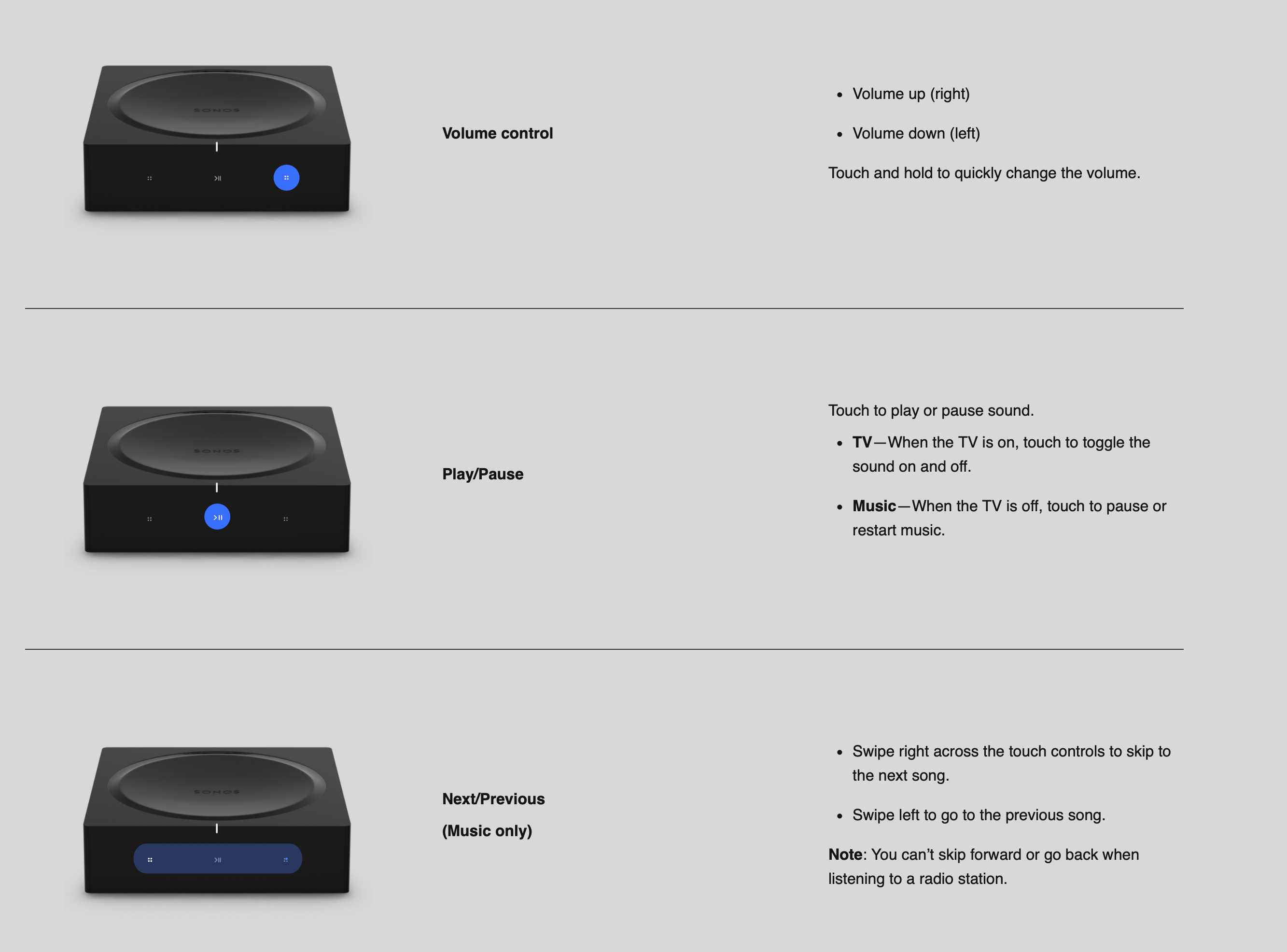
It’s rather surprising to find that the Sonos documentation on the Amp says almost nothing about the touch controls.
Are you asking because they do nothing when you touch them? My understanding is that, like any other Sonos product with touch controls, they can be enabled and disabled in the app System setting for the product. Have you checked to confirm that the controls are enabled?
I think the forum auto-tags each new post based on what products the poster owns, so the only assumption that seems valid is that the question refers to an Amp.
It’s rather surprising to find that the Sonos documentation on the Amp says almost nothing about the touch controls.
Are you asking because they do nothing when you touch them? My understanding is that, like any other Sonos product with touch controls, they can be enabled and disabled in the app System setting for the product. Have you checked to confirm that the controls are enabled?
I did not know what they were for so I did not try them.