
October 10, 2016
Question

Playlist artwork barely shows up on iPad Pro

  • October 10, 2016
  • 17 replies
  • 494 views
Hi,

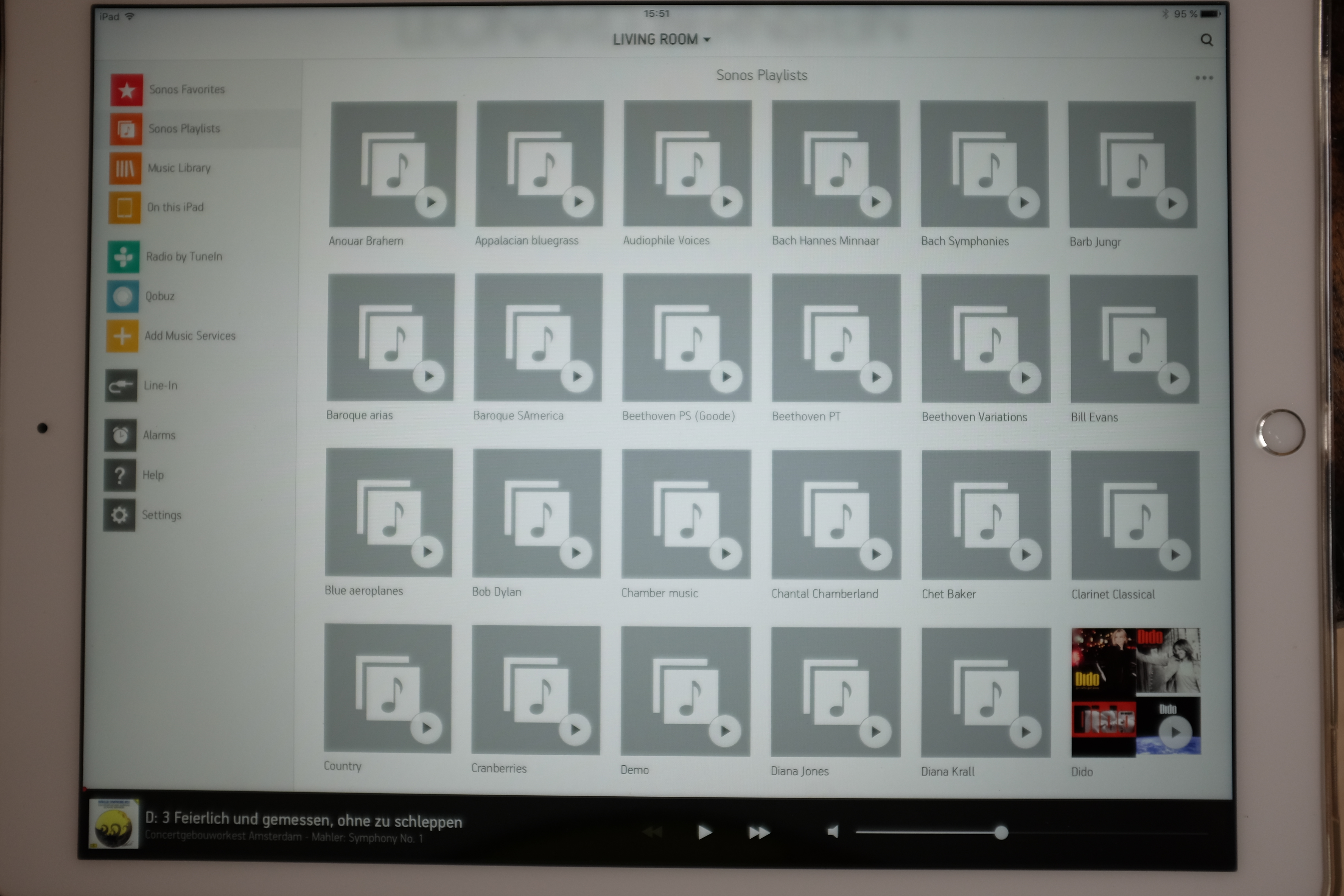
I have a problem with the artwork of playlists on my iPad Pro. My music is on a NAS and when I call up my playlists on the iPad I get a screen as shown below. Even when I wait 5-10 minutes it remains pretty much like this. What is wrong and what can I do to remedy this situation? Should I submit a ticket?
    This topic has been closed for further comments. You can use the search bar to find a similar topic, or create a new one by clicking Create Topic at the top of the page.

    17 replies

    Emile15Author
    October 11, 2016
    No one?
    Craig L
    Sonos Staff
    October 12, 2016
    Hi there Emile, and thanks for posting!

    Do you have any other devices set up with the Sonos App, like a PC or Mac? If so, can you try browsing the NAS drive from there and tell me if the album art is still missing? Also, if you have any other software which can browse this NAS drive library - such as iTunes - can you check whether album art appears here as well?

    I would also recommend checking out this article on our support site for some tips regarding this kind of issue.
    Help others find useful content by clicking the like button and selecting the best answer to your question
    Emile15Author
    October 12, 2016
    Thanks for your reply Craig. Just to reiterate the problem: when I call up "Sonos Playlists" on the iPad Pro almost no artwork is shown, despite having a fast WiFi network. If I wait several minutes and especially if I start scrolling the list more artwork appears but by no means all. Since we are talking about Sonos playlists I do not need to go to another device to check whether the artwork is actually present, all I need to do is open the playlist on the iPad, and that is what I did for a few of them. In all these cases when I open the playlist every item in it has artwork associated with it even if it takes a second or two to appear. I have enclosed an example. As you can see, the Diana Krall playlist has no album art, yet all the items in it do.


    Emile15Author
    October 14, 2016
    Hi Craig,

    Any suggestions?
    Stuart_W
    World-Class Superstar
    October 14, 2016
    Hi Craig,

    Any suggestions?


    I don't want to be rude and I know you have an issue. But why not answer the first part of Craig L's question? -- "Do you have any other devices set up with the Sonos App, like a PC or Mac? If so, can you try browsing the NAS drive from there and tell me if the album art is still missing?"

    This will help troubleshoot your problem

    Where is your artwork stored - As a "folder.jpg" in the Album folder or embedded in each track or both. What size are they (pixels)?
    Arc + Sub (Gen 1) + 2 x Play 1/ Stereo Play 3s/ Era 100 Stereo in Kitchen, One Stereo in Bedroom, Play 1 stereo pair in Study, Play 1in Bathroom, Sonos Move 2
    Emile15Author
    October 14, 2016
    Dear Stuart,

    Thanks for the response and giving me a chance to explain. Unless I am the one who fails to see what is at issue here I think you may have missed something. I did read Craig's question carefully. Now it is possible I missed something, but I concluded that Craig wants to ensure that my tracks actually have artwork associated with them. That is why I took a screenshot (no 1 of the 2) of the actual tracks belonging to one of the playlists that does not show album art. As you can see on screenshot 2 the Diana Krall playlist has NO album art, but the tracks (all of them!) do have album art (screenshot 1).

    Another reason I did not follow up Craig's suggestion is that I think he may have misread what I wrote too. The issue is not whether there is artwork associated with the tracks in a playlist -- I made sure it was before I asked the question here (see also above), but that artwork associated with the playlist itself sometimes shows and sometimes does not. On a PC or Mac such playlists have NO artwork associated with them (at least not on my computers), so it is pointless, as Craig suggests, to check the App on a PC or a Mac.
    Stuart_W
    World-Class Superstar
    October 14, 2016
    Hi Emile15

    It sounds like you perhaps have a fundamental misunderstanding of how the system works in terms of playing songs and playlists.

    A playlist is a list of locations of songs (Your NAS, Apple Music, PC - wherever). The Playlists are stored on the Sonos devices and NOT on your iPad or Phone or PC.

    When you activate the iPad app and select Playlists these are fetched from the Play unit and when you select play the player goes and gets the track. t will then retrieve the artwork and display on your device.

    So, we assume that your tracks have artwork associated with them else we are all wasting our time - But do you see that your artwork may well display differently on different controllers?

    In other words what Craig asked you to do is NOT pointless.
    Arc + Sub (Gen 1) + 2 x Play 1/ Stereo Play 3s/ Era 100 Stereo in Kitchen, One Stereo in Bedroom, Play 1 stereo pair in Study, Play 1in Bathroom, Sonos Move 2
    Emile15Author
    October 14, 2016
    Stuart you fail to address the issues raised.

    The first screenshot shows that artwork is associated with the individual tracks.

    The second shows that despite this fact the playlist in which these tracks appear does NOT show artwork on the iPad whereas other playlists DO show the correct artwork.

    As I explained earlier, playlist artwork is NOT displayed on other controllers, i.e. it is ONLY displayed on an iPad (and iPhone/iPod).

    As to where my artwork is stored. It is all all embedded in the files (often there is also a jpg in the folder) and, yes, I am aware of size restrictions on artwork but that does not apply here. If I had gone over the limit the album art would not show up for individual tracks. Moreover, as Sonos notes on its help pages "iPhone / iPad / iPod touch support album artwork up to 320kb in size with no resolution limit."
    Craig L
    Sonos Staff
    October 14, 2016
    Hi Emile, if you have the Sonos App on an iPhone or Android? If so could you please check the Sonos Playlists from one of these devices, as they should show playlist artwork. As the iPad is inconsistent with how its displaying the artwork, it may be that it is having a little trouble retrieving the album art from the NAS drive, so if we can narrow it down to the iPad then this would help. Also, so we can get a closer look at your system could you submit a diagnostic report and reply here with the confirmation number: How to Submit a Diagnostic
    Help others find useful content by clicking the like button and selecting the best answer to your question
    Emile15Author
    October 14, 2016
    Hi Craig,

    The same problem affects my iPhone and as far as I can tell (I have not gone through the whole list) the playlists without artwork correspond to those on the iPad. If it helps I am happy to make a picture of what I see on my phone.

    The diagnostics number is 6640196.