
Contributor I
June 13, 2019
Answered

Connect:Amp Model ?

  • June 13, 2019
  • 19 replies
  • 24493 views
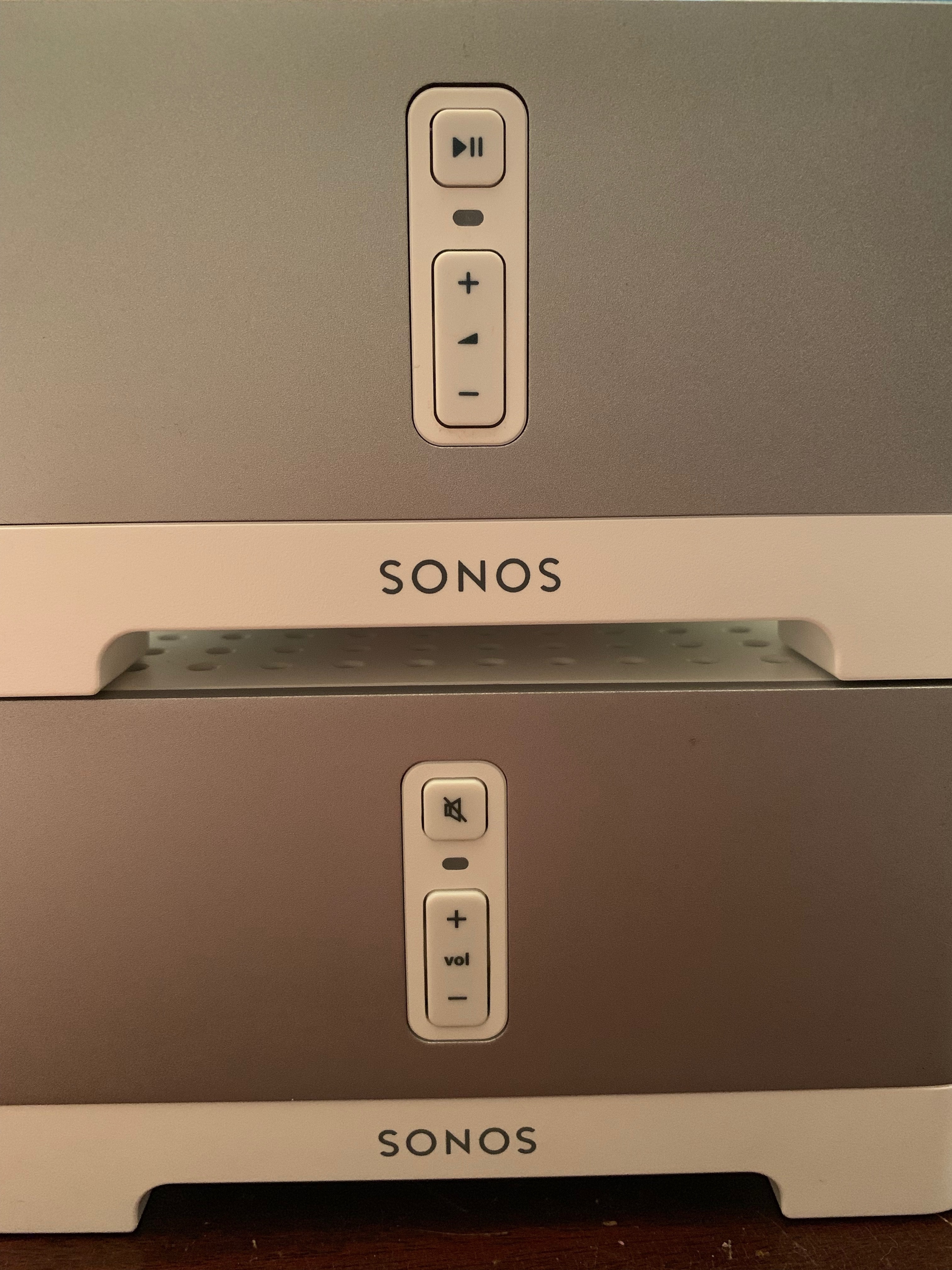
I recently purchased two Connect:Amps via Craigslist, both work well. One does not have the label on the Botton and has blue rubber feet:

Connect:Amp: Bedroom 2
Serial Number: 00-0E-58-D0-61-B2:A
Version: 10.2 (build 50165071)
Hardware Version: 1.16.3.1-1
Series ID: P100
IP Address: 192.168.1.199
WM: 0
OTP: 1.1.1 (1—16-3-0.9)

The other one appears newer and has a different icon on the top button (see image: Bedroom 2 is bottom, Playroom 2 top).

Connect:Amp: Playroom 2
Serial Number: 5C-AA-FD-E0-23-EC:0
Version: 10.2 (build 50165071)
Hardware Version: 1.17.3.1-1
Series ID: C100
IP Address: 192.168.1.198
WM: 0
OTP: 1.1.1 (1-17-3-2.1)

I looking to find out if they have same specs and perhaps how old they are. Thanks
    This topic has been closed for further comments. You can use the search bar to find a similar topic, or create a new one by clicking Create Topic at the top of the page.
    Best answer by cariacou

    I believe there were only ever 2 version of the connect amp.

    The first one had 4 Ethernet ports on the back (zp100), and the second one had only 2 Ethernet ports (zp120, Connect:amp).

    The second gen has newer hardware, zp100 is an old model by now.

    It looks like you have the latest one.
    They went through a few different cosmetic changes throughout the years (logo change, feet color changes etc). Features remained the same: the hardware remained unchanged.


    Moderator note: There was a change to the Connect:Amp and Connect in 2015 that upgraded some of the internals. One of the easy ways to check is on the button on the front. If it has the Play/Pause, it should be one of the newer ones.

    19 replies

    Stanley_4
    Grand Maestro
    January 25, 2020

    The serial number on both legacy and modern start with B8-E9-37. 

    Take another look at the serial numbers, you are just seeing the MAC portion, there should be more numbers ahead of that.

    ZP0606 XX-XX-XX-XX-XX

    The 0606 is 2006 and June, YYMM.

    Enthusiast I
    January 25, 2020

    The serial number on both legacy and modern start with B8-E9-37. 

    Take another look at the serial numbers, you are just seeing the MAC portion, there should be more numbers ahead of that.

    ZP0606 XX-XX-XX-XX-XX

    The 0606 is 2006 and June, YYMM.

    Got it Thanks

    Lyricist I
    January 29, 2020

    I also have a mix of connect amps and can confirm. 
     

    P100 is considered obsolete 
    hardware version - 1.16.3.1-1


    C100 is considered modern

    hardware version - 1.17.3.1-1


    Both were purchased and installed at the same time 4 years ago. 1 is modern, 1 is obsolete. 
     

    whats jammed is that because they were changing the internals only you’d never know which version you were getting. Not a problem at the time but per Sonos new direction, the old p100 is junk and will need to be removed less the rest of my modern system will be left behind.


    4 years later now I find out that I was sold old hardware. 

    Same issue for me.  I have six connect:amps, all purchased and installed at the same time in 2015.  Now it appears one of the six is a legacy product even though it was retailed at the time with the same specs as the rest.  What is different about the “legacy” connect:amp variant that renders it unable to accept ongoing software updates after May 2020 to remain operable with the rest of the modern system?

    jgatie
    January 29, 2020

    Same issue for me.  I have six connect:amps, all purchased and installed at the same time in 2015.  Now it appears one of the six is a legacy product even though it was retailed at the time with the same specs as the rest.  What is different about the “legacy” connect:amp variant that renders it unable to accept ongoing software updates after May 2020 to remain operable with the rest of the modern system?


    All legacy devices have 32 MB RAM and storage.  All modern devices have more (some 32 times more).  The modern Connect:Amp units have 64 MB RAM and storage.  See this thread for a graphic:

    Updated memory graphic

    Avid Contributor II
    February 1, 2020

    Hi

    I have two Connect’s and one apparently is legacy, the other modern.  The above has been interesting, thanks.   In retrospect changing specs in a model that continues *apparently* unchanged is not a good idea, Sonos!!!

    Is the info about what is modern and what is legacy, within a model, online anywhere official?  Sonos?  It should be.


    Stanley_4
    Grand Maestro
    February 1, 2020

    Sonos has learned the invisible model change lesson so hopefully we are done with that.

    I’m not sure they learned the confusing names, like the Play 1 versus Sonos One naming lesson though.

    Lyricist I
    April 15, 2020

    If you don’t have access to the About of your device, there are a couple other ways to check.


    If you check out the serial number on the unit itself, there should be four digits at the beginning before the 00 that marks when the unit was manufactured, looking like YYMM. There was an update to the Connect:Amp in 2015 where some of the basic computing internals were upgraded. At the time, it wasn’t noted with a generation change, though we learned from that and did so in later years.

    The 2015 Connect and Connect:Amp units have that Play/Pause button as well.


    The newer version of those devices are not legacy devices, but the older version is now a legacy device.


    Can you please tell us when exactly the model change in 2015 was?
    How about a device from starting with a serial number “1501” or “1502” which would mean January or February 2015 - are they considered modern or obsolete?

    Lyricist I
    June 9, 2020

    Hi, I have 2 x connect:amps and I am trying to decide if I should be upgrading to the new S2 app/operating system. I have read the above answers and many other sources but still can't find a definitive answer.

    I can't find the year in the serial number like mentionsed above, and if I look in the products in my system it doesn't say if they are "modern" or "discontinued" (see pic). I'm not sure what the registration dates refer to as they were installed and registered in 2018. I'm guessing this has been done automatically by Sonos in readiness of the new app.

    I'm fairly sure they are modern as they are C100 and not P100, but this is incredibly frustrating!

    If they're suitable, am I then OK to move to the S2 app? What are the benefits for doing so?

    Any help would be appreciated.

    Airgetlam
    June 9, 2020

    If they don’t say Sonos S1 Required next to them, then they’re modern. 

    Bruce