
Contributor I
June 13, 2019
Answered

Connect:Amp Model ?

  • June 13, 2019
  • 19 replies
  • 24492 views
I recently purchased two Connect:Amps via Craigslist, both work well. One does not have the label on the Botton and has blue rubber feet:

Connect:Amp: Bedroom 2
Serial Number: 00-0E-58-D0-61-B2:A
Version: 10.2 (build 50165071)
Hardware Version: 1.16.3.1-1
Series ID: P100
IP Address: 192.168.1.199
WM: 0
OTP: 1.1.1 (1—16-3-0.9)

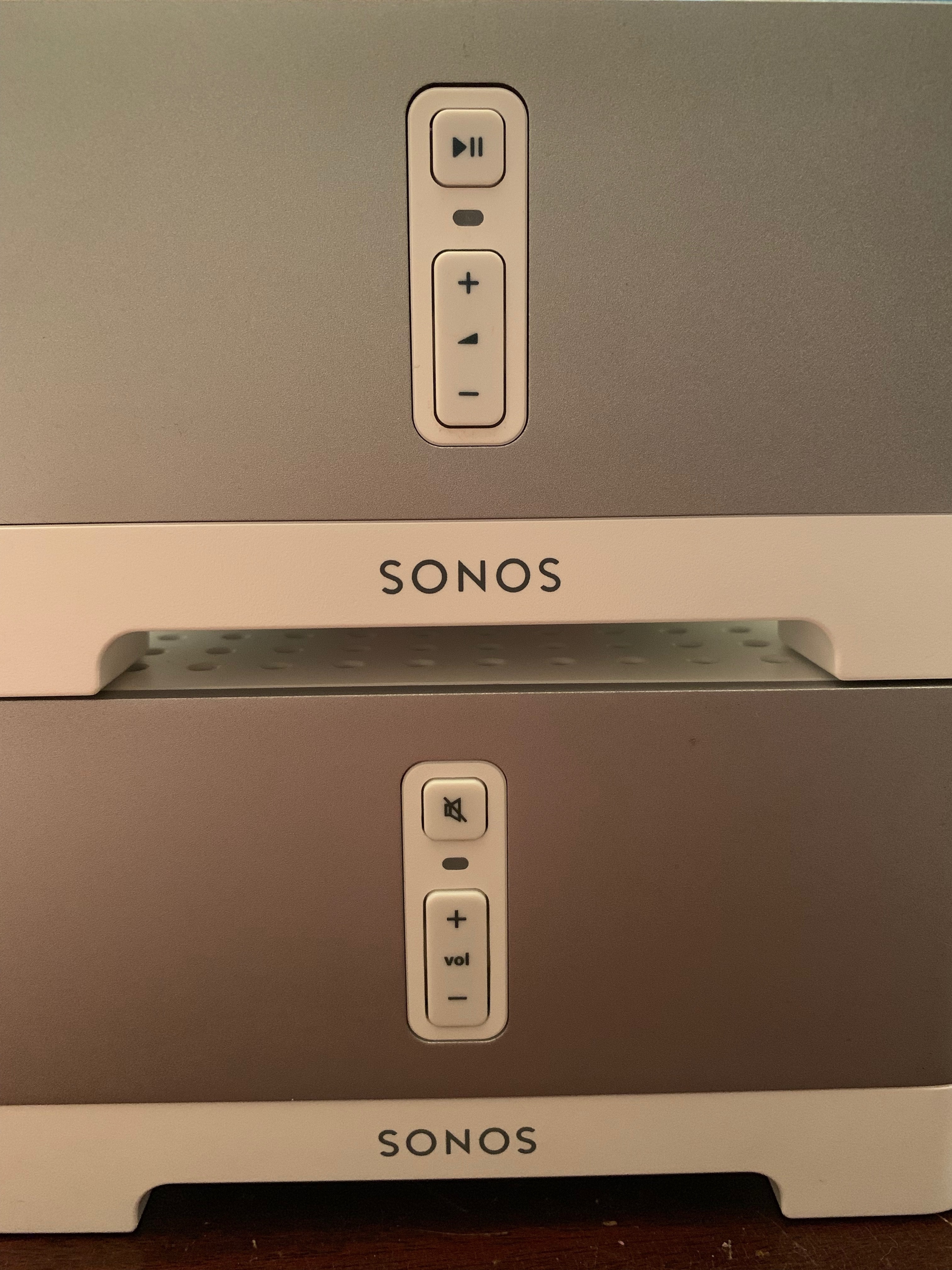
The other one appears newer and has a different icon on the top button (see image: Bedroom 2 is bottom, Playroom 2 top).

Connect:Amp: Playroom 2
Serial Number: 5C-AA-FD-E0-23-EC:0
Version: 10.2 (build 50165071)
Hardware Version: 1.17.3.1-1
Series ID: C100
IP Address: 192.168.1.198
WM: 0
OTP: 1.1.1 (1-17-3-2.1)

I looking to find out if they have same specs and perhaps how old they are. Thanks
    This topic has been closed for further comments. You can use the search bar to find a similar topic, or create a new one by clicking Create Topic at the top of the page.
    Best answer by cariacou

    I believe there were only ever 2 version of the connect amp.

    The first one had 4 Ethernet ports on the back (zp100), and the second one had only 2 Ethernet ports (zp120, Connect:amp).

    The second gen has newer hardware, zp100 is an old model by now.

    It looks like you have the latest one.
    They went through a few different cosmetic changes throughout the years (logo change, feet color changes etc). Features remained the same: the hardware remained unchanged.


    Moderator note: There was a change to the Connect:Amp and Connect in 2015 that upgraded some of the internals. One of the easy ways to check is on the button on the front. If it has the Play/Pause, it should be one of the newer ones.

    19 replies

    cariacou
    cariacouAnswer
    Enthusiast I
    June 13, 2019

    I believe there were only ever 2 version of the connect amp.

    The first one had 4 Ethernet ports on the back (zp100), and the second one had only 2 Ethernet ports (zp120, Connect:amp).

    The second gen has newer hardware, zp100 is an old model by now.

    It looks like you have the latest one.
    They went through a few different cosmetic changes throughout the years (logo change, feet color changes etc). Features remained the same: the hardware remained unchanged.


    Moderator note: There was a change to the Connect:Amp and Connect in 2015 that upgraded some of the internals. One of the easy ways to check is on the button on the front. If it has the Play/Pause, it should be one of the newer ones.

    Feature request: Guest Mode. Ex: Add an admin login to the Sonos app to restrict desired settings/zones to non-guest users
    June 13, 2019
    I suspect they are essentially the same model. The reason for the different buttons is that the physical button used to be a mute button, then Sonos changed it to act as a play/pause. A firmware update repurposed the button on existing equipment, but obviously the physical button was unchanged. I can't remember exactly when the change was made. Maybe 5 or 6 years ago?
    KDU472Author
    Contributor I
    June 13, 2019
    Thanks for the responses, much appreciated!
    Contributor I
    January 21, 2020

    FYI, I have both of these series, and they look the same and work the same, but now that the Connect:Amp is announced as End of Life, I see the P100 is the obsolete model and the C100 is still reported as “Modern”. 

    I’ll have to wait until I get home to see if this is shown on the label.  The other way you can tell is the serial number.  My old/obsolete P100’s all start with 00, the “Modern” P100 start with a 3 or a 5.  Looking at eBay it seems the older model *might* be labeled ZP120, and the newer model as CTAZPUS1.


    KDU472Author
    Contributor I
    January 21, 2020

    Thanks bferrell, really helpful info!!

    Lyricist I
    January 21, 2020

    @bferrell, I am able to back your theory re. the C100 model appearing to continue receiving support but mine (bought in October 2015) has a 00 serial number and is designated “Modern product”:

    Connect:Amp: Living Room
    Serial Number: 00-0E-**-**-**-**:C
    Version: 10.6.1 (build 54272160)
    Hardware Version: 1.17.3.1-2
    Series ID: C100


    Enthusiast I
    January 24, 2020

    I also have a mix of connect amps and can confirm. 
     

    P100 is considered obsolete 
    hardware version - 1.16.3.1-1


    C100 is considered modern

    hardware version - 1.17.3.1-1


    Both were purchased and installed at the same time 4 years ago. 1 is modern, 1 is obsolete. 
     

    whats jammed is that because they were changing the internals only you’d never know which version you were getting. Not a problem at the time but per Sonos new direction, the old p100 is junk and will need to be removed less the rest of my modern system will be left behind.


    4 years later now I find out that I was sold old hardware. 

    Ryan S
    Retired Sonos Staff
    January 24, 2020

    If you don’t have access to the About of your device, there are a couple other ways to check.


    If you check out the serial number on the unit itself, there should be four digits at the beginning before the 00 that marks when the unit was manufactured, looking like YYMM. There was an update to the Connect:Amp in 2015 where some of the basic computing internals were upgraded. At the time, it wasn’t noted with a generation change, though we learned from that and did so in later years.

    The 2015 Connect and Connect:Amp units have that Play/Pause button as well.


    The newer version of those devices are not legacy devices, but the older version is now a legacy device.

    Mark good posts by pressing the like button, and select the best answer on questions you've asked to help others find solutions.
    Enthusiast I
    January 24, 2020

    The serial number on both legacy and modern start with B8-E9-37. 
     

    the question is what is Sonos going to do for their customers who were deceptively sold old stock which in turn had as little as a 4 year fully functional lifespan?

    Stanley_4
    Grand Maestro
    January 25, 2020

    If you got old stock I’d start with your seller and see what they tell you. Once you have done that then contact Sonos support directly and discuss the issue.

    It has been a while but Sonos was quite helpful is fixing the mess Best Buy put me in by selling me not only old stock but old stock that had spent a couple Phoenix, AZ summers sitting in a steel shipping container in the full summer sun. I’m surprised it worked at all and it didn’t work long. Best Buy was not interested in fixing things, Sonos once I proved Best Buy had screwed me made things right even though it was no fault of theirs.