Answered

Unable to connect my UGREEN NAS to SONOS

  • February 20, 2026
  • 9 replies
  • 66 views

I am trying to connect my new UGREEN NAS to SONOS. After typing in the NAS path and folder the following message appears:

The computer (path name)refused to let the SONOS product connect to it.

How can I overcome this problem.

Any help would be greatly appreciated.

Rudolf

Best answer by Airgetlam

Wouldn’t you want to ask UGREEN why the NAS is refusing connections?

From the Sonos side, S1 uses SMB v1 (and associated things) are used to communicate with an NAS. For S2, the NAS needs to be using SMB v2 or higher. But if there’s a security setting on the NAS side, as it sounds like their may be, you probably need to go through their software to fix it.

Remember, here is the FAQ.

9 replies

Airgetlam
  • Answer
  • February 20, 2026

Wouldn’t you want to ask UGREEN why the NAS is refusing connections?

From the Sonos side, S1 uses SMB v1 (and associated things) are used to communicate with an NAS. For S2, the NAS needs to be using SMB v2 or higher. But if there’s a security setting on the NAS side, as it sounds like their may be, you probably need to go through their software to fix it.

Remember, here is the FAQ.


MoPac
Forum|alt.badge.img+19
  • Headliner III
  • February 20, 2026

 Did you enable SMB on the Ugreen NAS?


  • Author
  • Contributor I
  • February 27, 2026

Hi Airgetlam and MoPac

Thanks for your advice. I have enabled SMB on my UGREEN but not sure which version. I will get in contact with UGREEN. Hopefully, they can fix my problem. 

I have S1.

Rudolf


Airgetlam
  • February 27, 2026

S1 requires SMB v1 (unusual in use these days), along with corresponding files, such as NTML v1. I’d certainly recommend, if you can, upgrading your Sonos system to S2, which allows SMB v2 or higher.  Unfortunately, it depends on how much CPU and memory are on the Sonos devices, most of the older ones can’t be updated. 


  • Author
  • Contributor I
  • February 27, 2026

Most of my devices are 10 years +. I was in contact with UGREEN  and I’m awaiting their reply. 
 

thanks for your help.

Rudolf


Stanley_4
  • Grand Maestro
  • February 27, 2026

Check under advanced here, they avoid mentioning it in any searchable documents.

https://support.ugnas.com/#/detail/eyJjb2RlIjoiMiYmNzgifQ==


Airgetlam
  • February 27, 2026

That’s both obscure, and doesn’t mention which version of SMB is being supported. I sure hope their CS can confirm it will support SMB v1. 


Stanley_4
  • Grand Maestro
  • February 27, 2026

Yep, stuff like that is why I passed on that brand of NAS.

I do hope the advanced button is hiding the versions option, but their support site is no help with that.


Hi Rudolf St,

I have a Ugreen NAS DXP2800 and was facing the same problem. I’ll share the settings I have made to get it to work with my Sonos S1 controller on Windows 11. 

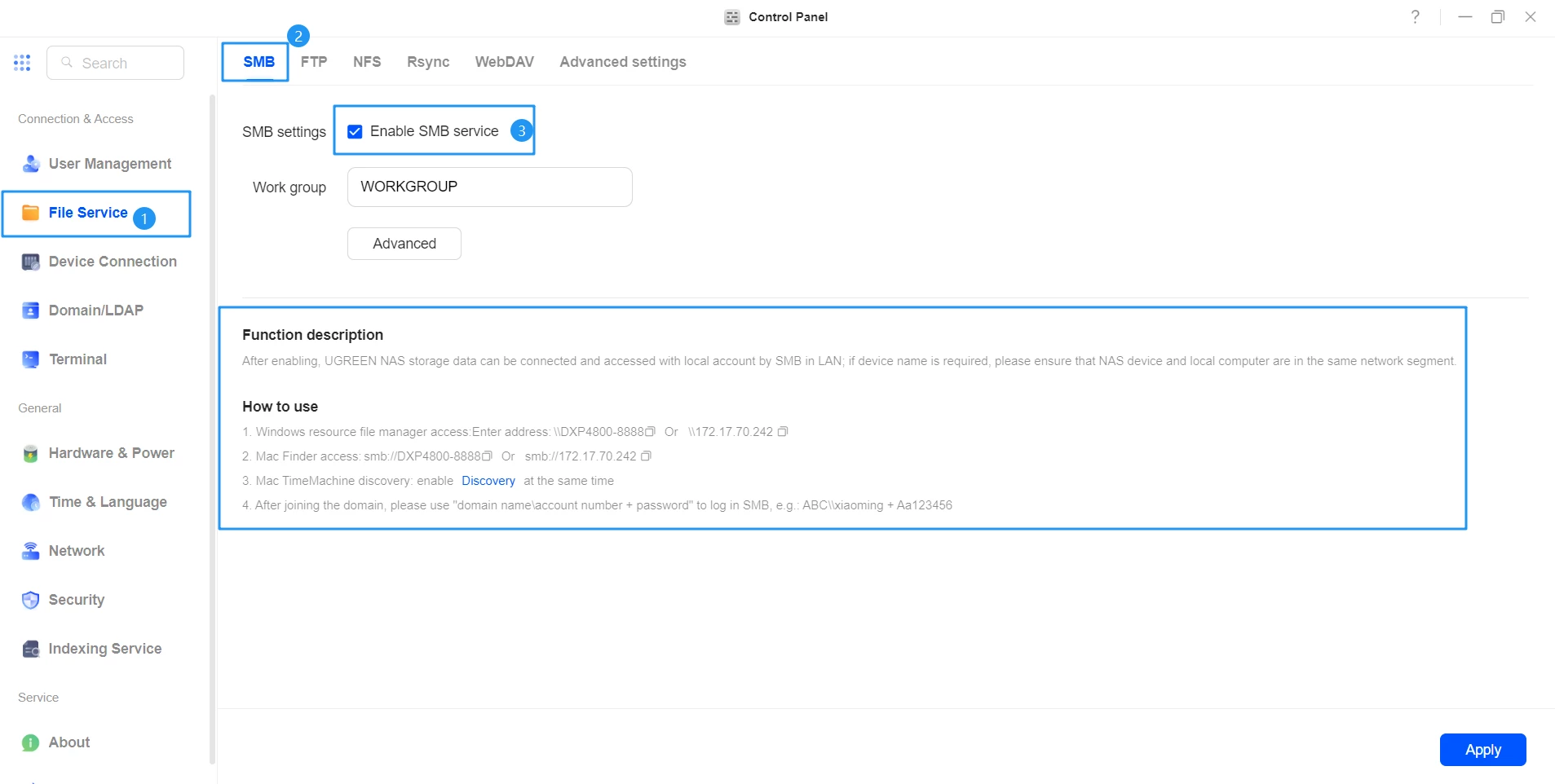
  1. The picture above is correct. In the File Service section you have to enable the SMB service first of all and click APPLY.  I don’t know if Workgroup name is important. 
  2. Then click on ADVANCED.
  3. In the GENERAL tab lower down you see “Support SMB protocol” Click the arrow on the right, ENABLE SMB v1 and SAVE.
  4. Then go to the MORE tab and check the box for “Enable NTLMv1 validation” and SAVE.
  5. Return back to the main File Service section where you see SMB, FTP, NFS etc. At the end is “Advanced Setttings”. In that tab I have “Enable wsdde service” checked as I’m using Windows. I assume Mac users need to choose “Enable Bnjour Service”
  6. Reboot and see if you can access your NAS folder in the Sonos S1 app.

I was able to finally add my NAS music folder and all is working fine now. The one thing I did notice is that in a network search you will see the NAS name shown twice. Once the original name and a second instance with an extension. For example NASNAME and NASNAME-fsmc. From what I understand this is caused by the enabling of SMB1 which broadcasts the name a second time. But there is no difference when accessing either folder.

Hope this info helps.