
Contributor I
March 28, 2023

Unable to set Sonos Era 100 as Alexa-enabled device in room/group using Alexa app

  • March 28, 2023
  • 102 replies
  • 7852 views

Today I’ve upgraded my two Sonos Ones with Sonos Era 100s. After adding Alexa to the speakers, I tried to go into the Alexa app to associate them with their respective rooms. I’m able to add them as the room speaker, but I am unable to set them as the Alexa device for that room (allowing for room-specific commands like “Alexa, turn off the lights”, etc).

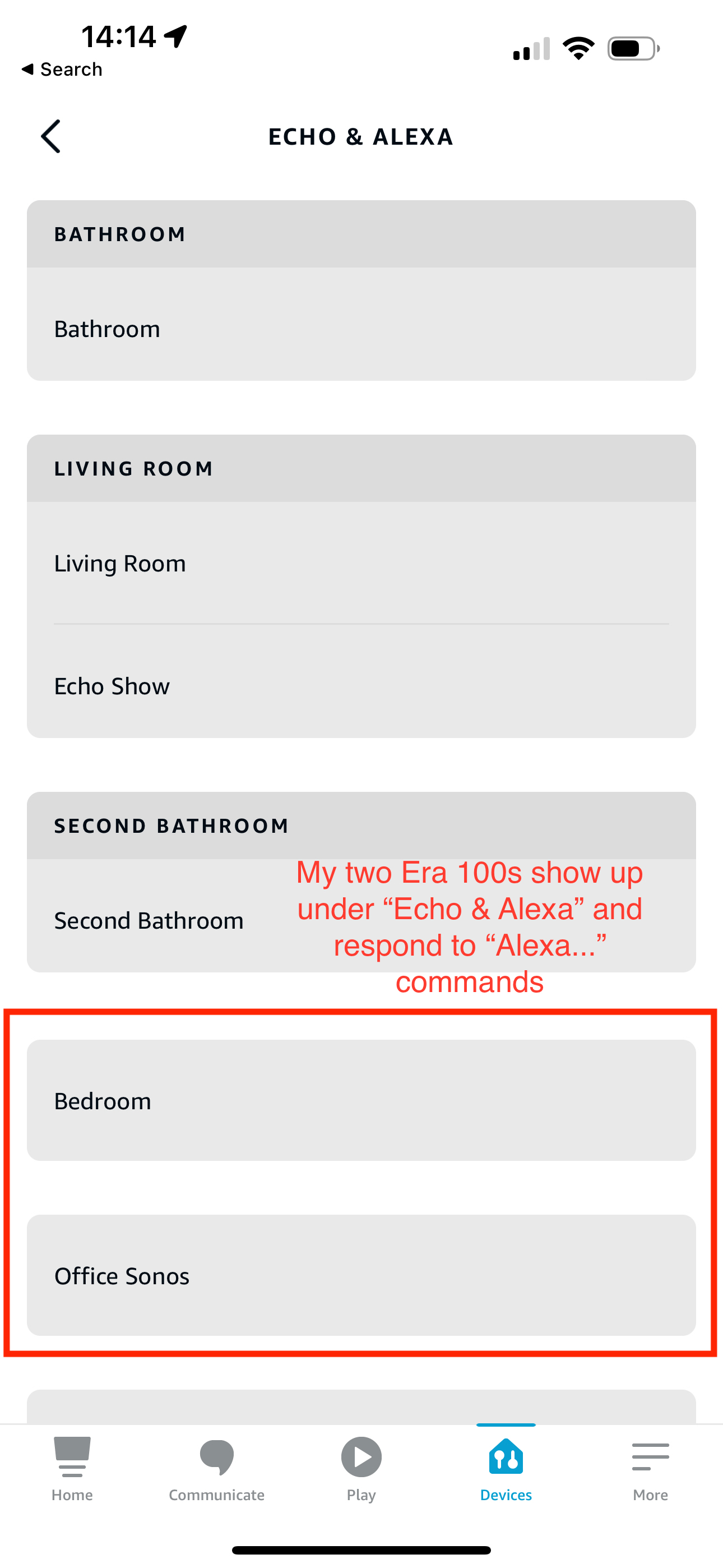
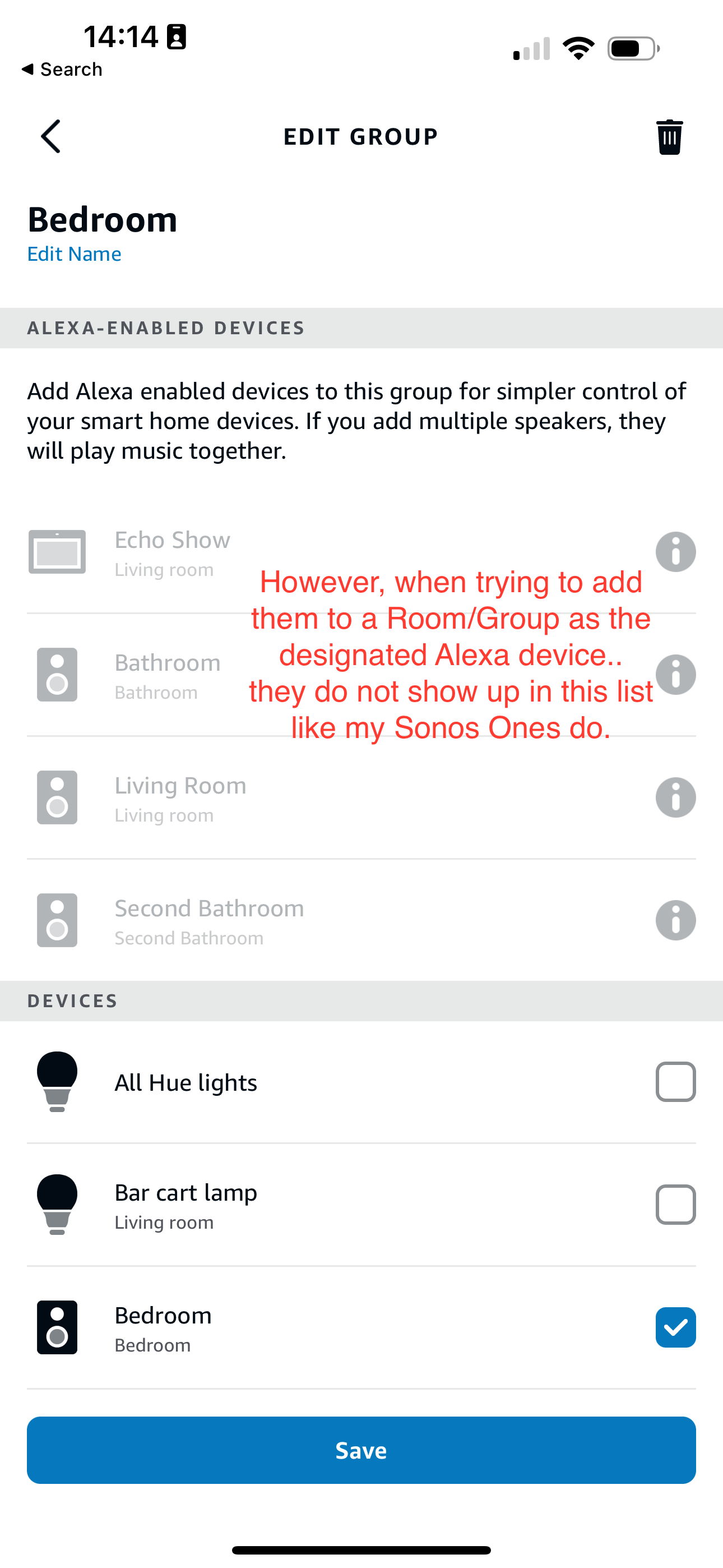
What’s weird is my Era 100s will show up under the Echo & Alexa devices section in the Alexa app, but they do not show up under Alexa-enabled devices when editing a room/group (see attached screenshots).

I’ve reached out to Alexa support and they were largely unhelpful, they claimed that from their resources Alexa isn’t supported on the Sonos Era 100 (maybe their documentation hasn’t been updated since this is a brand new product?). So they left the conversation there even after showing them that Sonos clearly states Alexa built-in support for the Era 100.

Has anyone else experienced this issue? Seems like a bug in the Alexa app, and their support team is unwilling to report the issue up their chain.
 

This topic has been closed for further comments. You can use the search bar to find a similar topic, or create a new one by clicking Create Topic at the top of the page.
Pinned Reply By Corry P

Hi Everyone

If you are still experiencing this issue (which we believed had stopped happening outside of Germany) please submit a support diagnostic and post the given number along with a screenshot of the Alexa app showing a lack of Era units under “Alexa-enabled Devices”, as above. Thank you.

102 replies

Enthusiast I
March 28, 2023

Alexa is broken after the version 15.2 app update. Doesn't work on my Beam.

UKMedia
March 28, 2023

Alexa is broken after the version 15.2 app update. Doesn't work on my Beam.

Please first disable then enable the Sonos skill in the Alexa App.  If the problem persists then have a look at my article: Tips & Tricks - Resolving random issues impacting Sonos devices.. | Sonos Community

Remember: Sometimes Red Wine helps :)
UKMedia
March 28, 2023

Today I’ve upgraded my two Sonos Ones with Sonos Era 100s. After adding Alexa to the speakers, I tried to go into the Alexa app to associate them with their respective rooms. I’m able to add them as the room speaker, but I am unable to set them as the Alexa device for that room (allowing for room-specific commands like “Alexa, turn off the lights”, etc).

What’s weird is my Era 100s will show up under the Echo & Alexa devices section in the Alexa app, but they do not show up under Alexa-enabled devices when editing a room/group (see attached screenshots).

I’ve reached out to Alexa support and they were largely unhelpful, they claimed that from their resources Alexa isn’t supported on the Sonos Era 100 (maybe their documentation hasn’t been updated since this is a brand new product?). So they left the conversation there even after showing them that Sonos clearly states Alexa built-in support for the Era 100.

Has anyone else experienced this issue? Seems like a bug in the Alexa app, and their support team is unwilling to report the issue up their chain.


Can you open the Sonos App>Settings>Services & Voice>Amazon Alexa and ensure that your two new Era 100’s are shown as enabled.  If they are not in the list then please select + Add to Another Product.

Remember: Sometimes Red Wine helps :)
Enthusiast I
March 28, 2023

Alexa is broken after the version 15.2 app update. Doesn't work on my Beam.

Please first disable then enable the Sonos skill in the Alexa App.  If the problem persists then have a look at my article: Tips & Tricks - Resolving random issues impacting Sonos devices.. | Sonos Community


This hasn't helped and it's actually worse now because I can't reconnect my Beam to Alexa (see screenshot). Why is Sonos so unreliable?


Enthusiast I
March 28, 2023


Enthusiast I
March 28, 2023


Finally connected but Alexa and all music services are inoperable in the Sonos app with version 15.2…


Why do we need a computer degree to operate Sonos??

Lyricist I
March 28, 2023

Today I’ve upgraded my two Sonos Ones with Sonos Era 100s. After adding Alexa to the speakers, I tried to go into the Alexa app to associate them with their respective rooms. I’m able to add them as the room speaker, but I am unable to set them as the Alexa device for that room (allowing for room-specific commands like “Alexa, turn off the lights”, etc).

What’s weird is my Era 100s will show up under the Echo & Alexa devices section in the Alexa app, but they do not show up under Alexa-enabled devices when editing a room/group (see attached screenshots).

I’ve reached out to Alexa support and they were largely unhelpful, they claimed that from their resources Alexa isn’t supported on the Sonos Era 100 (maybe their documentation hasn’t been updated since this is a brand new product?). So they left the conversation there even after showing them that Sonos clearly states Alexa built-in support for the Era 100.

Has anyone else experienced this issue? Seems like a bug in the Alexa app, and their support team is unwilling to report the issue up their chain.


Having the exact same issue here! Received new Era speakers today, had Ones before. Removed Sonos skill in Alexa, deleted all Sonos devices, re-enrolled everything, but didn’t help. My remaining Sonos One can be added to a room, all new Era speakers cannot.


If anyone has a solution for this, highly appreciated!

Lyricist I
March 29, 2023

I sat through 35 mins on to Sonos support. Whilst patient, utterly useless advice - deleted all skills, started from scratch twice and it just doesn’t work. 

Pretty poor releasing a product that clearly doesn’t do what it is supposed to do. Although, I don’t doubt  that Amazon also have their grubby mitts over not making this work either. 

Ideas welcome especially if it doesn’t involve deleting everything and starting again….again!

UKMedia
March 30, 2023

Alexa is broken after the version 15.2 app update. Doesn't work on my Beam.

Please first disable then enable the Sonos skill in the Alexa App.  If the problem persists then have a look at my article: Tips & Tricks - Resolving random issues impacting Sonos devices.. | Sonos Community


This hasn't helped and it's actually worse now because I can't reconnect my Beam to Alexa (see screenshot). Why is Sonos so unreliable?


Did you follow both the skill and the steps within the article linked?  (At this stage, we don’t know if this is a Sonos or Amazon issue, from the description you’ve described.)

Remember: Sometimes Red Wine helps :)
Avid Contributor III
March 30, 2023

Hi

The Era 100 are wonderful……….Alexa not supported is rubbish, it is.   You are correct. Had more or less the same problem. Upgraded my Sonos Ones first generation to a pair of Era 100.  Could assign them to the room however Alexa would not play game.  I changed the room name I was using on my previous Sonos ones and the problem was sorted.