
Contributor I
October 23, 2017

Sonos One doesn't work with Hue?

  • October 23, 2017
  • 34 replies
  • 18407 views
According to Amazon that's the case.

So i did a chat with Amazon support since the Sonos One is not finding my Phillips Hue lights (which work fine with the Dot)...
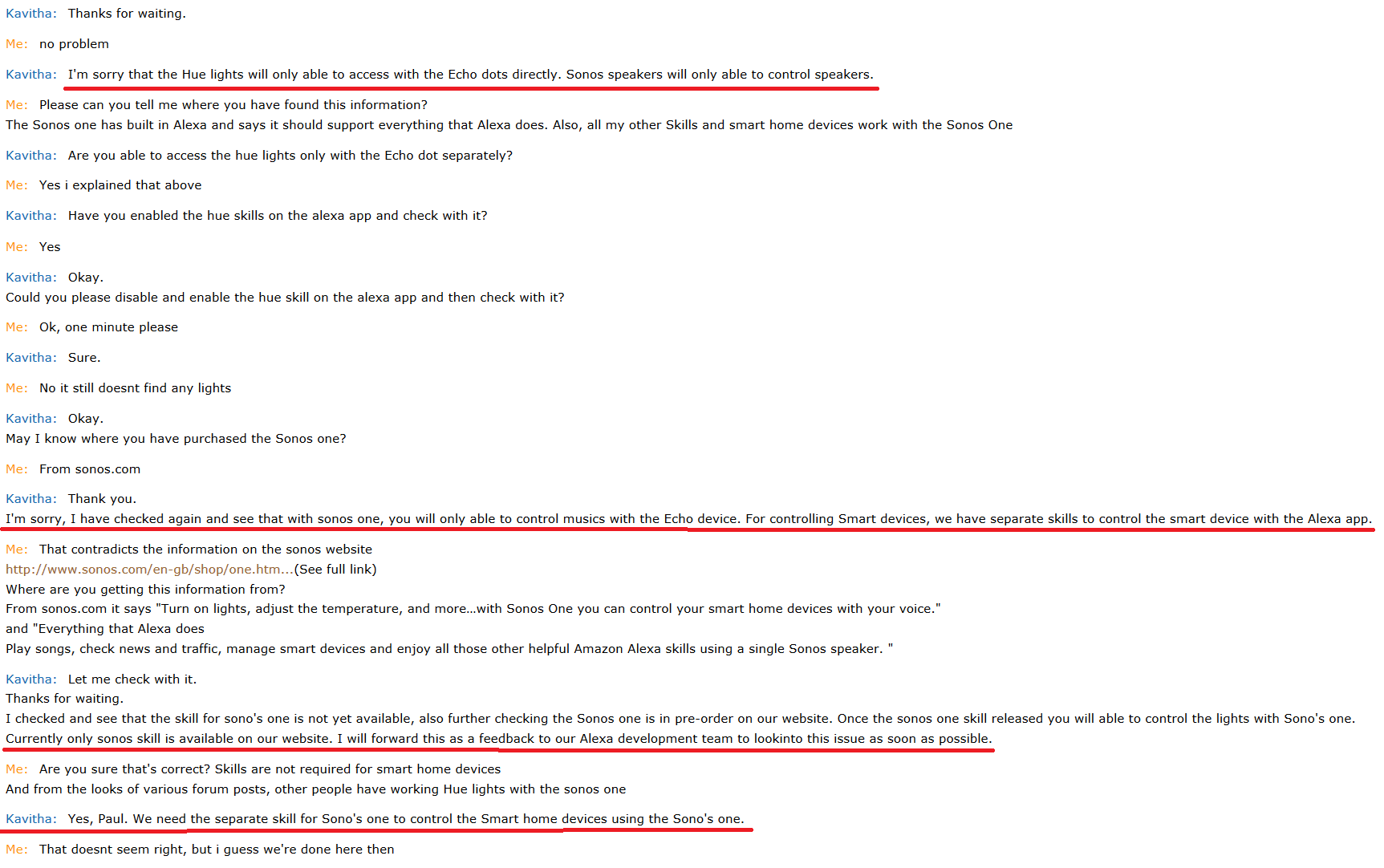


Can someone from Sonos weigh in on this? If i can't entirely replace my Dot with the Sonos One then it's going to get sent back.

Quite simply my Sonos One doesn't find my hue lights, but if i plug the Dot back in it disovers them fine, and they can be controlled via the One. If i unplug the Dot the lights become unreachable. All other smart home devices are ok.

I don't want to make this post too wordy, but i've done all the troubleshooting i can think of, inculding removing and re-adding voice services which i saw in another post. I have removed the Dot from my Alexa account, leaving just the One, still no joy.

My lights are using the v1 Hue Bridge in case that matters

Thanks
This topic has been closed for further comments. You can use the search bar to find a similar topic, or create a new one by clicking Create Topic at the top of the page.

34 replies

jfranche
Enthusiast I
October 28, 2017
My hue lights work well with the Sonos one. I do have the 2nd gen hue bridge, not sure if that matters.
AjTrek1
October 28, 2017
My hue lights work well with the Sonos one. I do have the 2nd gen hue bridge, not sure if that matters.

Are you using a Dot or other Echo device in conjunction with the Play One to control your lights?
Together Everyone Achieves More = T.E.A.M.
AjTrek1
October 28, 2017
Can someone please clarify if the Sonos One will control lights without having a Dot or Echo as a go between. As of now I can only control lights connected via a Hue Bridge (2nd Gen) by having my Echo Dot as a go between. Not a big deal but some answers in this post seem to indicate that a Dot is not needed with the Sonos One. Thanks!
Together Everyone Achieves More = T.E.A.M.
Ryan S
Retired Sonos Staff
October 30, 2017
Hey Aj, a couple others in this thread have confirmed the Sonos One working with the Hue lights through that hub. The only potential concern is that with the v1 Hue Bridge there might be trouble. I'm looking into that with the team, but from what we've seen it shouldn't be an issue.

Just a general note, if you're having issues discovering devices, you can also try discovering using a mobile device on the network running an Amazon App, the Amazon Music app has Alexa built in, you could use that to discover devices.
Mark good posts by pressing the like button, and select the best answer on questions you've asked to help others find solutions.
AjTrek1
October 31, 2017
Hey Aj, a couple others in this thread have confirmed the Sonos One working with the Hue lights through that hub. The only potential concern is that with the v1 Hue Bridge there might be trouble. I'm looking into that with the team, but from what we've seen it shouldn't be an issue.

Just a general note, if you're having issues discovering devices, you can also try discovering using a mobile device on the network running an Amazon App, the Amazon Music app has Alexa built in, you could use that to discover devices.


Thanks Ryan

I figured out that I needed to disable the Hue skill which essentially delinks it and then re-enable the skill which required me to sign back into my Hue account and go through discovery mode again. To me that was the same as doing a reset to clean out the cache (erase everything) and start with a clean slate. So just in case someone else runs into a similar issue I can definitely say that an Echo device is not required as a go between or bridge between the Sonos One and the Hue Bridge v2. The Sonos One with Alexa will find the Hue Bridge straight ahead. Thanks again for responding and offering your assistance. 🆒
Together Everyone Achieves More = T.E.A.M.
Lyricist I
December 30, 2017
I had this same issue and just corrected it by removing the light bulb that was giving me issues on my Sonos One from the Hue app and re-adding it
Lyricist I
January 13, 2018
As I put a decent amount of time and nerves into fixing this issue I want to let you how it worked out for me in the end.

Problem was: Alexa App/Sonos One couldn't dicover my Hue Bridge V2 (which I actually only bought because I thought the V1 one was the problem in the first place).

Strange was: Bridge and bulbs worked fine with the Hue App on iOS as well as with Siri/Homekit.

After trying out every suggestion I found on the internet, updating every imaginable piece of firmware (router, bulbs, you name it ...), messing around with port forwarding and deleting/delinking/reinstalling/reconnecting almost every app and skill involved I almost gave up.

Although the bridge was working fine with the Hue App and also showed up as connected in my account on the Hue website I somehow decided to delete it. After reconnecting the bridge with my account there is way more Information about my bridge available on the website AND it was discovered by the Alexa App in an instant!

Glad if this helps anyone else.
Lyricist III
March 2, 2018
Wow. Months later and I am having the same problem with my v1. I can't tell from here if I am supposed to be able to use this or if I need to buy a new Hue hub. It's too bad Sonos doesn't seem to monitor/help people on here. Not impressed with the level of support being provided for these products.
Chris
Lead Maestro
March 2, 2018
Hue lights work fine on my Sonos One. You probably need to look at how Alexa and Hue are communicating (search internet for Hue and Alexa issues) to solve problem. It shouldn't be an issue with Sonos - it should be an Alexa issue and your setup. V1 bridge or V2 bridge doesn't matter. As you can see from the 1st reply above - that person to found it to be an Alexa/Hue not setup properly. Remove Sonos from the equation and focus on the Alexa app and Hue.
Respect the Queue (2)Move (3)Beam (1) Era100 (2)ARC (1)SonosOne (1)Playbar (4)Play5 (4)Play1 (3)Play3 (1)Port (2)Connect (1) Roam (2) Ace (1)Connect:Amp (4)Sonos Amp (1)Sub + (9) Echo + Smartthings; (2)Play)
Lyricist III
March 2, 2018
For the amount of money I've spent on Sonos products, I shouldn't have to spend hours trying to fix things. I've followed the directions and they haven't worked. Getting technical support is proving to be a nightmare.