

cd6445
Enthusiast II
Sep 25, 2018 6:26 AM UTC
Answered

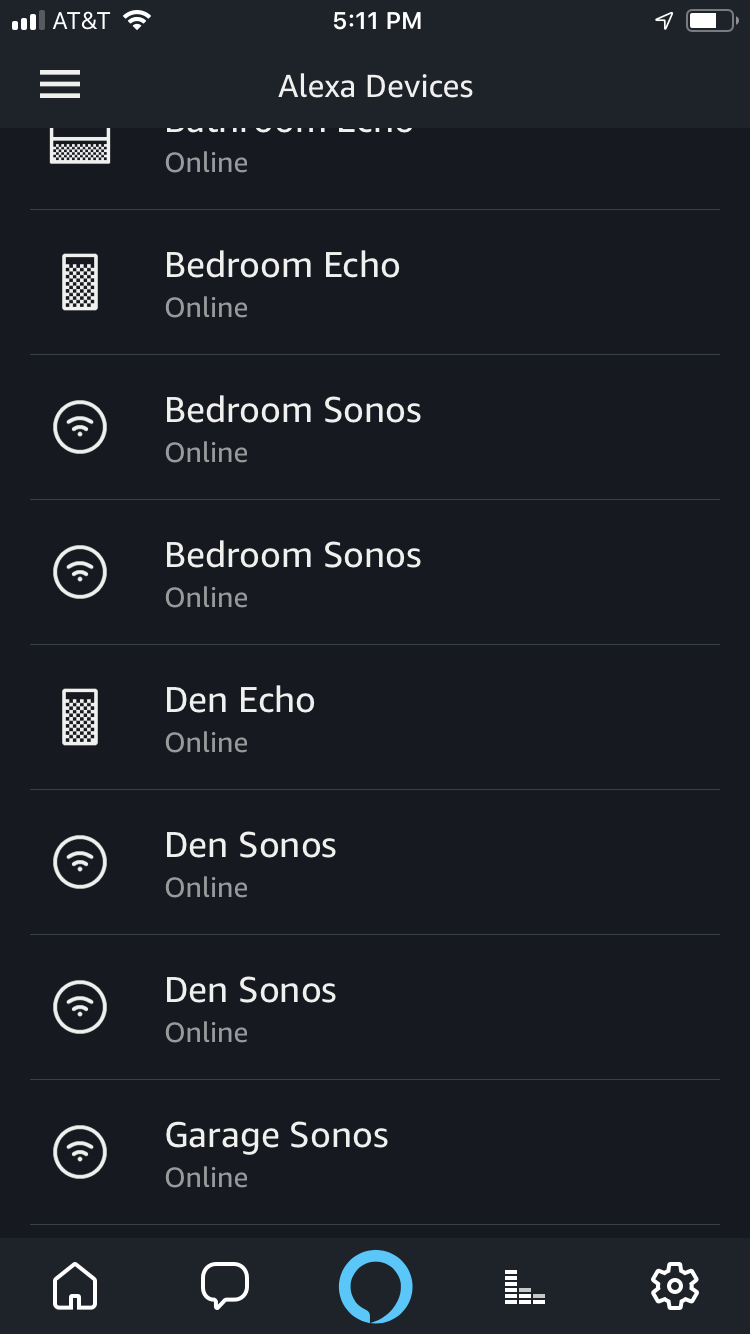
Multiple instances of the same Sonos device in Alexa app

I found something exploring through the Alexa app that looks odd. I show 2 instances of the same device name but with different serial numbers in the Alexa app as shown in the pic. Is this normal? it doesn't show up like this on the Amazon content and devices list as only a single device is shown.

    This topic has been closed for further comments. You can use the search bar to find a similar topic, or create a new one by clicking Create Topic at the top of the page.
    Ken_Griffiths
    Sep 27, 2018 10:10 AM UTC
    Dale63,

    In addition to removing the devices and the Sonos Skill, like you have done previously, go online to your Amazon Account and remove your 'sharing agreement' with Sonos ... you will find that/those in your Amazon Account settings/'login with Amazon' section. Also make sure you remove any Sonos devices in the online Amazon 'Manage Content and Devices' area and then remove any elements of the Sonos devices in your Alexa App. When you then next rescan with Alexa, the Sonos devices should not reappear.

    I think that should work (hopefully) to remove all your Sonos devices from the Alexa App.

    8 replies

    bockersjv
    Local Superstar
    Sep 25, 2018 8:34 AM UTC
    You could just delete them in Alexa and then discover again.
    Translate
    cd6445
    cd6445Author
    Enthusiast II
    Sep 25, 2018 11:02 AM UTC
    yep did that. I also disabled the skill for 3 days to maybe purge the system and re-enabled. the result was still the same.
    Translate
    melvimbe
    Sep 25, 2018 12:22 PM UTC
    That's strange. What does your network look like? Do you have multiple routers?
    Translate
    Danny
    cd6445
    cd6445Author
    Enthusiast II
    Sep 25, 2018 12:46 PM UTC
    Velop 3 node hardwired backhaul bypassing mesh wifi. All 7 devices are Mac/ip DHCP reservation and hard wired. The only place it shows multiples are in the Alexa app. The Amazon content and devices shows one instance, Alexa Devices show one instance, Apple home app shows one instance, but the Alexa>settings>devices is displaying multiple same devices. Things that make you go.... hmmmmm :?
    Translate
    cd6445
    cd6445Author
    Enthusiast II
    Sep 25, 2018 1:22 PM UTC
    I just went into the Alexa app and selected "Forget" on all the Sonos Devices and disabled the skill. Then I ran discovery and one of the instances of the duplicates disappeared but one remains on all devices. The serial number that no longer show represents the devices that I have. The ones that remain do not appear to reference my devices SN at all. And I see no option to remove the remains devices anywhere. This is after I forgot, disabled, and discovered which removed one duplicate device.

    Translate
    UKMedia
    Sep 27, 2018 8:17 AM UTC
    Hi

    All Sonos Alexa devices will be shown twice in the Alexa App>Settings>Devices - One for the Alexa component and again for the Sonos hardware. (This is to enable Sonos to have different settings for each component in the future, although at present they are the same for both) They should only be listed once in the Alexa App>Smart Home>Devices. Can you confirm which part of the Alexa App you viewing?
    Translate
    Remember: Sometimes Red Wine helps :)
    Ken_Griffiths
    Sep 27, 2018 10:10 AM UTC
    Dale63,

    In addition to removing the devices and the Sonos Skill, like you have done previously, go online to your Amazon Account and remove your 'sharing agreement' with Sonos ... you will find that/those in your Amazon Account settings/'login with Amazon' section. Also make sure you remove any Sonos devices in the online Amazon 'Manage Content and Devices' area and then remove any elements of the Sonos devices in your Alexa App. When you then next rescan with Alexa, the Sonos devices should not reappear.

    I think that should work (hopefully) to remove all your Sonos devices from the Alexa App.
    Translate
    cd6445
    cd6445Author
    Enthusiast II
    Sep 27, 2018 11:33 AM UTC
    perfect! That was the missing link. Thanks for the assistance
    Translate