
Contributor I
November 20, 2017
Answered

"Discovery Failed" when trying to add devices to Alexa with Sonos One

  • November 20, 2017
  • 26 replies
  • 19500 views
I get a "Discovery Failed" message when trying to discover devices through my new Sonos One with Alexa. I've followed the following steps:

1. Set up Sonos One and added voice control with Alexa. Alexa responds to commands and knows who I am
2. Set up the Alexa app, connected it to my account
3. Enabled the smart skill for Sonos

I tried both asking Alexas to discover devices ("Alexa, discover devices") and trying to locate devices through the Alexa app but I get a very quick "Discovery Failed" response (see image)
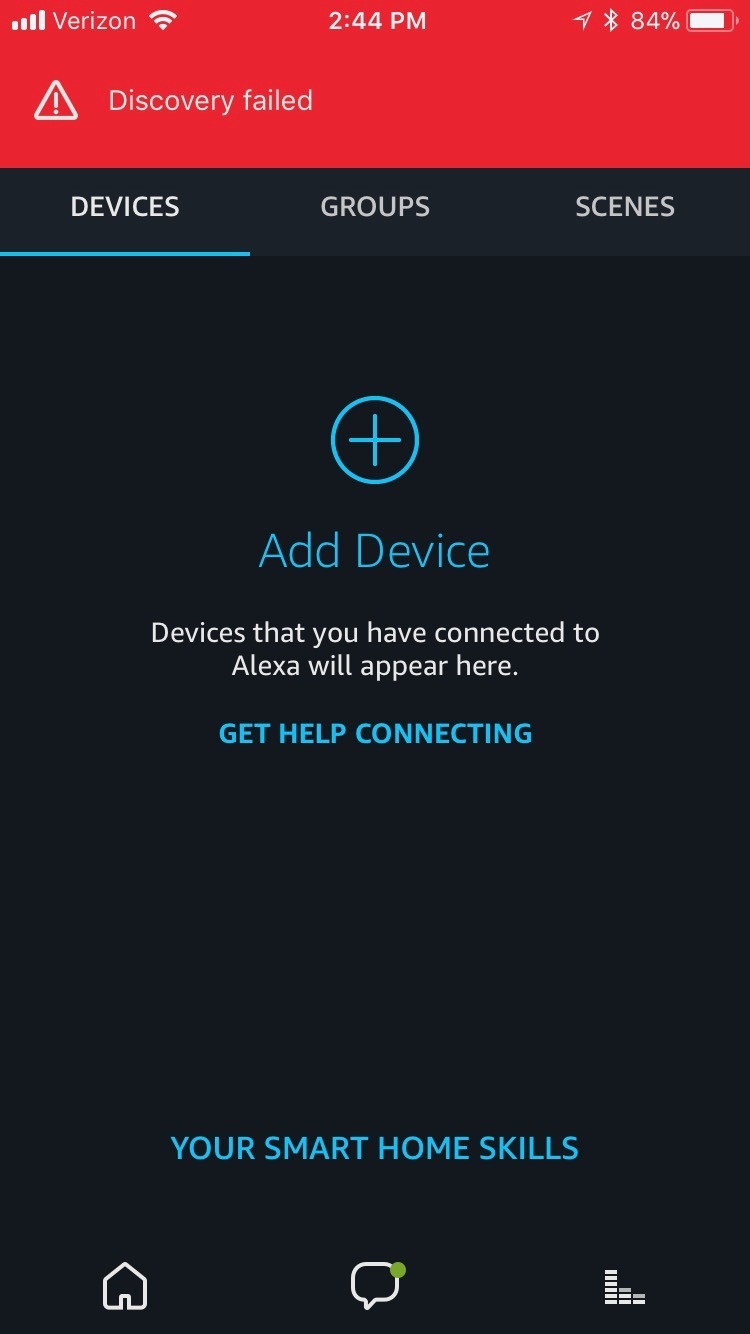


For what it's worth, I've also tried to connect my Nest thermostat by enabling that skill and connecting my account, but that device also cannot be discovered.

Also, I've tried to uninstall my apps and go through this entire process again. That also does not work. Please help.
This topic has been closed for further comments. You can use the search bar to find a similar topic, or create a new one by clicking Create Topic at the top of the page.
Best answer by goldnotsilver
Solution for Mac ecosystems, and multiple Amazon accounts: After deleting ALL Sonos and Alexa apps previously installed on my handheld devices to ensure there was no conflict between devices, I used the Sonos app on my Mac (Download this from Sonos direct, it's not on the App Store.) I left Alexa app on my iPad.

1. I had a long forgotten Amazon account that Alexa was defaulting to, even though my Prime membership is on a new account with a different email different from what I first entered in Alexa. (Hubs had set up new account for Christmas shopping some years ago.) If you get the 'no devices found' error, check for old Amazon accounts. Pick the oldest one. I'm betting Amazon wants you to use that one. Amazon, this is critical information to share.

2. In a web browser, I changed my old Amazon account passwords. (If you don't have a useraccount and password book, buy one today. It'll save your bacon on a regular basis. Who can remember dozens of them? Not me.)

3. In Alexa I linked the old Amazon account. Also added Music Prime--it's fab.

4. In Alexa, Enabled Skills for Sonos and Nest thermostat.

5. Immediately my Sonos products and Nest showed on Alexa's Smart Home-->Devices tab. No need to discover devices.

6. Enabled sharing on the Sonos app on my iMac, with the help of Google. I'd write instructions for this, but breakfast's on.

Have been enjoying the superb Sonos sound since I wrangled the Amazon account confusion. We're wanting more Sonos One units for around the house. Will I buy more Alexa enabled stuff? Not just yet. Let's see the reviews on the Schlage and LED bulb reviews first.

For those of you who have helped, thank you.

26 replies

UKMedia
December 4, 2017
I asked 'Alexa, what skills are enabled?' The only skill the Sonos One can find is 'So Near' which is a reminder of where you put something. This isn't a problem with the app--I've checked my app from iMac, Samsung Tablet, iPhone, and iPad (all of which are updated) and all show the Nest and Sonos skills as active. I unplugged the Sonos One. This is a problem with the Sonos One or how it integrates with the Alexa app.

Just a few more things to check... Do you have multiple Amazon accounts? It's advisable to have all Alexa devices and your Sonos account linked to the same Amazon account? Also, make sure that you aren't logged on to any other Amazon account for music in a different app.

If you access your Alex app>Smart Home>Devices does it list your Sonos One?

As a last resort did you follow these steps?

Hi goetzum

A couple of things to check first:

1/ Can you make sure that you are not logged on to any other Amazon account in ANY other app on devices logged in via your email address - this can confuse Alexa with regard to the linking of your Sonos account to your Amazon account;
2/ Make sure that if you have multiple Amazon accounts that you've Enabled the Sonos skill in the Amazon account that you've linked to your Sonos account.

If the problem persists after these steps then please follow the steps I've listed in the Answer in this post which will reset Voice Control and rerun the Set-Up.

https://en.community.sonos.com/amazon-alexa-and-sonos-229102/sonos-one-not-responding-to-alexa-comands-6793239

Let us know how you get on.
Remember: Sometimes Red Wine helps :)
Lyricist II
December 10, 2017
Hi,

I also got this message ('discovery failed' a lot on all of my devices (phone, tablet, pc). It was because I tried to enable Alexa in a country which is not yet supported. I changed the location of my sonos account and now everything works.
Lyricist III
December 10, 2017
Solution for Mac ecosystems, and multiple Amazon accounts: After deleting ALL Sonos and Alexa apps previously installed on my handheld devices to ensure there was no conflict between devices, I used the Sonos app on my Mac (Download this from Sonos direct, it's not on the App Store.) I left Alexa app on my iPad.

1. I had a long forgotten Amazon account that Alexa was defaulting to, even though my Prime membership is on a new account with a different email different from what I first entered in Alexa. (Hubs had set up new account for Christmas shopping some years ago.) If you get the 'no devices found' error, check for old Amazon accounts. Pick the oldest one. I'm betting Amazon wants you to use that one. Amazon, this is critical information to share.

2. In a web browser, I changed my old Amazon account passwords. (If you don't have a useraccount and password book, buy one today. It'll save your bacon on a regular basis. Who can remember dozens of them? Not me.)

3. In Alexa I linked the old Amazon account. Also added Music Prime--it's fab.

4. In Alexa, Enabled Skills for Sonos and Nest thermostat.

5. Immediately my Sonos products and Nest showed on Alexa's Smart Home-->Devices tab. No need to discover devices.

6. Enabled sharing on the Sonos app on my iMac, with the help of Google. I'd write instructions for this, but breakfast's on.

Have been enjoying the superb Sonos sound since I wrangled the Amazon account confusion. We're wanting more Sonos One units for around the house. Will I buy more Alexa enabled stuff? Not just yet. Let's see the reviews on the Schlage and LED bulb reviews first.

For those of you who have helped, thank you.
Lyricist I
December 30, 2017
My solution to failed discovery of my Sonos Play5 speaker was much simpler than many of the possible solutions given previously. When I had initially set up my Alexa app on my iPad and iPhone I had used my email rather than my mobile number. Once I logged out and repeated the initial setup using my mobile number instead of my email, the discovery of my sonos worked just fine. Hope this works for some of you!
Lyricist I
December 31, 2017
Hi everyone with the same frustrating issue as I HAD!!!

Discovery Failed- so I spent just over 7 hours today resetting, deleting apps, enabling, disabling skills and several factory resets of the 'one' trying to get my sons sonos set up. I've got 2 others in the house which were relatively simple to set up but his has been a complete nightmare! The difference is that my sons phone on which we set this account up is an android. He was so irritated with me messing with his phone all day that I decided to give up and look for the answer (for the umpteenth time) on my iPad. I just randomly decided to log onto his sonos account from the iPad and try the set up process. Amazingly once I had signed out of my own amazon account (this is very important) the Alexa app was able to discover his device!!!! No more 'discovery failed' messages- and now it is up and running perfectly. Whilst I can't be certain I'm pretty sure all of my problems were to do with trying to set this up from his android phone rather than an iOS device- so if anyone else is having this problem- give it a try from an iPad or iPhone- it worked for me! I can't believe how frustrating this has been- but we got there in the end. Good luck!!
Lyricist I
January 25, 2018
Guys I had the same issues. I was having trouble connecting to my August Smartlock and even connecting to skills like Spotify. Very odd! I'd ask Alexa to do it and it said it couldn't see any of my devices or skills added. I eventually went to SETTINGS > SIGN OUT. I went through the whole setup again with setting up Alexa (wifi, bluetooth, etc) and magically it could see everything and do everything. Hope this helps.