
Contributor I
November 20, 2017
Answered

"Discovery Failed" when trying to add devices to Alexa with Sonos One

  • November 20, 2017
  • 26 replies
  • 19500 views
I get a "Discovery Failed" message when trying to discover devices through my new Sonos One with Alexa. I've followed the following steps:

1. Set up Sonos One and added voice control with Alexa. Alexa responds to commands and knows who I am
2. Set up the Alexa app, connected it to my account
3. Enabled the smart skill for Sonos

I tried both asking Alexas to discover devices ("Alexa, discover devices") and trying to locate devices through the Alexa app but I get a very quick "Discovery Failed" response (see image)
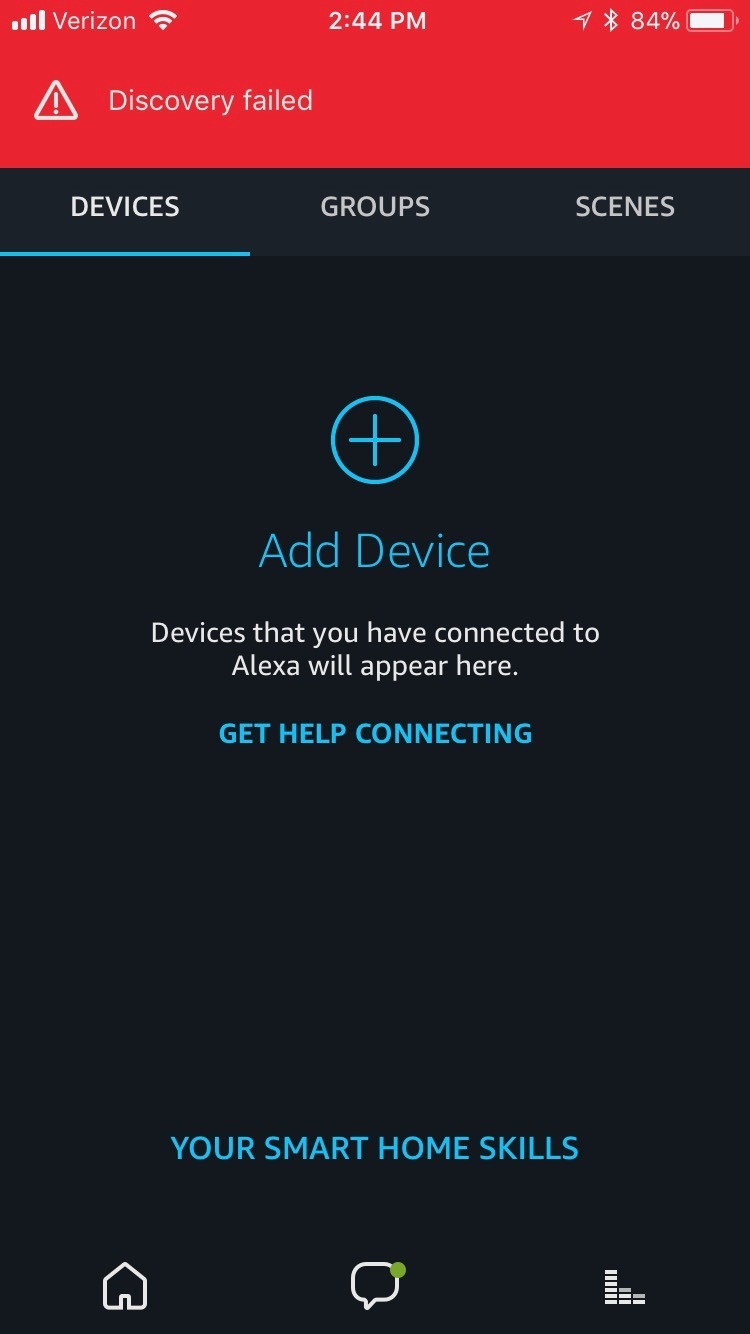


For what it's worth, I've also tried to connect my Nest thermostat by enabling that skill and connecting my account, but that device also cannot be discovered.

Also, I've tried to uninstall my apps and go through this entire process again. That also does not work. Please help.
This topic has been closed for further comments. You can use the search bar to find a similar topic, or create a new one by clicking Create Topic at the top of the page.
Best answer by goldnotsilver
Solution for Mac ecosystems, and multiple Amazon accounts: After deleting ALL Sonos and Alexa apps previously installed on my handheld devices to ensure there was no conflict between devices, I used the Sonos app on my Mac (Download this from Sonos direct, it's not on the App Store.) I left Alexa app on my iPad.

1. I had a long forgotten Amazon account that Alexa was defaulting to, even though my Prime membership is on a new account with a different email different from what I first entered in Alexa. (Hubs had set up new account for Christmas shopping some years ago.) If you get the 'no devices found' error, check for old Amazon accounts. Pick the oldest one. I'm betting Amazon wants you to use that one. Amazon, this is critical information to share.

2. In a web browser, I changed my old Amazon account passwords. (If you don't have a useraccount and password book, buy one today. It'll save your bacon on a regular basis. Who can remember dozens of them? Not me.)

3. In Alexa I linked the old Amazon account. Also added Music Prime--it's fab.

4. In Alexa, Enabled Skills for Sonos and Nest thermostat.

5. Immediately my Sonos products and Nest showed on Alexa's Smart Home-->Devices tab. No need to discover devices.

6. Enabled sharing on the Sonos app on my iMac, with the help of Google. I'd write instructions for this, but breakfast's on.

Have been enjoying the superb Sonos sound since I wrangled the Amazon account confusion. We're wanting more Sonos One units for around the house. Will I buy more Alexa enabled stuff? Not just yet. Let's see the reviews on the Schlage and LED bulb reviews first.

For those of you who have helped, thank you.

26 replies

Lyricist III
December 3, 2017
Discovery failed for me as well. Immediately. Sonos skill IS enabled in Alexa. Question--do my Amazon, Alexa, and Sonos email and passwords have to be identical? So far not at all impressed.
UKMedia
December 4, 2017
I've just purchased a Sonos One and have an existing Gen 1 Alexa Echo device. All my devices (Hue Lights (Gen 1 Bridge) and Nest (Gen 3)) was fine whilst I had my Alexa Echo Connected.
Once I set up my new Sonos One configured and working, I decided to switch off my Echo, after a couple of hours I noticed that simple commands to Sonos One to "switch off my lights" she couldn't find any of the Hue Lights. I tested if she could find my Nest Thermostat and that was fine. With Echo off, I re-discovered all the devices in the house with Sonos and could only detect the Nest. I had to switch my Echo back on and rediscover all my devices and now I'm running Echo and Sonos One just control my lights.
I wonder if the Sonos One can't detect the ZigBee protocol or I need to upgrade my Hue Bridge to latest Square one?


Try using https://alexa.amazon.co.uk or .com from a PC and select Smart Home>Devices>Discover
Remember: Sometimes Red Wine helps :)
UKMedia
December 4, 2017
Discovery failed for me as well. Immediately. Sonos skill IS enabled in Alexa. Question--do my Amazon, Alexa, and Sonos email and passwords have to be identical? So far not at all impressed.

No, I have different email addresses for Alexa and Sonos. I've mentioned this before but there are differences between the iOS & Android app vs. the PC app. Discovery appears more dependable on the PC version, in my experience: https://alexa.amazon.co.uk or .com
Remember: Sometimes Red Wine helps :)
Lyricist III
December 4, 2017
Discovery failed for me as well. Immediately. Sonos skill IS enabled in Alexa. Question--do my Amazon, Alexa, and Sonos email and passwords have to be identical? So far not at all impressed.

No, I have different email addresses for Alexa and Sonos. I've mentioned this before but there are differences between the iOS & Android app vs. the PC app. Discovery appears more dependable on the PC version, in my experience: https://alexa.amazon.co.uk or .com
The Sonos One boxes states "Made for IOS". Touts its integration with iPod, iPhone, and iPad. And 'Works with Android". The apps on iPhone, iPad, and Mac are operating as expected. Sonos doesn't work well with Alexa. It has nothing to do with the app with which one tries to beg Alexa to find Sonos. I used the app on my iMac, my latest gen iPad Pro, and after a lot of trial and failure, I'm trying the iPhone app next. You're suggesting it's because I don't use Windows?
Lyricist III
December 4, 2017
I have enabled my Nest Thermostat and Sonos skills in Alexa. I ask Alexa to 'Discover Devices'. She tells me to enable the skills. I've reported this glitch. I'm feeling like a beta tester.
UKMedia
December 4, 2017
Discovery failed for me as well. Immediately. Sonos skill IS enabled in Alexa. Question--do my Amazon, Alexa, and Sonos email and passwords have to be identical? So far not at all impressed.

No, I have different email addresses for Alexa and Sonos. I've mentioned this before but there are differences between the iOS & Android app vs. the PC app. Discovery appears more dependable on the PC version, in my experience: https://alexa.amazon.co.uk or .com
The Sonos One boxes states "Made for IOS". Touts its integration with iPod, iPhone, and iPad. And 'Works with Android". The apps on iPhone, iPad, and Mac are operating as expected. Sonos doesn't work well with Alexa. It has nothing to do with the app with which one tries to beg Alexa to find Sonos. I used the app on my iMac, my latest gen iPad Pro, and after a lot of trial and failure, I'm trying the iPhone app next. You're suggesting it's because I don't use Windows?


If you don't like the advice that others have fixed problems by using a PC (Windows or MAC) app, then don't follow it!
I have given you some of my time because I like Sonos products and am willing to help others - some appreciation would be nice!

The reality is that the iOS and Android apps are newer both for Sonos and Alexa but in some instances like 'Discover', the PC or MAC version works better for some reason. (e.g. In Alexa, there is no 'Forget All' under Smart Home>Devices in Android or IOS any more but it is still there in the browser version.)
Remember: Sometimes Red Wine helps :)
Lyricist III
December 4, 2017
Thanks for your time. Can I borrow your PC?
UKMedia
December 4, 2017
Thanks for your time. Can I borrow your PC?For a price 🙂 Seriously, I would have thought you can access the version I mentioned on Safari from your MAC, just don't use the App.
Remember: Sometimes Red Wine helps :)
Lyricist III
December 4, 2017
I'm loading the app on my husband's Samsung tablet, since I've already tried iPad, iPhone, and iMac versions of the Sonos and Alexa apps, carefully following instructions. The Alexa app shows that I have Nest Thermostat and Sonos skills enabled. I ask "Alexa, Discover Devices". Immediate reply "I couldn't find any new smart devices."
Lyricist III
December 4, 2017
I asked 'Alexa, what skills are enabled?' The only skill the Sonos One can find is 'So Near' which is a reminder of where you put something. This isn't a problem with the app--I've checked my app from iMac, Samsung Tablet, iPhone, and iPad (all of which are updated) and all show the Nest and Sonos skills as active. I unplugged the Sonos One. This is a problem with the Sonos One or how it integrates with the Alexa app.