
Contributor I
March 21, 2019

Alexa Skill - Amazon Not Connecting to Sonos Website

  • March 21, 2019
  • 18 replies
  • 896 views
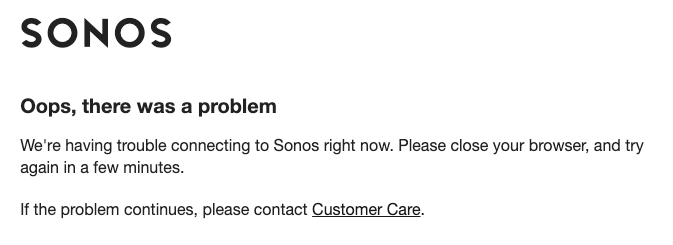
I'm trying to set up the Alexa Sonos Skill, and keep getting the following message. I've waited and tried multiple times to do the skill, and keep getting the same message over and over. I'm logged into my Sonos account, so it's not an issue with Sonos. For some reason, Amazon isn't letting me connect and set up the Alexa Skill. Any ideas?
    This topic has been closed for further comments. You can use the search bar to find a similar topic, or create a new one by clicking Create Topic at the top of the page.

    18 replies

    Smilja
    March 21, 2019
    You need to sign in to Amazon and Sonos with the same email address. Log out of all Amazon apps (including the Alexa app) that are installed on your mobile device, and try afterwards again to authorise the Sonos skill.
    »And the world is like an apple whirling silently in space, Like the circles that you find in the windmills of your mind.« (›Windmills Of Your Mind‹ [1967]. Music by Michel Legrand ; English lyrics written by Alan & Marilyn Bergman)
    Contributor I
    March 21, 2019
    Thanks Smilja - I did those things and am still getting the same message. Thoughts? I did it on my app, and also through the Amazon homepage, and in both instances received the message.
    Smilja
    March 21, 2019
    Please reproduce this behavior, submit a diagnostic and reply here with the confirmation number.
    »And the world is like an apple whirling silently in space, Like the circles that you find in the windmills of your mind.« (›Windmills Of Your Mind‹ [1967]. Music by Michel Legrand ; English lyrics written by Alan & Marilyn Bergman)
    Contributor I
    March 21, 2019
    Okay, thanks. Will do.
    Contributor I
    March 21, 2019
    Quick question - the behavior is happening in the Alexa App when I try to connect with Sonos to activate the Alexa Skill, as part of that process on Amazon. Will the diagnostic capture that behavior within the Alexa app? It appears that the diagnostic captures something from within the Sonos app...
    Keith N
    Sonos Staff
    March 21, 2019
    Hey there, familyuser123. Diagnostic reports will not report on whats going on in the Alexa app. In general, diagnostics show how well your Sonos speakers are connecting to the local network along with a few Sonos specific controller logs.

    That said, if the problem is only when the two (Sonos & Amazon Alexa) attempt to shake hands, it still is something we would likely want to have the support team take a closer look at. At least at that point, we can ensure the Sonos part of the equation is sorted and determine if you need to get in contact with Amazon. As far as I understand, we aren't experiencing any outages with Amazon Alexa at the moment.
    Yes... I'm *that* Keith - u/KeithFromSonos on Reddit
    Contributor I
    March 21, 2019
    Okay, thanks Keith. I'll reach out to the support team so we can figure out where in the process things are breaking down.
    Lyricist II
    March 21, 2019
    I am having this same issue today

    Sonos One was unable to play music via Alexa Voice command
    It would find the track, then say "Sonos is offline"
    Sonos was still able to play music via its App, and Alexa was still able to answer questions and otherwise function normally.

    I disabled the Alexa skill to see if I could re-establish the connection, but now when I try to re-add it, the Sonos API web page will not proceed because it stalls on a page that says:

    Register your speakers
    You need to link speakers to your Sonos account before you can add this skill


    Speakers are clearly in the app, and when I check the Sonos account on this web site the speakers are there too.

    Choosing the "I've fixed the problem" link in the API page just sends it into a loop.
    Choosing the "Go to the Sonos app" button is not helpful either.
    Smilja
    March 22, 2019
    Register your speakers
    You need to link speakers to your Sonos account before you can add this skill

    In the Sonos app, try entering the 'More --> Settings --> Room Settings'; if this doesn't prompt you to sign into your Sonos account, go to 'More --> Settings --> Account Settings'.
    »And the world is like an apple whirling silently in space, Like the circles that you find in the windmills of your mind.« (›Windmills Of Your Mind‹ [1967]. Music by Michel Legrand ; English lyrics written by Alan & Marilyn Bergman)
    Lyricist I
    April 2, 2019
    Exactly same problem here. Music services stop working via Alexa 1-2 weeks, although speakers (1xBeam + 1xOne) worked ok through the Sonos App. I deactivate Sonos skill on Alexa and when I try to re-activate I get that message while trying to connect to api.sonos.com "Oops, there was a problem". :@

    Any luck here?