
Contributor I
Aug 29, 2024 6:36 AM UTC
Answered

alexa setup

Alexa was working fine, for some reason we factory reset the Sonos one (dont ask me why) and now I cant get alexa to work. I dont have either alexa app or amazon app on my phone, and when I click “sign in” it just immediately says there was an issue and I can try again or cancel. Extremely frustrating 
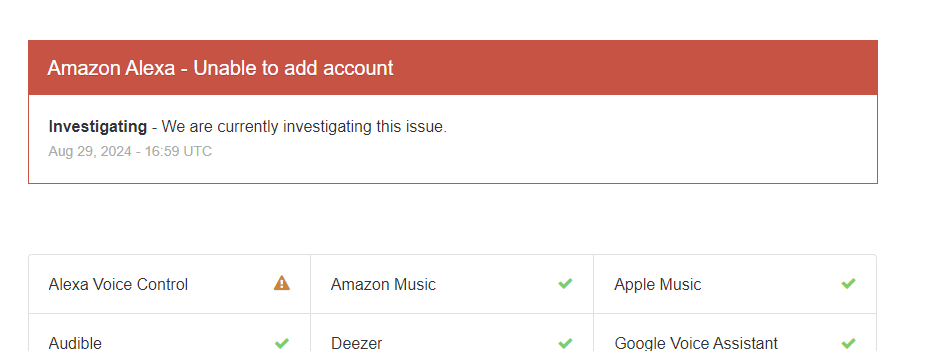
This topic has been closed for further comments. You can use the search bar to find a similar topic, or create a new one by clicking Create Topic at the top of the page.
furacaoprAnswer
Prodigy III
Aug 29, 2024 5:15 PM UTC

5 replies

Senior Virtuoso
Aug 29, 2024 7:36 AM UTC

Alexa was working fine, for some reason we factory reset the Sonos one (dont ask me why) and now I cant get alexa to work. I dont have either alexa app or amazon app on my phone, and when I click “sign in” it just immediately says there was an issue and I can try again or cancel. Extremely frustrating 

First question has to be: having reset your speaker, have you gone through setting it up again on your system? Did you then reinstall Alexa service on the speaker? 

Translate
UKMedia
Aug 29, 2024 8:32 AM UTC

Also, can you open the Sonos App and select the cog wheel in the top right hand corner, then select ‘Manage’.  Scroll down to ‘Voice Assistants’ and check if Amazon Alexa is listed.  If it is, please select it and then select ‘Add to another product’.  Please follow the prompts on the App from there.

If this doesn’t work, or if Amazon Alexa is not listed under ‘Voice Assistants’ above, then please remove the Sonos skill within the Alexa App and try adding Alexa to Sonos again.  Please come back to us if the problem persists.

Edit:

For anyone else reading this post, this is a good example of the reason to not factory reset your device unless recommended! 🤓

Translate
Remember: Sometimes Red Wine helps :)
Contributor I
Aug 29, 2024 4:55 PM UTC

Seems like a load of people are all having the same issue with this. No what you say to do does NOT work. Also, you’re kind of being a d*** with the nerd emoji taunting me that I “reset” it when MAYBE I’m a new owner of said unit and it was sold to me this way. Not even gonna bother with it, forums are all correct in that your company  does not give a *  about the issue, reaffirmed by your * attitude.

*Moderator Note: Modified in accordance with the Community Code of Conduct.*

Translate
UKMedia
Aug 29, 2024 4:59 PM UTC

Seems like a load of people are all having the same issue with this. No what you say to do does NOT work. Also, you’re kind of being a d*** with the nerd emoji taunting me that I “reset” it when MAYBE I’m a new owner of said unit and it was sold to me this way. Not even gonna bother with it, forums are all correct in that your company  does not give a * about the issue, reaffirmed by your * attitude.

*Moderator Note: Modified in accordance with the Community Code of Conduct.*

I'm just a Sonos user, not employed by Sonos. I'm a little confused by your reaction, as I'm just trying to help you resolve your issue. Perhaps, it would be best if you contact Sonos support.

Translate
Remember: Sometimes Red Wine helps :)
furacaoprAnswer
Prodigy III
Aug 29, 2024 5:15 PM UTC