
Contributor I
May 10, 2019

Wired speaker drops out in Mixed Mode

I have a Mixed Mode setup with Wired and WiFi connected speakers.I don't use SonosMesh as the WiFi space is so crowded that you can't run a single channel (1,6 or 11) clearly through out the setup.


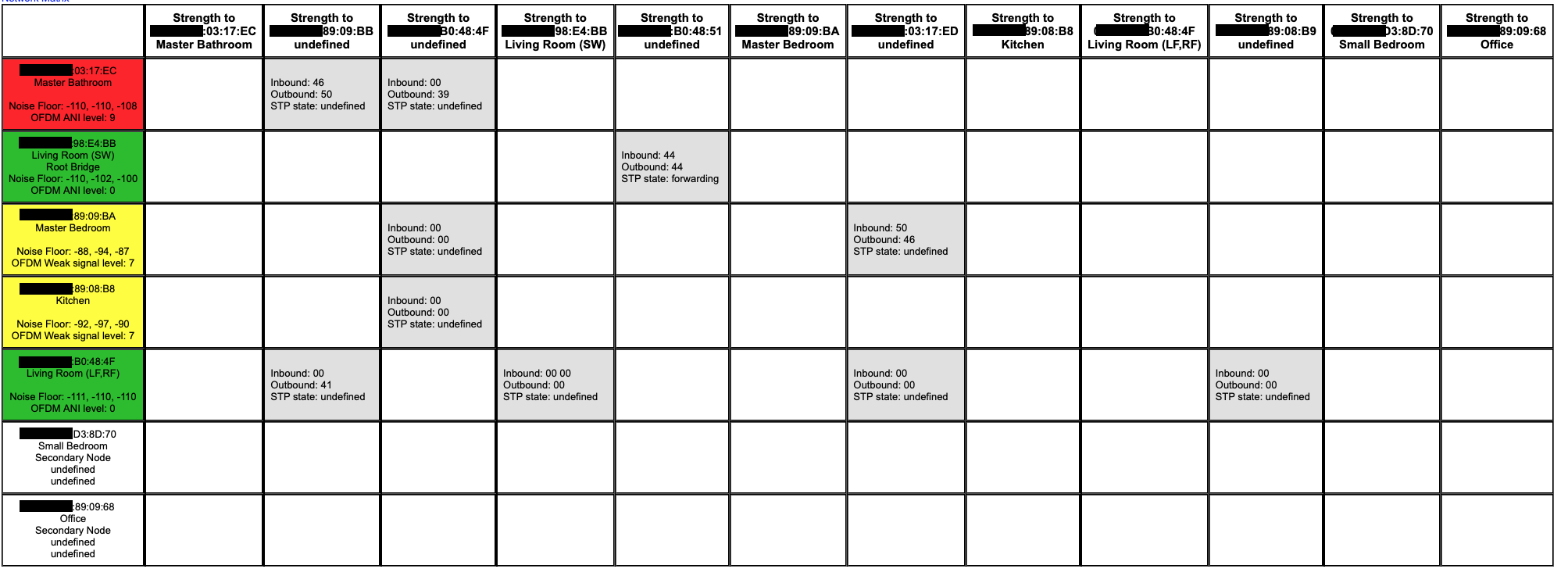
Somehow the wired (!) office keeps dropping out.

Any idea why this would happened?
(and also I have STP undefined in my network matrix, to unknown devices..?!)
    This topic has been closed for further comments. You can use the search bar to find a similar topic, or create a new one by clicking Create Topic at the top of the page.

    23 replies

    MDSTAuthor
    Contributor I
    May 12, 2019
    I'm turning from sceptic to rather convinced this is not relevant when SonosNet is turned off.

    If Direct Routing is through a tunnel in the 802.11g, then it is inside through a higher layer. Hence, channel choice have zero effect. It's just technically not possible.

    If Direct Routing is outside, then it's running on another setup, communicating in the 2G spectrum, depending on channel choice. Then it must run on a separate protocol. The only one I can see that exist is SonosNet.

    I did google it and found this one: http://www.patentsencyclopedia.com/app/20140098713. This is clearly not IEEE 802.11g. (And also impossible, as a patent wouldn't be able to change an industry standard).

    I can only see this as SonosNet and related to the STP.

    If there isn't a third WIFI network?!!!
    Smilja
    May 12, 2019
    I'm turning from sceptic to rather convinced this is not relevant when SonosNet is turned off. [...]
    Nothing whatsoever to do with SonosNet.


    Wireless setup requirements

    The following requirements and limitations apply to a Sonos system operating in a wireless setup. If your network does not meet these requirements, we recommend configuring your system in a wired setup.

    Your router must broadcast a 2.4GHz signal for Sonos products to connect to. If you have a dual band router (i.e., 2.4GHz and 5GHz), do not disable the 2.4GHz signal.
    Wireless-N and Wireless-AC routers should work with Sonos as long as they are still broadcasting over B and G WiFi. Most Wireless-N and AC routers should do this unless manually configured not to.
    The network must not contain enterprise access points that have been configured to require certificates or other forms of enterprise authentication. If you are using multiple access points, make sure they are all set to the same 2.4GHz wireless channel.
    Sonos cannot connect to guest networks or networks that use a portal page to login.
    Networks using wireless range extenders are known to cause issues with Sonos systems that are configured in a wireless setup.

    https://support.sonos.com/s/article/126?language=en_US
    »And the world is like an apple whirling silently in space, Like the circles that you find in the windmills of your mind.« (›Windmills Of Your Mind‹ [1967]. Music by Michel Legrand ; English lyrics written by Alan & Marilyn Bergman)
    ratty
    May 12, 2019
    If Direct Routing is through a tunnel in the 802.11g, then it is inside through a higher layer. Hence, channel choice have zero effect. It's just technically not possible.
    It's perfectly possible. The channel is a shared medium. Layer 2 frames carry a destination address. There's nothing to stop a station having a 'side conversation' with a peer device. Remember that Sonos controls the entire networking stack on its own devices.

    Sonos (Keith N) outlined how it works, and indeed I've seen it working by studying diagnostic pages that, regrettably, are no longer available to users.

    I can only see this as SonosNet and related to the STP.

    It's not SonosNet as such, but it does exploit the same L2 direct peer-to-peer tunnels. STP gets overlaid onto the L2 SonosNet mesh in order to sort out the multiple possible bridged paths and break loops. Direct Routing exists "outside" of both WiFi and SonosNet (STP) modes. In the latter case it bypasses the STP topology, creating a shortcut between 'leaves' of the tree.