
Contributor I
May 10, 2019

Wired speaker drops out in Mixed Mode

I have a Mixed Mode setup with Wired and WiFi connected speakers.I don't use SonosMesh as the WiFi space is so crowded that you can't run a single channel (1,6 or 11) clearly through out the setup.


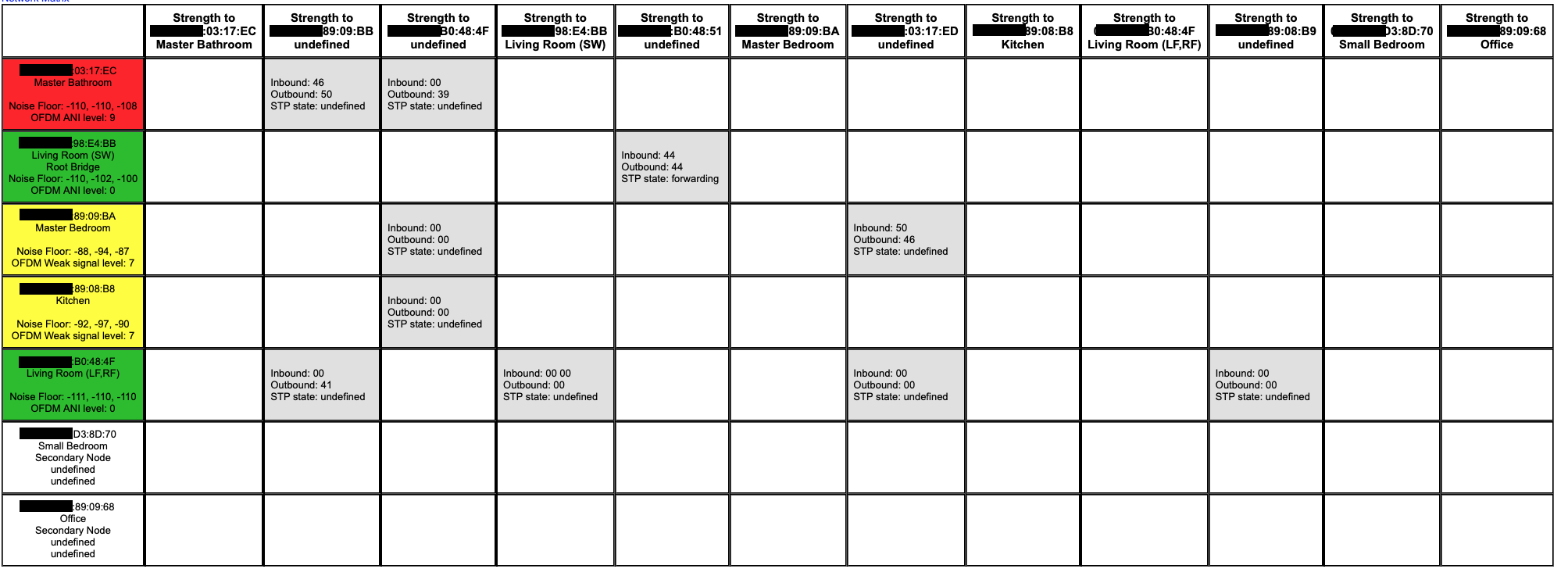
Somehow the wired (!) office keeps dropping out.

Any idea why this would happened?
(and also I have STP undefined in my network matrix, to unknown devices..?!)
    This topic has been closed for further comments. You can use the search bar to find a similar topic, or create a new one by clicking Create Topic at the top of the page.

    23 replies

    Smilja
    May 12, 2019
    Thanks for the input Ratty,
    I did a reset. First it looks normal, but then when I pair it with the Soundbar it becomes Root Bridge once again. I think it does have something to do with pairing Soundbars and Satellites


    We do not recommend using the Sub or surround speakers as the wired products.

    https://support.sonos.com/s/article/3209?language=en

    If the SUB's WiFi card is enabled, then disable it as well, and enable the Playbar's(?) WiFi card instead.

    P.S. Router and Access Points require to be set on the same channel, regardless whether Sonos is running over WiFi or SonosNet.
    »And the world is like an apple whirling silently in space, Like the circles that you find in the windmills of your mind.« (›Windmills Of Your Mind‹ [1967]. Music by Michel Legrand ; English lyrics written by Alan & Marilyn Bergman)
    ratty
    May 12, 2019
    The Living Room's main speaker is on WiFi with WM:1, and the Sub is supposedly wireless with WM:2. Neither's radio can be disabled.

    In any case a wired Sub, with a disabled radio, and a main speaker on WiFi is not going to work well owing to latency fluctuations. Mixed mode is risky enough between grouped rooms; using mixed mode within a home theatre setup is really asking for trouble.

    ---

    I confess I've limited experience of Sonos home theatre setups in WiFi mode, so I'll have to put the Sub's behaviour down to mysterious idiosyncrasy. I don't think it's relevant to the original problem, though, which sounds like it's related to the choice of GC. If it's one of the WiFi'd players and the Office wired unit is grouped with it, the latency fluctuations between the two could be breaking the sync.
    MDSTAuthor
    Contributor I
    May 12, 2019
    May I just check one thing - you did have actual problems with interference when trying SonosNet? I ask because I have run Sonos without problems in very congested WiFi environments. I realise every situation is different, but just wanted to make sure there were performance issues, not just a presumption that there would be such issues.

    Yes. Thanks for considering John B. I've done a wifi survey also. It's not really ideal running 2G on a single channel in the environment.


    We do not recommend using the Sub or surround speakers as the wired products. https://support.sonos.com/s/article/3209?language=en


    If the SUB's WiFi card is enabled, then disable it as well, and enable the Playbar's(?) WiFi card instead.


    I do agree. SUB and playbar are both running on Wifi. None are wired.

    P.S. Router and Access Points require to be set on the same channel, regardless whether Sonos is running over WiFi or SonosNet.


    Well... I don't really agree on this. (I don't see how this could even be a requirement). Each unit only communicate with their own Access Point. So this would be irrelevant. Same channels in a multi AP environment is though not recommended.
    MDSTAuthor
    Contributor I
    May 12, 2019

    I confess I've limited experience of Sonos home theatre setups in WiFi mode, so I'll have to put the Sub's behaviour down to mysterious idiosyncrasy. I don't think it's relevant to the original problem, though, which sounds like it's related to the choice of GC. If it's one of the WiFi'd players and the Office wired unit is grouped with it, the latency fluctuations between the two could be breaking the sync.


    I agree. GC is probably the issue. I'm gonna try to put Office on GC and see if it drops out. If it doesn't, at least the issue is identified. Thank you for taking time and help
    Smilja
    May 12, 2019
    Well... I don't really agree on this. (I don't see how this could even be a requirement). Each unit only communicate with their own Access Point. So this would be irrelevant. Same channels in a multi AP environment is though not recommended.
    See this for example.
    »And the world is like an apple whirling silently in space, Like the circles that you find in the windmills of your mind.« (›Windmills Of Your Mind‹ [1967]. Music by Michel Legrand ; English lyrics written by Alan & Marilyn Bergman)
    ratty
    May 12, 2019
    P.S. Router and Access Points require to be set on the same channel, regardless whether Sonos is running over WiFi or SonosNet.


    Well... I don't really agree on this. (I don't see how this could even be a requirement). Each unit only communicate with their own Access Point. So this would be irrelevant. Same channels in a multi AP environment is though not recommended.

    Sonos state that, for a system in WiFi mode using multiple access points, the channels should be the same.
    https://support.sonos.com/s/article/126

    This is to enable efficient grouping. Where they can, Sonos units will talk to each other directly within a group. If two players are attached to different APs, on different channels, they're unable to establish a peer-to-peer connection. The group may still work, but sub-optimally.
    MDSTAuthor
    Contributor I
    May 12, 2019
    Well... I don't really agree on this. (I don't see how this could even be a requirement). Each unit only communicate with their own Access Point. So this would be irrelevant. Same channels in a multi AP environment is though not recommended.

    See this for example.


    That looks like a SonosNet feature, related to the spanning tree protocol. Not a 2G WiFi feature.

    I expect that to be valid if you have a SonosNet, that is a mesh network. In that case having mesh-AP and SonosNet both fighting over 2G Channels with broadcasting, would create a noisy wireless environment.

    In this case, there is neither a WiFi mesh or SonosNet present.
    ratty
    May 12, 2019
    That looks like a SonosNet feature, related to the spanning tree protocol. Not a 2G WiFi feature.No, Keith N was discussing the same point I made above, namely that for a system attached to multiple APs in WiFi/"wireless" mode (i.e. not SonosNet) the APs need to share the same channel for "direct routing" between grouped nodes to function.
    MDSTAuthor
    Contributor I
    May 12, 2019
    I don't really get it.

    The SONOS connects with a standard 802.11g to the access point. 802.11g is not a SONOS standard but IEEE.

    Direct routing lets one player bridge to another one (It's surely not a 802.11g feature). The only way I can see it being used, is outside 802.11g. The only network I can see where it being featured is in SonosNet. If SonosNet is disabled, where would that be?!!
    ratty
    May 12, 2019
    A valid scepticism.

    In fact in WiFi mode the peer-to-peer tunnels are still there, and you can inspect their signal strengths in the Network Matrix. They only get used as a direct path for the live audio stream between grouped nodes. For all other purposes -- playback commands, pings, http requests, etc -- the nodes talk via the AP as normal. In other words the direct routing topology is overlaid on the normal WiFi hub/spoke connections. So, yes, "outside 802.11g" is one way to describe it.

    Sonos has patents in this area. You can google for them if you're interested.