
Contributor I
May 10, 2019

Wired speaker drops out in Mixed Mode

I have a Mixed Mode setup with Wired and WiFi connected speakers.I don't use SonosMesh as the WiFi space is so crowded that you can't run a single channel (1,6 or 11) clearly through out the setup.


Somehow the wired (!) office keeps dropping out.

Any idea why this would happened?
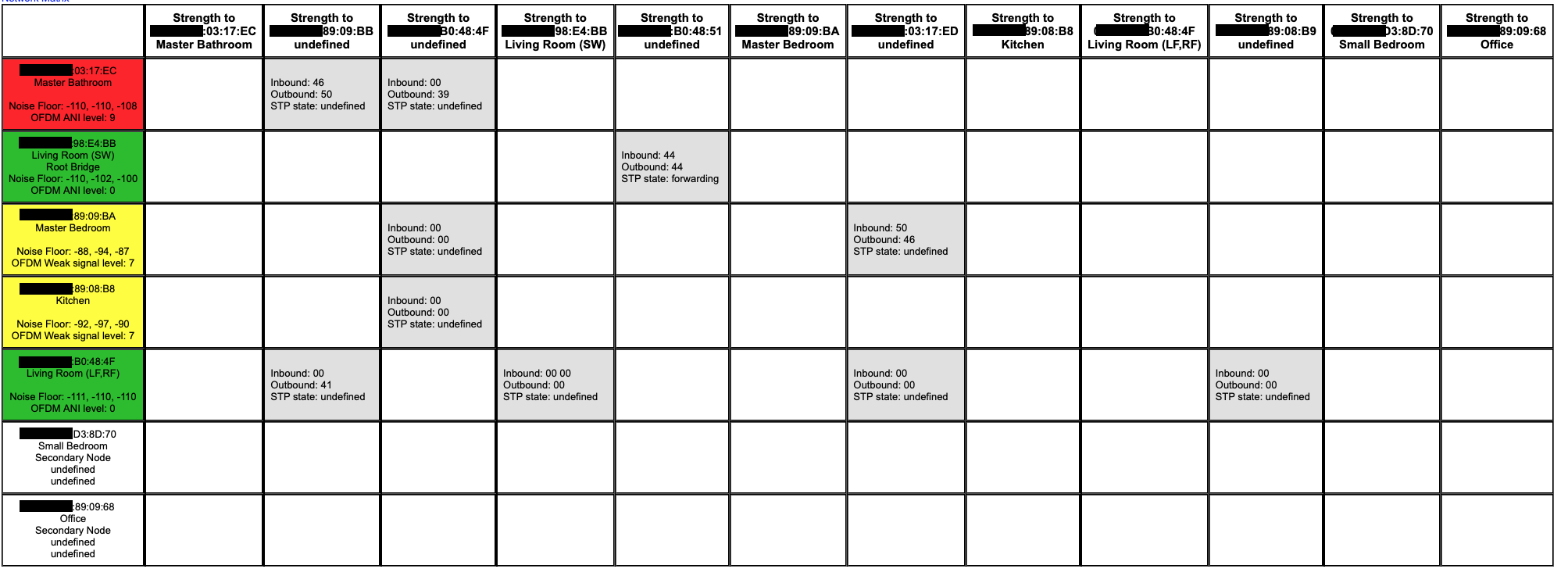
(and also I have STP undefined in my network matrix, to unknown devices..?!)
    This topic has been closed for further comments. You can use the search bar to find a similar topic, or create a new one by clicking Create Topic at the top of the page.

    23 replies

    ratty
    May 10, 2019
    A bit more info please:
    - kindly list the WM parameters for each node
    - kindly confirm which nodes have their radio disabled
    - what WiFi setup do you have (router, APs, meshed WiFi, etc) and channel usage?
    MDSTAuthor
    Contributor I
    May 11, 2019
    Sure!

    Network mode
    Play 5 (Office) and AMP (Small Bedroom) have WiFi Disabled and are running WM:0
    SUB (Living Room) have WM:2
    Master Bathroom, Master Bedroom, Kitchen and Living Room have WM:1

    Wifi Setup
    The network runs with several APs.
    WiFi network no.1 is running 5G only. It has all clients, except SONOS.
    WiFi network no.2 is running 2G only. It has all SONOS clients, nothing else.

    Why not Sonos Mesh?
    The 2G WiFi is running on different channels per AP, as the area is heavily congested with other 2G networks. (I wish I could run a single channel 2G, but it's sadly right down impossible)
    May 11, 2019
    I shall basically leave this to @ratty's greater expertise. But it is strange that the Sub is acting as Root Bridge. I would power off router, APs and Sonos, power back in that order. When you power back Sonos do wired units first
    ratty
    May 11, 2019
    The matrix is rather meaningless in this context, other than indicating ambient noise levels and potential peer-to-peer signal strengths for grouping.

    WM1/2 nodes should have their STP disabled, so the Sub just looks like it's confused. I would check behind its '/usr/sbin/brctl showstp br0' link to confirm this.

    'Undefined' columns are a side-effect of nodes being in WiFi mode, or disabled radios, or a HT speaker's 5GHz interface. The matrix gets a bit messed up.

    ---

    As for the original problem of the wired Office dropping out, I'd suspect a plain old wiring fault. Resocket the cables. If possible run some sustained ping tests using Nirsoft's PingInfoView or ping bursts from the Android/iOS Fing app.
    buzz
    Grand Maestro
    May 11, 2019
    MDST,

    I notice that you partially obscured MAC addresses for security. Note that the portion you obscured is the manufacturer's segment. This is relatively easy for a hacker to guess. (given that this is a SONOS forum)
    ratty
    May 11, 2019
    One afterthought: I take it that the wired Office player was dropping out when played on its own. If it was grouped with wireless players, and was not the group coordinator (the first room), there could be wireless issues in play.
    MDSTAuthor
    Contributor I
    May 11, 2019
    Thanks.

    OFFICE
    I checked the wiring. It's brand new. Running PING for about 2-3 minutes shows no single PING above 1ms.

    STP
    /usr/sbin/brctl showstp br0 shows wired speakers using STP and also the SUB

    SUB
    Don't know why it's acting fishy. Perhaps it's acting default as a root bridge if I connect satellites (surround) and therefor have STP enabled. /proc/ath_rincon/status still shows it's running in INFRA mode (Satellite)

    Group Coordinator
    This sounds like something I should dig deeper into. I though that one of the wired speakers would be group coordinator and since both are wired, there wouldn't be an issue. (Assuming they are part of same group)

    Edit: "OK, I read up on the GC a bit. it clearly sounds like this is the issue" Now how to resolve it without manually choosing a wired player first...:?
    ratty
    May 11, 2019
    "INFRA (satellite)" doesn't sound right for the Sub. And it definitely shouldn't think it's root. I suggest you factory reset it and add it again.

    The GC is the first room in the group, to which other rooms are added. If that room is a pair, then the left unit is GC. Because the GC fetches the stream, and distributes it to the others, its connection is more stressed.
    MDSTAuthor
    Contributor I
    May 12, 2019
    Thanks for the input Ratty,
    I did a reset. First it looks normal, but then when I pair it with the Soundbar it becomes Root Bridge once again. I think it does have something to do with pairing Soundbars and Satellites
    May 12, 2019
    May I just check one thing - you did have actual problems with interference when trying SonosNet? I ask because I have run Sonos without problems in very congested WiFi environments. I realise every situation is different, but just wanted to make sure there were performance issues, not just a presumption that there would be such issues.