

Corry P
Sonos Staff
June 10, 2022
Tutorial

Sonos & Pi-hole

Sonos & Pi-hole

​Hi Everyone!

Due to some recent difficulties I had getting Sonos Voice Control installed on my system because of the presence of Pi-hole on my network, I thought it might be useful to some to write an article on what the problem was, why it happened, and how I fixed it. There are quite a few technical terms here, so I have included some Wiki links.

If you already have Pi-hole installed and running, and understand what it does, you can skip the hidden section below.

What is Pi-hole?

Pi-hole is a piece of open-source software which blocks ads for all devices on your network by acting as a DNS Sink(hole). Pi-hole runs on the Linux operating system which can be controlled via another computer (or phone/tablet) using a terminal emulator. Because Pi-hole needs no GUI (Graphical User Interface), it is often installed on a minimal, CLI-only (Command Line Interface) version of Linux such as Armbian Linux or Raspberry Pi’s Rasbian.


Personally, I keep a dedicated device for running Pi-hole to minimise latency and maximise stability due to the lack of other software installed - the fewer applications a computer runs, the more stable and responsive it will be.


During setup, you give the device a static IP address on your network, then configure your router to provide Pi-hole’s IP address as the DNS (Domain Name System) server that all devices connecting to your network using DHCP (Dynamic Host Configuration Protocol) will use. 


DNS servers convert human-friendly addresses such as sonos.com into computer friendly IP addresses like 2.22.108.216 (the IP address of sonos.com). Pi-hole checks these requests against a list of known ad servers - if there's a match, Pi-hole returns a null IP of 0.0.0.0 (this is the sink in DNS Sink) and the requesting device is unable to show the ad and carries on with its other tasks. If there is no match, Pi-hole forwards the request on to a internet-based DNS server of your choice (the choice made during setup), the IP is resolved, passed to Pi-hole and Pi-hole relays it to the requesting device, allowing it to communicate with (that part of) the internet.


For anyone looking for an installation guide, I personally followed this YouTube video from Craft Computing and found it very helpful:

You're running Pi-Hole wrong! Setting up your own Recursive DNS Server!


Sonos & Pi-hole

I experienced two problems relating to Sonos and Pi-hole:

  1. When Sonos Radio was released, I was given no option to purchase a subscription in the Sonos app

  2. When I was allowed an early peek at Sonos Voice Control, it was not listed as an option in the Sonos app, so I was unable to install it to my compatible, voice-enabled Sonos speakers.

But more issues could easily arise, if not for the simple adjustments I made to Pi-hole’s configuration. Problem 1 was solved by adding sonos.com to the Pi-hole whitelist, and problem 2 was solved by adding optimizely.com to the whitelist.

Edit: Since May 2024, app-measurement.com is also needed in the whilelist.
 

bo4zNAMKUWfVvizoDtFhl5gRjmgmsJj7topAAOEbCMdHQciqUZ4ZEwLfrOo3-kdn5TSkqwz29nQVij1jmaSoYp_p0t-xDB8Dp5zEcCZTrCCPh_Me0DgRZl9rkq31gmFUzimQfHv4ZAlfVyxHrg​ 


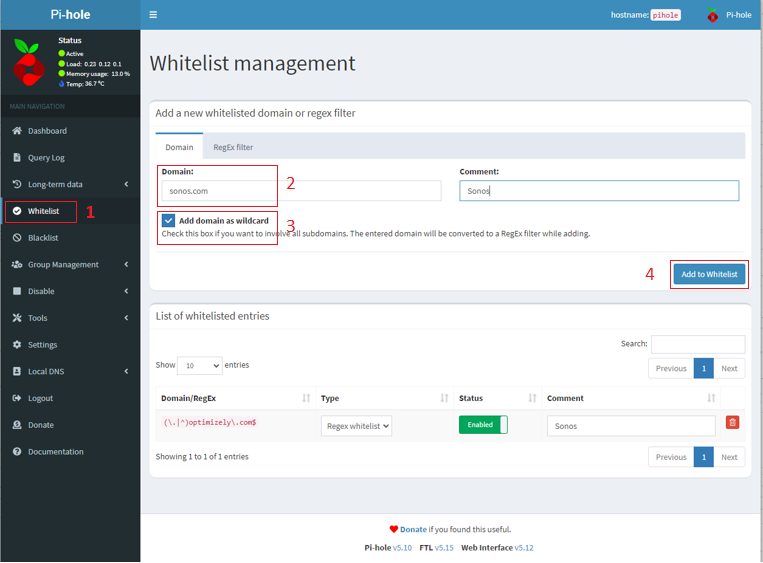
In the Pi-hole configuration page, go to the Whitelist section on the left.

  1. Type sonos.com into the Domain box. Optionally, add a Comment.

  2. Mark the Add domain as wildcard check box

  3. Click Add to whitelist

  4. Repeat for optimizely.com and for app-measurement.com.

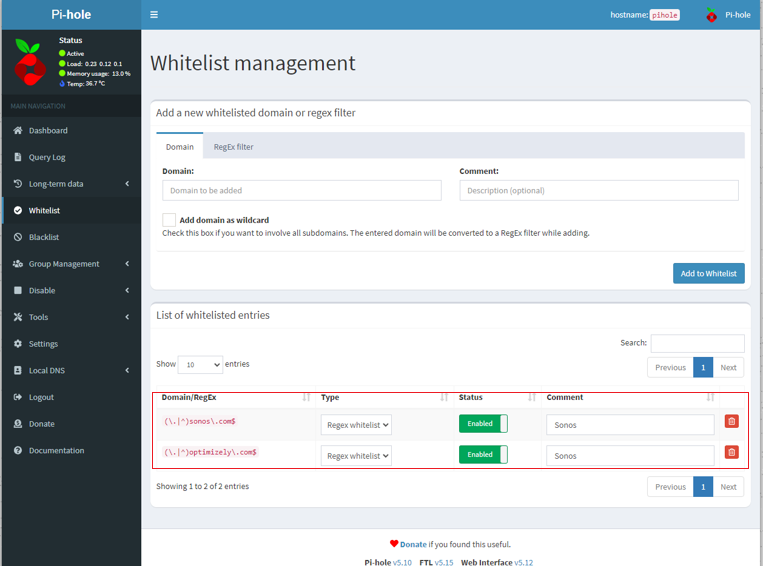
You’ll now have two entries as shown. Don’t worry about the fact that they look a little weird - they’ve been adjusted to act as wildcards, so that all sub-domains are allowed access.
tcM6s72pWxLIR7Snwh_ggAhhs-jSvck1OUxiP0hyMqMFHdjFEHKchutbS159wgYgSYZHD_f7lzVGYxri5UzW0IKgXcaPcVoraUf2pB57-h0rBaf5gkXE_XYzvTav9w9lqKW1Pt4dHo0rBQ1KcQ​ qT_niEeDBAY7cy2muuutlQ_z2oVHgbtBLkG1VvekAQnR_G8hjQnCtjVxiyjVOgh3yCBSSlsd_oo_HwMxxVS8_6gZVsTeIEK9DUfRf5fdHeA1JiiRRkNCzWih220bqgPCk7Fa7X-XDgbhZzlrbg

If you don’t like the idea of using wildcards, you can instead whitelist the following addresses (without marking the Add domain as wildcard check box):

msmetrics.ws.sonos.com - this was added to Pi-hole’s default blocklist due to how often Sonos devices “phone home”. It is not an ad server.

logx.optimizely.com - this allows features to be enabled or disabled in the Sonos app without changes to the software

cdn.optimizely.com - this allows features to be enabled or disabled in the Sonos app without changes to the software

So far, we’ve restored functionality of the Sonos app. To allow us to gather metrics of app usage, so to better tailor your experience on the Sonos app, please also allow the following addresses:

urbanairship.com as a wildcard, or

device-api.urbanairship.com and combine.urbanairship.com as individual entries.

Summary

With that done, you should not have any problems with Pi-hole and Sonos operating on the same network, and be assured of full operability of the Sonos app and of your Sonos system. While I hope this has been helpful, please be aware that Sonos cannot offer further support on third-party software such as Pi-hole. Pi-hole’s community forums are a good place to seek further support.

Photo by Stefan Cosma on Unsplash


This topic has been closed for further comments. You can use the search bar to find a similar topic, or create a new one by clicking Create Topic at the top of the page.

26 replies

Stanley_4
Grand Maestro
August 13, 2024

I studied a number of languages during my years as a perpetual undergraduate student — French, German, Spanish, Russian, Sanskrit. 

But I have no idea what language you folks are speaking here. Am I going to need to study up on this just to make my Sonos speakers work so I can listen to music at home? If that’s the case, I’m whatcha call ‘SOL’ in vernacular American English.


Not needed for Sonos but there are tweaks you can do to Pi-Hole that you might like. Not worth doing just for Sonos though, well in my opinion.

As a great fan of Pi-Hole I’d suggest you, and everyone else read up on it and install a copy on their local network. It is a DNS (Domain Name System) blocker that keeps unwanted sites (junk, tracking, malware and more) from being accessed by your computer.

Pi-hole Discourse

Free but they do accept donations, just add a Raspberry Pi or other compatible computer and do a minimal setup process and you should see a nice improvement in both speed and privacy.

Enthusiast II
August 13, 2024

@Stanley_4 : I’ve got ‘netgear armor’ running on my network. Does that perform a similar function? I also do not have ‘alexa’ or any other voice activated stuff going on and as far as I know I’ve disabled all such buzzers and bells on my Sonos speakers.

Incidentally, I’ve noticed of late I keep getting notifications from that netgear ‘network security’ app telling me it has blocked suspicious incoming from sonos. Not sure what the hay that’s about, but I don’t recall that happening at all before the May 7 watershed event.

Stanley_4
Grand Maestro
August 13, 2024

Don’t know anything about Netgear Armor https://www.netgear.com/home/services/armor/ but it sounds very different.

If netgear is blocking stuff from Sonos you might capture the message and post it here so folks could give you an opinion on what it is blocking and what results you could expect from it.

press250
Prodigy III
August 13, 2024

Hi @chambolle and @Stanley_4, Netgear Armor is the very popular Bitdefender desktop malware package implemented in the Netgear router. Bitdefender includes internet browsing protection, so the notifications are likely related to the Sonos and third-party servers that were added with the new app in May 2024.

I doubt Netgear Armor is causing trouble, tho’ I could be more definitive with the actual wording of the notification(s).

As an aside, many contemporary Wi-Fi routers (from Netgear, Asus, and others) include this type of protection, so if it is causing trouble for @chambolle it is causing trouble for many other users.

sigh
Prodigy II
August 13, 2024

...

...

Yeah; from what I’ve seen and read elsewhere, a hosted service somewhere (not sure now if it’s Plex, or Sonos-run) accesses the Plex server to obtain music data. Playback itself is local/NAT loopback but an external connection is required for the service to function. As soon as I start to browser the Plex collection, a ton of connections appear in my firewall states, and disappear when Sonos is closed out. Disabling port forwarding breaks the service.


The only workaround I’ve found so far is to use the Plex-hosted relay, which does seem to work pretty well most of the time, since playback itself is direct and not proxied. This alleviates the majority of my concerns (not wanting to leave Plex exposed in general), but would be still nice to lock things down more.

🤔 It’s going to depend what Plex are doing with the Sonos service, but from my limited understanding of the Sonos API I’d expect the requests would be coming from the Plex Cloud services. The controller requests the meta data, eg library contents, cover art urls, media urls via the Sonos API, then playback, art display uses the urls.

So

Sonos App → Sonos Cloud API → Plex Cloud → Your server (unless plex cache it) for meta data

The Plex documentation is a bit lacking in details, but under remote access troubleshooting they provide this link to get the current public source IPs of their AWS workers. Most of the Plex platform is on Amazon EKS, so the file gets updated automatically as they change.

https://s3-eu-west-1.amazonaws.com/plex-sidekiq-servers-list/sidekiqIPs.txt

It is going to be a pain to keep them up to date in your firewall unless you can automate updating your firewall when it changes. How big a pain depends how frequently they change.

If the sources you see being blocked aren’t from the IPs in that list, then maybe it’s undocumented Plex sources or maybe it’s Sonos. As Plex know how their integration works you’d probably need to try and extract the info from them 😕

Corry P
Corry PAuthor
Sonos Staff
August 14, 2024

Hi All

In regards to Plex, I did recently discover that if your ISP utilises CGNAT, then Plex will only work via their Relay function (going through their cloud), though I cannot get even this to work on my own system for some reason (possibly due to PiHole - I haven’t done any testing as of yet). You can circumvent this by paying your ISP extra for a static public IP address.

I found that Sonos could access Plex immediately after enabling Remote Access in the Plex server’s settings, but that at some point afterwards, connection would not be possible (presumably, once your public IP has changed).

More info can be found on Plex’s Remote Access Troubleshooting page: https://support.plex.tv/articles/200931138-troubleshooting-remote-access/

I hope this helps.


"Common sense is the collection of prejudices acquired by age eighteen." - Albert Einstein