

Corry P
Sonos Staff
June 10, 2022
Tutorial

Sonos & Pi-hole

Sonos & Pi-hole

​Hi Everyone!

Due to some recent difficulties I had getting Sonos Voice Control installed on my system because of the presence of Pi-hole on my network, I thought it might be useful to some to write an article on what the problem was, why it happened, and how I fixed it. There are quite a few technical terms here, so I have included some Wiki links.

If you already have Pi-hole installed and running, and understand what it does, you can skip the hidden section below.

What is Pi-hole?

Pi-hole is a piece of open-source software which blocks ads for all devices on your network by acting as a DNS Sink(hole). Pi-hole runs on the Linux operating system which can be controlled via another computer (or phone/tablet) using a terminal emulator. Because Pi-hole needs no GUI (Graphical User Interface), it is often installed on a minimal, CLI-only (Command Line Interface) version of Linux such as Armbian Linux or Raspberry Pi’s Rasbian.


Personally, I keep a dedicated device for running Pi-hole to minimise latency and maximise stability due to the lack of other software installed - the fewer applications a computer runs, the more stable and responsive it will be.


During setup, you give the device a static IP address on your network, then configure your router to provide Pi-hole’s IP address as the DNS (Domain Name System) server that all devices connecting to your network using DHCP (Dynamic Host Configuration Protocol) will use. 


DNS servers convert human-friendly addresses such as sonos.com into computer friendly IP addresses like 2.22.108.216 (the IP address of sonos.com). Pi-hole checks these requests against a list of known ad servers - if there's a match, Pi-hole returns a null IP of 0.0.0.0 (this is the sink in DNS Sink) and the requesting device is unable to show the ad and carries on with its other tasks. If there is no match, Pi-hole forwards the request on to a internet-based DNS server of your choice (the choice made during setup), the IP is resolved, passed to Pi-hole and Pi-hole relays it to the requesting device, allowing it to communicate with (that part of) the internet.


For anyone looking for an installation guide, I personally followed this YouTube video from Craft Computing and found it very helpful:

You're running Pi-Hole wrong! Setting up your own Recursive DNS Server!


Sonos & Pi-hole

I experienced two problems relating to Sonos and Pi-hole:

  1. When Sonos Radio was released, I was given no option to purchase a subscription in the Sonos app

  2. When I was allowed an early peek at Sonos Voice Control, it was not listed as an option in the Sonos app, so I was unable to install it to my compatible, voice-enabled Sonos speakers.

But more issues could easily arise, if not for the simple adjustments I made to Pi-hole’s configuration. Problem 1 was solved by adding sonos.com to the Pi-hole whitelist, and problem 2 was solved by adding optimizely.com to the whitelist.

Edit: Since May 2024, app-measurement.com is also needed in the whilelist.
 

bo4zNAMKUWfVvizoDtFhl5gRjmgmsJj7topAAOEbCMdHQciqUZ4ZEwLfrOo3-kdn5TSkqwz29nQVij1jmaSoYp_p0t-xDB8Dp5zEcCZTrCCPh_Me0DgRZl9rkq31gmFUzimQfHv4ZAlfVyxHrg​ 


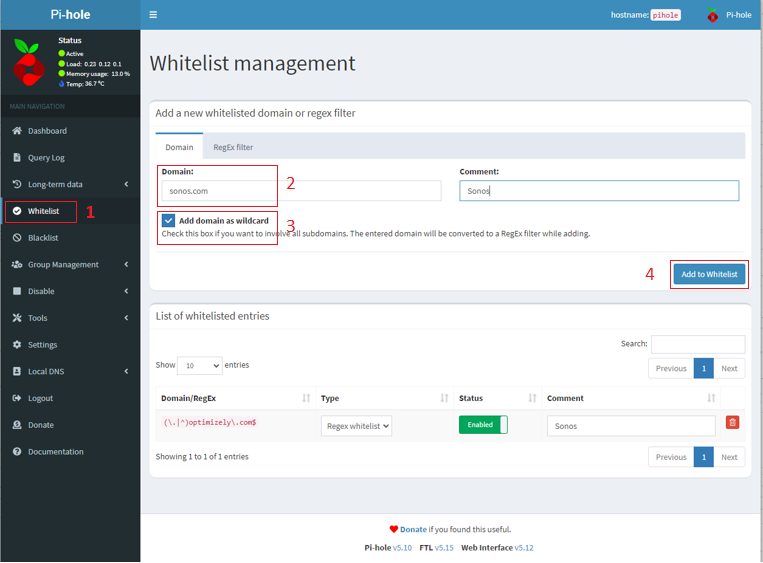
In the Pi-hole configuration page, go to the Whitelist section on the left.

  1. Type sonos.com into the Domain box. Optionally, add a Comment.

  2. Mark the Add domain as wildcard check box

  3. Click Add to whitelist

  4. Repeat for optimizely.com and for app-measurement.com.

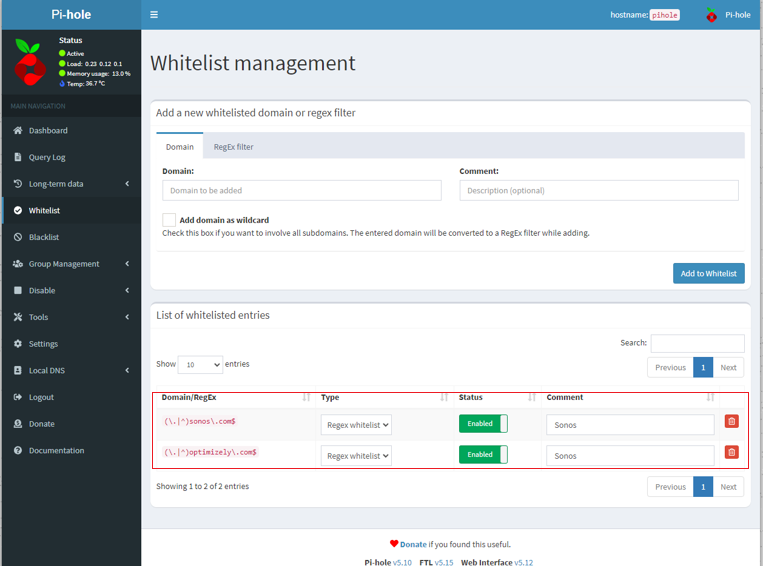
You’ll now have two entries as shown. Don’t worry about the fact that they look a little weird - they’ve been adjusted to act as wildcards, so that all sub-domains are allowed access.
tcM6s72pWxLIR7Snwh_ggAhhs-jSvck1OUxiP0hyMqMFHdjFEHKchutbS159wgYgSYZHD_f7lzVGYxri5UzW0IKgXcaPcVoraUf2pB57-h0rBaf5gkXE_XYzvTav9w9lqKW1Pt4dHo0rBQ1KcQ​ qT_niEeDBAY7cy2muuutlQ_z2oVHgbtBLkG1VvekAQnR_G8hjQnCtjVxiyjVOgh3yCBSSlsd_oo_HwMxxVS8_6gZVsTeIEK9DUfRf5fdHeA1JiiRRkNCzWih220bqgPCk7Fa7X-XDgbhZzlrbg

If you don’t like the idea of using wildcards, you can instead whitelist the following addresses (without marking the Add domain as wildcard check box):

msmetrics.ws.sonos.com - this was added to Pi-hole’s default blocklist due to how often Sonos devices “phone home”. It is not an ad server.

logx.optimizely.com - this allows features to be enabled or disabled in the Sonos app without changes to the software

cdn.optimizely.com - this allows features to be enabled or disabled in the Sonos app without changes to the software

So far, we’ve restored functionality of the Sonos app. To allow us to gather metrics of app usage, so to better tailor your experience on the Sonos app, please also allow the following addresses:

urbanairship.com as a wildcard, or

device-api.urbanairship.com and combine.urbanairship.com as individual entries.

Summary

With that done, you should not have any problems with Pi-hole and Sonos operating on the same network, and be assured of full operability of the Sonos app and of your Sonos system. While I hope this has been helpful, please be aware that Sonos cannot offer further support on third-party software such as Pi-hole. Pi-hole’s community forums are a good place to seek further support.

Photo by Stefan Cosma on Unsplash


This topic has been closed for further comments. You can use the search bar to find a similar topic, or create a new one by clicking Create Topic at the top of the page.

26 replies

Stanley_4
Grand Maestro
June 15, 2024

My apps seem to be working with the old Pi-Hole rules.

Once the apps are usable I probably should look into the filter settings again but I’m avoiding touching anything Sonos related until things stabilize and return to full functionality.

Bumper
June 15, 2024

Hey @Corry P, great post! Very much worth noting that your detective work applies to ANY mechanism that performs DNS filtering. @Bumper documented his challenge elsewhere in the forums and I am certain he’ll be keen to add optimizely.com to his whitelist.

And also note that a number of functions simply do not appear in the app if DNS filtering is used. I’m sure you can appreciate the immense difficulty of debugging these issues … it’s hardly intuitive to connect “why is function x missing?” to “by chance are you using privacy filtering?”

Thanks for tagging me @press250 , whitelisting optimizely seems to have fixed the issue of new features not showing up with my nextdns config. 

press250
Prodigy III
June 15, 2024

Thanks for tagging me, whitelisting optimizely seems to have fixed the issue of new features not showing up. 

Touchdown @Bumper … I just needed an extra week to help solve this snafu. 🤦

Can you tag @Corry P describe the “missing features” in this context? This behavior isn’t going to be limited to advanced users, Normal People who have turned on parental controls on their Wi-Fi router could very well end up in the same boat.

Bumper
June 16, 2024
 

Touchdown @Bumper … I just needed an extra week to help solve this snafu. 🤦

Can you tag @Corry P describe the “missing features” in this context? This behavior isn’t going to be limited to advanced users, Normal People who have turned on parental controls on their Wi-Fi router could very well end up in the same boat.

The features not enabled when using Nextdns: alarms, sleep timers, add to end of queue, add next.

Switching to Cloudflare or google DNS on the device allows the features to appear if the app is deleted and reinstalled. Features continued to work when switched back to Nextdns. So temporarily turning off your DNS will get you the missing features no need to whitelist anything if you don’t want to.

Or Whitelisting cdn.optimizely.com  as suggested in the OP by @Corry P fixed it for the above missing features as well.

Nextdns has been blocking the optimizely domain for as long as my logs go back but it’s only been an issue since the new app.


Prominent Collaborator I
June 16, 2024

The new controller app calls at least these domains with sub domains:

ingest.sentry.io

lh3.googleusercontent.com

i.ytimg.com

sdk.iad-05.braze.com

cdn.optimizely.com

sonos.com


Prominent Collaborator I
June 23, 2024

The new controller app calls at least these domains with sub domains:

ingest.sentry.io

lh3.googleusercontent.com

i.ytimg.com

sdk.iad-05.braze.com

cdn.optimizely.com

sonos.com


It seem that adding the following analytics domains help speed up upstart of the app (even though they doesn't seem like being called directly by the Android app):

firebase-settings.crashlytics.com

crashlyticsreports-pa.googleapis.com

Lyricist I
August 13, 2024

In the same vein as this topic, is there any list of hostnames/subnets that are used for incoming connections?


For instance, I have Plex setup in Sonos which works great, but I’d prefer to restrict incoming Plex connections to only Sonos services (everything else uses a VPN). I can just allow the incoming connections I see on the firewall, but if any of the IPs change then it will break things and I’ll have to go back and redo everything.


I’ve looked at the query log for devices playing Plex content and none of those domains seem to relate to the incoming connections I see. Best I can limit so far is to AWS, but that’s half the internet.

sigh
Prodigy II
August 13, 2024

In the same vein as this topic, is there any list of hostnames/subnets that are used for incoming connections?


For instance, I have Plex setup in Sonos which works great, but I’d prefer to restrict incoming Plex connections to only Sonos services (everything else uses a VPN). I can just allow the incoming connections I see on the firewall, but if any of the IPs change then it will break things and I’ll have to go back and redo everything.


I’ve looked at the query log for devices playing Plex content and none of those domains seem to relate to the incoming connections I see. Best I can limit so far is to AWS, but that’s half the internet.

Have you been through this?

I doubt Sonos are making incoming requests to your devices and the incoming you need to allow will be down to where your plex servers are surely?

https://support.plex.tv/articles/218237558-requirements-for-using-plex-for-sonos/

If your plex server is on the same lan as your Sonos devices, then according to plex the requirement is Nat loopback in your router. Or is your plex setup more complex?

Lyricist I
August 13, 2024

In the same vein as this topic, is there any list of hostnames/subnets that are used for incoming connections?


For instance, I have Plex setup in Sonos which works great, but I’d prefer to restrict incoming Plex connections to only Sonos services (everything else uses a VPN). I can just allow the incoming connections I see on the firewall, but if any of the IPs change then it will break things and I’ll have to go back and redo everything.


I’ve looked at the query log for devices playing Plex content and none of those domains seem to relate to the incoming connections I see. Best I can limit so far is to AWS, but that’s half the internet.

Have you been through this?

I doubt Sonos are making incoming requests to your devices and the incoming you need to allow will be down to where your plex servers are surely?

https://support.plex.tv/articles/218237558-requirements-for-using-plex-for-sonos/

If your plex server is on the same lan as your Sonos devices, then according to plex the requirement is Nat loopback in your router. Or is your plex setup more complex?

Yeah; from what I’ve seen and read elsewhere, a hosted service somewhere (not sure now if it’s Plex, or Sonos-run) accesses the Plex server to obtain music data. Playback itself is local/NAT loopback but an external connection is required for the service to function. As soon as I start to browser the Plex collection, a ton of connections appear in my firewall states, and disappear when Sonos is closed out. Disabling port forwarding breaks the service.


The only workaround I’ve found so far is to use the Plex-hosted relay, which does seem to work pretty well most of the time, since playback itself is direct and not proxied. This alleviates the majority of my concerns (not wanting to leave Plex exposed in general), but would be still nice to lock things down more.

Enthusiast II
August 13, 2024

I studied a number of languages during my years as a perpetual undergraduate student — French, German, Spanish, Russian, Sanskrit. 

But I have no idea what language you folks are speaking here. Am I going to need to study up on this just to make my Sonos speakers work so I can listen to music at home? If that’s the case, I’m whatcha call ‘SOL’ in vernacular American English.