
Contributor I
February 28, 2019

Sonos-Beamer wifi setup

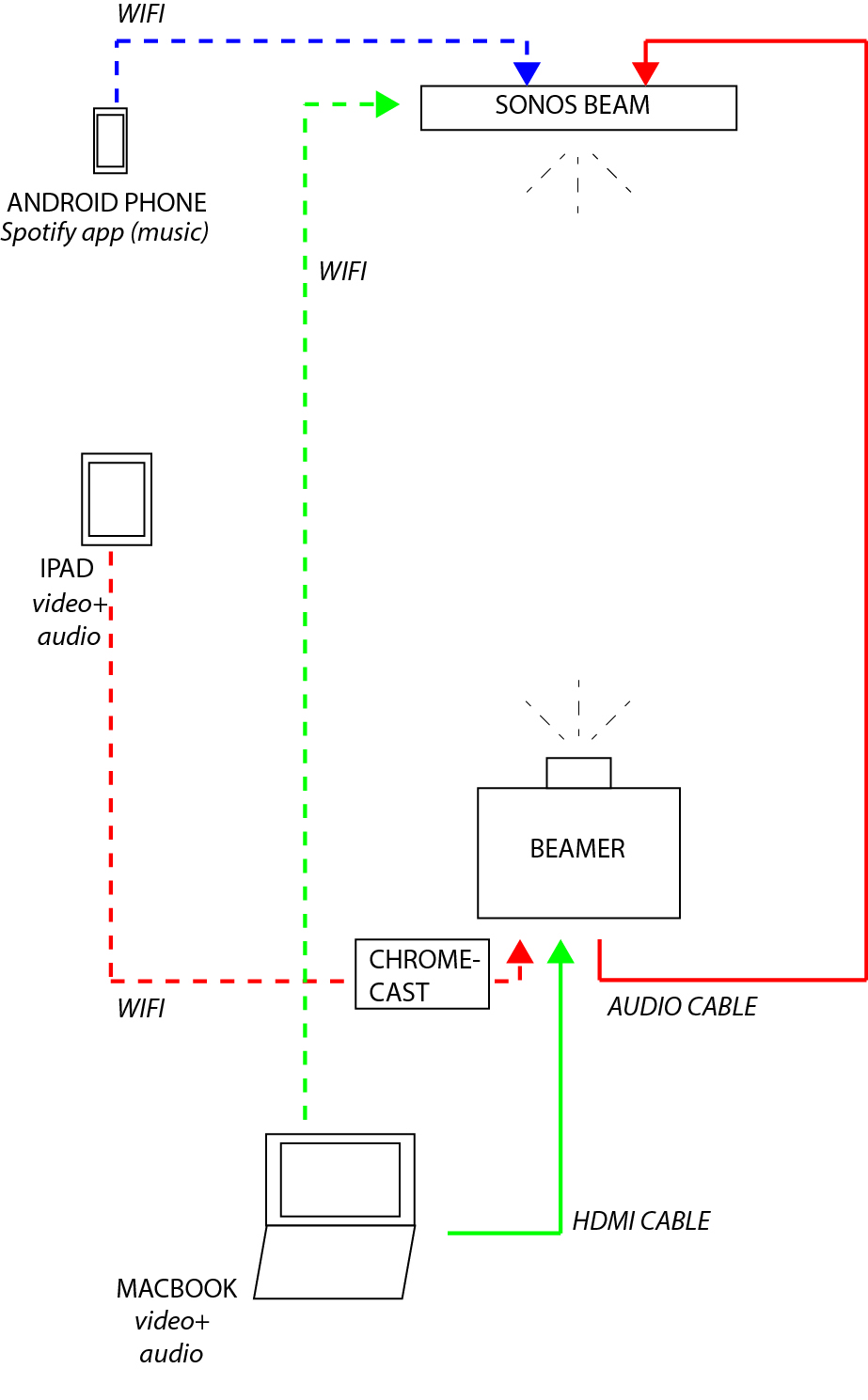
I'm looking for advice on my beamer-audio setup, combined with a wireless speaker function for spotify.

I made a scheme to make the 3 options clear in which I would like the set-up to work in an ideal case. But I know probably not realistic.. Would just be nice to sit in the couch and control everything through my Ipad..

I have all the material in the scheme (not chromecast and sonos yet), but looking to buy a Sonos.

Could you please advice which of these 3 options works (red, blue and green)? Or in the case one doesn't work on the alternative?


Many thanks!
This topic has been closed for further comments. You can use the search bar to find a similar topic, or create a new one by clicking Create Topic at the top of the page.

18 replies

EnergyHubAuthor
Contributor I
March 1, 2019
Wow. Very in detail, and vital info indeed. Thanks! En helemaal Lage Landen met Nederlandse en Vlaamse vertakkingen :)

So Netflix needs to stream stereo to Chromecast?

Noob question: what can the Beam do with 5.1 if no other Sonos are connected yet? Is there through emulation an extra?
Airgetlam
March 2, 2019
The Beam does 3.0 with a Dolby Digital signal, with no surround speakers or SUB attached.
Bruce
EnergyHubAuthor
Contributor I
March 2, 2019
And if I go for the 'red option' and Airplay 2 the sound (of netflix, other video,..) to the BEAM. Is there the same audio format mismatch?
Sjoop1985
March 2, 2019
As Danny mentioned above, Airplay will only get you stereo - due to bandwidth limitations, I guess - and it will introduce a delay. Furthermore, it's likely not possible to Airplay audio to Sonos while simultaneously providing the projector with the corresponding picture.
Also, the Beam doing 3.0 on its own when fed 5.1 is not a mismatch: for 5.1 surround, you need 5.1 physical channels. Not sure if there is any virtual surround happening.

I've said it before and I'll say it again: getting all of this to work without an actual TV in between to do the audio processing, requires some effort and still there are limitations. I think we've given you all information we can give you to make all scenarios from your start post (music, MacBook, Chromecast) work. It's now up to you to decide if you want to spend the effort (and of course money) on these solutions. We've also told you what the downsides are if you try a shortcut. Frankly, in my opinion, the shortcuts (like Airplay) are not really worth it at all, as they will give you an experience that's not even remotely comparable to what the "hard way" brings.
To be honest, I don't use Netflix, so the DD+ thing has not been an issue for me. I primarily stream digital files, and I've ran conversions to make sure that any files with unsupported audio also contain a DD 5.1 stream. However, I can imagine that the Netflix limitation may put you off ticking all the boxes we've discussed.
Anyway, should you choose to take this on, the community is here to support!
Life is what happens to you while you're busy making other plans (John Lennon) --- Living room: Arc, Sub, 2x One - Kitchen: One - Bedroom: Play 3 - Office: Beam - Bathroom: Play 1
EnergyHubAuthor
Contributor I
March 2, 2019
Thanks for all the input!
buzz
Grand Maestro
March 2, 2019
I’m not a fan of streaming content stored on or passing through a handheld. In that context I don’t care if AirPlay or similar ever works. But, I do understand that, for some users, handhelds are the center of the universe and that everything should be able to stream to everything using WiFi, Bluetooth, and the Cellphone network. I wire whenever possible.

I’m sure that 5G will trigger a major mindset shift. Initially I think that 5G will be wonderful — until it becomes as cluttered as WiFi is now for many users. By then we will probably be waiting for 6G and following to roll out.
Sjoop1985
March 2, 2019
Agreed. In the scenario I described above, similar in setup to the OP's, I stream all media to a Chromecast from a NAS, using BubbleUPNP on my handhelds as the controller, and Spotify for music. Besides the connectivity, I also dislike the fact that streaming directly from a handheld relies on the device being awake and providing processing power, a PC or laptop is already better suited for this, but I prefer an always-on device like a NAS.
Life is what happens to you while you're busy making other plans (John Lennon) --- Living room: Arc, Sub, 2x One - Kitchen: One - Bedroom: Play 3 - Office: Beam - Bathroom: Play 1
EnergyHubAuthor
Contributor I
March 3, 2019
Test / review

So I went over and bought the Beam. Works smoothly. For option blue..and green to my surprise. And as an extra I can apparently pauze the media playing on my macbook though my phone in the sonos app, what a great discovery. So in fact I don't need option red and all the extra gear for now.. (besides audio format and strong wifi dependecy issues, but not a problem at this stage).

Thanks for all the help and hopefully it will help others as well. The moment I expand my Sonos set with extra speakers I will go for your adviced setup with hdmi splitter and cables.