
Contributor I
February 28, 2019

Sonos-Beamer wifi setup

I'm looking for advice on my beamer-audio setup, combined with a wireless speaker function for spotify.

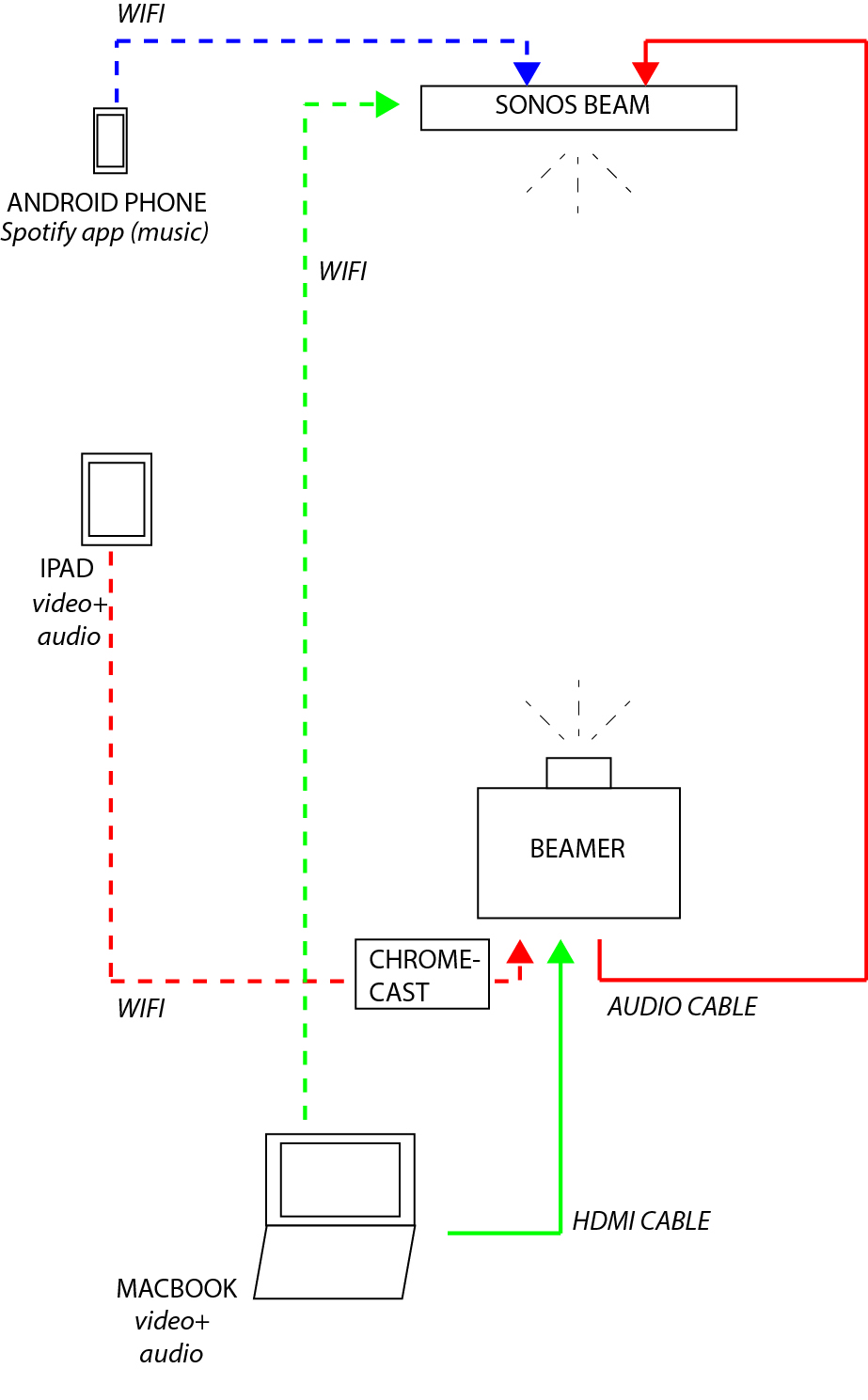
I made a scheme to make the 3 options clear in which I would like the set-up to work in an ideal case. But I know probably not realistic.. Would just be nice to sit in the couch and control everything through my Ipad..

I have all the material in the scheme (not chromecast and sonos yet), but looking to buy a Sonos.

Could you please advice which of these 3 options works (red, blue and green)? Or in the case one doesn't work on the alternative?


Many thanks!
This topic has been closed for further comments. You can use the search bar to find a similar topic, or create a new one by clicking Create Topic at the top of the page.

18 replies

Sjoop1985
February 28, 2019
As long as your projector can take the audio inputs from all connected devices and output it in a format that Sonos accepts (either PCM stereo or Dolby Digital 5.1), then all of the above will work.
  • Provided you have Spotify Premium, you can add your subscription to Sonos and play your Spotify music through the Sonos app or directly from the Spotify app.
  • Your Macbook connected directly to the projector will work, provided your projector will output the sound over the optical out in the correct format.
  • The same goes for the Chromecast, as long as its delivering a compatible audio stream.
Should you encounter the situation that your projector is unable to output the sound, you could put an HDMI switch with an audio out in between your HDMI devices and you projector, and have that switch output the sound to Sonos.

As I pointed out, another matter to consider is that, as you might have already read on this forum, Sonos is rather picky about the audio formats it will accept. Sonos can only play PCM stereo or Dolby Digital 5.1 directly. The devices are made with the premise that a TV will process and output the audio in one of those formats. Projectors often lack that sort of functionality and it's possible your projector will output bitstream audio for anything that it's fed. In that case, you will have to make sure that the audio streams accompanying the video you're feeding the projector (through the Chromecast or Macbook) are Sonos-compatible.
Life is what happens to you while you're busy making other plans (John Lennon) --- Living room: Arc, Sub, 2x One - Kitchen: One - Bedroom: Play 3 - Office: Beam - Bathroom: Play 1
melvimbe
February 28, 2019
To add a little bit more to what Sjoop stated, Apple airplay 2 can also be used in your situation.

Backing up a little bit first. In terms of music, you'll be able to play audio on the Beam using the Sonos controller on your android, ipad, or macbook. The Sonos app is just a controller, so the music is streaming directly from Spotify to your Beam witth this option.

You can also use airplay on your ipad or macbook to stream audio through the device to the beam. That will work for any audio playing on the device, pretty much just like bluetooth. However, for the case of a video, you'll only be able to get stereo out of this and I'm not sure that you'll be able to send audio through airplay and the video to the Beamer at the same time.

What Sjoop stated regarding passing the audio from the Beam to the way of audio cable (either optical or HDMI-ARC) is correct.
Danny
EnergyHubAuthor
Contributor I
February 28, 2019
Thanks Sjoop1985 and melvimbe for the swift and complete answers!

I'm afraid you pointed out the issue: the output of the beamer.. So best to route audio directly from Ipad or Macbook through Airplay to the Beam, and stream video to beamer through HDMI cable?
Sjoop1985
February 28, 2019
Danny, your superior expertise shows 😉 🙂 I own 0 Apple devices, so I tend to forget about Airplay...


I'm afraid you pointed out the issue: the output of the beamer.. So best to route audio directly from Ipad or Macbook through Airplay to the Beam, and stream video to beamer through HDMI cable?

It depends on what audio you mean.
  • For the best music experience, it is best played via Spotify, either directly or via the Sonos controller, as per "blue", you can also accomplish this from your Macbook.
  • Video+Audio like Youtube, Netflix or other digital streaming is best routed to Sonos as a TV would "red": either direct HDMI or Chromecast and then have the projector output the sound, or split off the sound using an HDMI splitter. If you try to display the video portion via the projector while Airplaying the audio to the Beam - in the unlikely case your device will be able to make that happen, you are stuck with stereo and almost guaranteed to run into lip-sync issues.
  • Any other form of audio, such as using Sonos like a simple pair of external speakers for your Macbook or iPad, runs into the core of what Sonos is not: a bluetooth speaker. As Danny said, the Sonos app should be seen as the remote control, not as the conduit actually streaming content to players.
I really hope we can help you achieve your goals - it seems to me you are very close to a setup that could work. I run a projector/Sonos setup in my living room that is quite similar (I do use an HDMI switch with audio extraction though), so it really shouldn't be an issue getting you up and running. What type of audio output does your projector have, or better yet, what is the make and model? That would enable us to give some better suggestions.
Life is what happens to you while you're busy making other plans (John Lennon) --- Living room: Arc, Sub, 2x One - Kitchen: One - Bedroom: Play 3 - Office: Beam - Bathroom: Play 1
EnergyHubAuthor
Contributor I
February 28, 2019
Thanks again. Clarified a lot. So now I understand the streaming vs controller for spotify.

As for video+audio streaming. I have an Optoma HD144x beamer. I'm quite sure the audio output is not too good for what I can find/see.
So option red seems unlikely. And for green I can only make it work through an hdmi splitter I guess? So still stuck with non remoteless controling of video as well as a long hdmi cable to my Beam? But with great audio 😉
Sjoop1985
February 28, 2019
An HDMI splitter with audio out like this one can take multiple HDMI inputs and then output the sound over an optical output to a Sonos Beam/Playbar/Playbase. You would connect your Chromecast, MacBook and other devices to it, connect the HDMI out to the projector and run an audio cable to Sonos. Optical cable is much less bulky than HDMI, that might help. Using HDMI to the Beam would not work, I think, since I can't see that this projector supports ARC.

Connecting both a Chromecast and a MacBook via the switch, would enable both red and green options. My HDMI switch connects a cablebox and Chromecast like this, and I stream YouTube, Netflix, and local video (on a NAS) to my projector and Sonos via the Chromecast almost daily. I occasionally use the free port on my switch to connect a laptop, therefore I can confirm that all you've described is technically possible, albeit with some effort.

That said, just to be cautious: once you sort out the hardware, please be aware that you will still need to make sure Sonos gets a stereo or Dolby Digital 5.1 audio signal for it to work.

Sorry to tell you that you have to jump through so many hoops... As I've said in some of my other posts on here, projectors and Sonos were not designed for each other, and trying to combine them, though not impossible, exposes some of the weaknesses on both ends.
Life is what happens to you while you're busy making other plans (John Lennon) --- Living room: Arc, Sub, 2x One - Kitchen: One - Bedroom: Play 3 - Office: Beam - Bathroom: Play 1
EnergyHubAuthor
Contributor I
March 1, 2019
Thanks again Sjoop!

Ok I will go for this option. Can't think of any other alternative for now that would make the red green and blue work.

The splitter works on power from the usb power output of the beamer I guess? And the chromecast is thus feeded through the splitter?

And the chromecast will feed 5.1, no? Or some other catches?

On the shopping list:
- chromecast
- hdmi to hdmi and spdif splitter (harder to find with short delivery time for Belgium 🙂 )
- spdif cable (same as Toslink?)
- sonos Beam

Thanks!
Sjoop1985
March 1, 2019
Aha! België. Aan de stijl van het Engels en het gebruik van het woord "beamer" dacht ik al dat het iemand uit de Lage Landen was!

HDMI switches are powered by mains power (through an adapter). They indeed seem to be a little harder to come by around here, I'm in the Netherlands myself. I bought this one from a Dutch shop, not sure if it's still in stock (the website looks to be down, currently).
The Chromecast can be powered from a USB port or through a mains adapter.
You need an optical cable, Toslink indeed - If I remember correctly, Toslink is the hardware spec of the cable, while S/PDIF is the audio protocol that is sent over it, but the terms are often used interchangeably. The Playbar and Playbase come with such a cable since they offer only an optical input, for the Beam, I cannot say, but given your situation you may need a longer cable.

As far as I know, Chromecast cannot decode 5.1, but can forward the bitstream over HDMI if you tell it to, streaming apps like Plex and BubbleUPNP have these settings available. Unfortunately it's not as simple as "Can Chromecast feed 5.1". It needs to be Dolby Digital 5.1 for Sonos. Not DTS, not AAC, not Dolby Digital Plus, not Atmos, only Dolby Digital will give you 5.1 surround. If you feed it stereo, you will get a simulated upmix, if you feed it any of the aforementioned other surround standards, you will get silence. This is also true for a direct HDMI connection, it is a Sonos issue, not a Chromecast issue. As I said, a lot of hoops to jump through to get 5.1 surround over Sonos with a projector. DM me if you want to discuss this further, so we don't stray too far from the topic here.

Please be aware that for exactly this reason, you will not be able to stream Netflix in 5.1 to your Chromecast, as Netflix uses Dolby Digital plus, which is not natively supported by Sonos. This would only be possible with an intermediate device (like a TV) that can extract the DD 5.1 core from the DD+ and stream it to Sonos.
Life is what happens to you while you're busy making other plans (John Lennon) --- Living room: Arc, Sub, 2x One - Kitchen: One - Bedroom: Play 3 - Office: Beam - Bathroom: Play 1
melvimbe
March 1, 2019
Just chiming in to say that Sjoop's got you well covered on this. Spot on with all his advice.
Danny
buzz
Grand Maestro
March 1, 2019
Pay attention to cable length between the projector and other elements of the system. Most of the cable types are specified for lengths up to three meters or so. In your situation this will probably be a nonstarter. Using premium cables one can easily extend this to about 15 meters. While this is not the absolute limit, it starts getting even more expensive and complicated beyond 15 meters.