
Trending Lyricist I
July 28, 2022
Answered

Help on improving my home setup - (Omada wifi / another boost?)

I have recently changed our home Wifi to TP Link Omada as our existing Wifi didnt reach around the home, I am planning on adding some managed switches too which I think will help with our sonos setup in the long run.


I currently have a number of devices hard wired (wifi off), a boost and some on wifi (should be sonosnet)


We have had performance issues on and off over the years and hard wiring some of the sonos appears to have fixed it, the office and nursery speakers are hard wired as they are the furthest from the Boost. Would an additional boost help?


Since changed to Omada APs, our devices connected by WiFi arent able to play anything, the wired devices are still functioning, these are currently connected to dumb switches.


Our network matrix is as below:
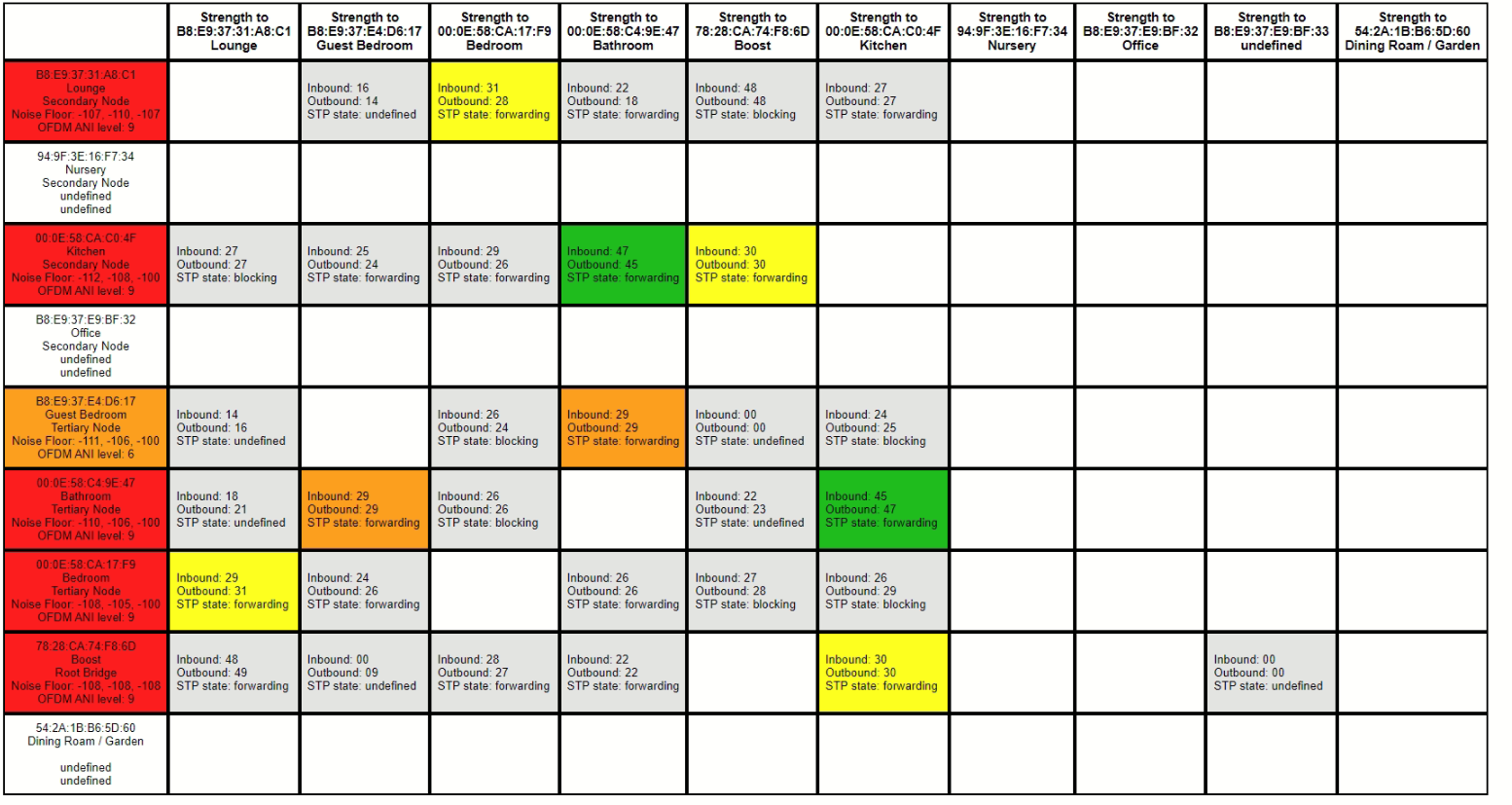


Any advice, suggestions are appreciated. 

I plan to move the location of the boost again as a first port of call. Does anyone use TP Link Omada and know the best settings to use?

This topic has been closed for further comments. You can use the search bar to find a similar topic, or create a new one by clicking Create Topic at the top of the page.
John BAnswer
August 1, 2022

When you can, turn the whole baby alarm system off for a few minutes and refresh the matrix.

Edit: just seen your question about this!

66 replies

ratty
August 1, 2022

Actually SonosNet might be worse. However if you powercycle the Office unit it may rejoin SonosNet. If that doesn't work, try changing the SonosNet channel back and forth. The nuclear option is to factory reset and re-add. 

Trending Lyricist I
August 1, 2022

Actually SonosNet might be worse. However if you powercycle the Office unit it may rejoin SonosNet. If that doesn't work, try changing the SonosNet channel back and forth. The nuclear option is to factory reset and re-add. 

I would guess it would be worse due to the location of the speaker… However it may connect through the Kitchen, I will power cycle and see.

Already gone nuclear on this one today so no issues doing so again

Trending Lyricist I
August 1, 2022

An update after todays tweaking, Sonos seems happy, been playing music in all rooms as a test and various grouped rooms and no dropouts. Best performance in a long time!


However, our baby monitor now keeps disconnecting and beeping! Ordering a new one… an old school DECT one which will hopefully behave and then all is good

Trending Lyricist I
August 4, 2022

Just dropping back in to say thanks for the help I have received on this post!

My Network Matrix is looking much healthier since changing the baby monitor.


The interference near the Boost is likely to be the Zigbee Hub, and the Lounge is possible Nvidia Shield as that connects via Bluetooth to it’s remote and gamepad

August 4, 2022

That’s great.  Thanks for posting back.  I’m glad changing the baby monitor worked as it would have been a shame to have had to get rid of the baby.

You could try changing the channel on the Zigbee, or moving it physically further from the router and Boost if cable and set up allow.  For a while in the recent past I had the Zigbee hub connected to the Ethernet port on one of my wireless Sonos speakers, and it worked fine.

ratty
August 4, 2022

“Office” still appears to be a maverick. It could be that it’s so far from any SonosNet nodes that it’s fallen back to WiFi.

August 4, 2022

“Office” still appears to be a maverick. It could be that it’s so far from any SonosNet nodes that it’s fallen back to WiFi.

Maybe turn off 5GHz wifi (or all wifi?) temporarily to see if that will get it to join SonosNet?  Maybe then it will stick, particularly if the interference picture is further improved.

Trending Lyricist I
August 4, 2022

“Office” still appears to be a maverick. It could be that it’s so far from any SonosNet nodes that it’s fallen back to WiFi.

Maverick! I like that term…  It shouldn’t really be too far from the Boost but there are walls etc in betweem


You could try changing the channel on the Zigbee, or moving it physically further from the router and Boost if cable and set up allow.  For a while in the recent past I had the Zigbee hub connected to the Ethernet port on one of my wireless Sonos speakers, and it worked fine.


Both Boost and Hubitat are currently centrally located, I may be better moving the Boost, I will experiment with this and report back in the coming days/week

That’s great.  Thanks for posting back.  I’m glad changing the baby monitor worked as it would have been a shame to have had to get rid of the baby.


I laughed too much at this!

August 4, 2022

Well it's a question of priorities!

Trending Lyricist I
October 17, 2022

So, after a couple of months with no changes to anything internally, we have started to notice the issues creeping back in.

These are:

1: Local files not playing, Sonos reports \\NASIP\Music not found when playing and attempts to play track

  1. Spotify or Amazon Music drops out and skips tracks or doesn’t start

I am back to where I was before seeing if using Omada would improve anything.


Any suggestions on what to try next? Unfortunately the wifi coverage in our house has never brilliant hence the need for a system like BT Whole Home or Omada. I have even tried Deco with similar results