
Trending Lyricist I
July 28, 2022
Answered

Help on improving my home setup - (Omada wifi / another boost?)

I have recently changed our home Wifi to TP Link Omada as our existing Wifi didnt reach around the home, I am planning on adding some managed switches too which I think will help with our sonos setup in the long run.


I currently have a number of devices hard wired (wifi off), a boost and some on wifi (should be sonosnet)


We have had performance issues on and off over the years and hard wiring some of the sonos appears to have fixed it, the office and nursery speakers are hard wired as they are the furthest from the Boost. Would an additional boost help?


Since changed to Omada APs, our devices connected by WiFi arent able to play anything, the wired devices are still functioning, these are currently connected to dumb switches.


Our network matrix is as below:
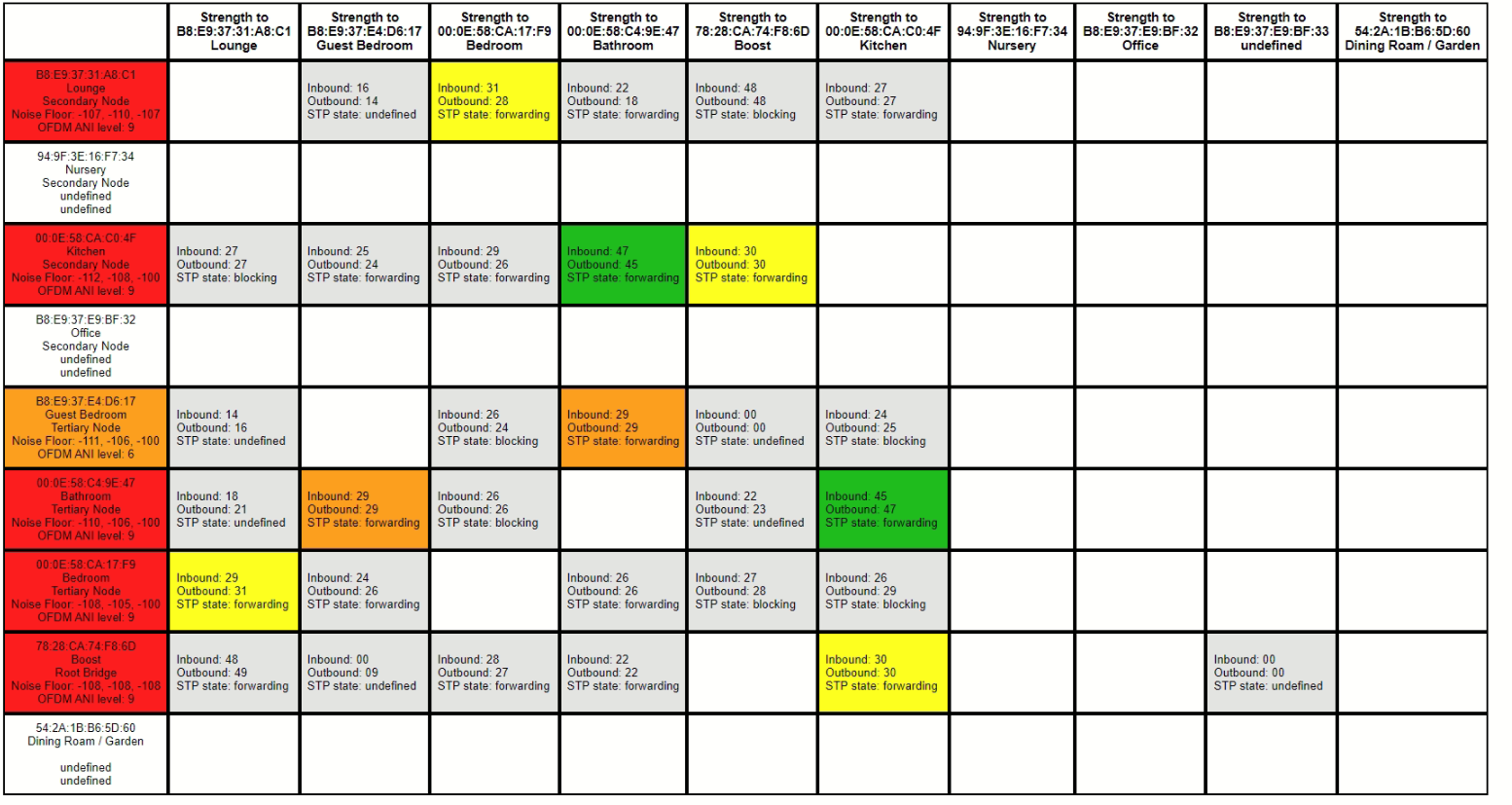


Any advice, suggestions are appreciated. 

I plan to move the location of the boost again as a first port of call. Does anyone use TP Link Omada and know the best settings to use?

This topic has been closed for further comments. You can use the search bar to find a similar topic, or create a new one by clicking Create Topic at the top of the page.
John BAnswer
August 1, 2022

When you can, turn the whole baby alarm system off for a few minutes and refresh the matrix.

Edit: just seen your question about this!

66 replies

Trending Lyricist I
August 1, 2022

I’ll try it this afternoon, as I am pretty intrigued now!


Thanks everyone for your input on this so far, been scratching my head for a while on this!

Ken_Griffiths
August 1, 2022

@wolvesphil,

Yes, lots of interference around the majority of devices, but maybe things need to settle - it would help to know what 2.4Ghz WiFi channels are in use by the Omada WiFi Hubs, aswell as knowing the chosen SonosNet channel.

Zigbee channel 25 or 26 are often good ones to use as I find those channels do not interfere too much, even with WiFi/SonosNet channel 11, if that may help you at all?

I’m not aware of the customisation allowed with the Omada WiFi mesh system, but perhaps in an ideal world, if no neighbours are encroaching on the property with their wireless networks, It would help for example, to get the Omada/Hubs all using ‘fixed’ channel-1 (ideally with a channel-width of 20Mhz only), then SonosNet on Channel-6 and Zigbee devices like your lights etc. running on channel-25. 

Try to get the baby monitor then on Channel 11 - if it allows that change. When the baby cries it might then only flash your lights on & off (joke) ha ha😀


ratty
August 1, 2022

In my experience a baby monitor completed hosed the entire system. They’re notorious. I guess it was a rather crude use of the entire 2.4GHz band, as it evidently sprayed noise everywhere.

Trending Lyricist I
August 1, 2022

@wolvesphil,

Yes, lots of interference around the majority of devices, but maybe things need to settle - it would help to know what 2.4Ghz WiFi channels are in use by the Omada WiFi Hubs, aswell as knowing the chosen SonosNet channel.

Zigbee channel 25 or 26 are often good ones to use as I find those channels do not interfere too much, even with WiFi/SonosNet channel 11, if that may help you at all?

I’m not aware of the customisation allowed with the Omada WiFi mesh system, but perhaps in an ideal world, if no neighbours are encroaching on the property with their wireless networks, It would help for example, to get the Omada/Hubs all using ‘fixed’ channel-1 (ideally with a channel-width of 20Mhz only), then SonosNet on Channel-6 and Zigbee devices like your lights etc. running on channel-25. 

Try to get the baby monitor then on Channel 11 - if it allows that change. When the baby cries it might then only flash your lights on & off (joke) ha ha😀


There is no way of changing the baby monitor and I think as @ratty says, it most likely saturates the entire band, which now may explain by previous WiFi issues with the old system and I am now trying to solve something that isnt solveable. 


I have my Omada AP’s running on channel 11 as this shows the least interference, 20MHz channel width and Low Tx Power.


Zigbee Hubitat Hub is running on Channel 25, so may be some interference with my AP’s

Zigbee Philips Hue is running on channel 15


Neighbours wifi channel 6 looking at “Wifi Analyzer App”, also a lower strength one on channel 1


Sonosnet has been moved to channel 1 as this looks to be the most free


Trending Lyricist I
August 1, 2022


This is with just the boost hardwired.

Boost is in the same location as my Hubitat and Hue hubs, i can move it


Baby monitor is currently turned off

ratty
August 1, 2022


This is with just the boost hardwired.

Boost is in the same location as my Hubitat and Hue hubs, i can move it


Baby monitor is currently turned off


It takes a minute or two before the ANI level reacts to a change in local interferers. 

As for the hubs, try spacing them at least 50cm away. The inverse square law obviously applies.

August 1, 2022

Again, try powering off the hubs temporarily and see if anything makes a radical difference.

Trending Lyricist I
August 1, 2022

Things are looking better / less red with the devices being power cycled.

This is still with baby monitor off, will turn that back on in 30 minutes

Something in the lounge appears to be source of the most interference… there is a Logitech Harmony Hub, Echo Show, Nvidia Shield, and the under stairs cupboard where the smart home hubs and boost live. This is probably 5m from the sonos lounge


Trending Lyricist I
August 1, 2022

Again, try powering off the hubs temporarily and see if anything makes a radical difference.

Good suggestion! That will be one for later in the week when time allows… As it now appears they are creating some interference.


If I move the boost should this ideally be centrally located in the house?

Trending Lyricist I
August 1, 2022

Baby monitor back on! I think I have found the culprit…


Is there a way to get my Office speaker to use Sonosnet rather than WiFi? Assume that would be better...