
Contributor I
October 30, 2016
Question

Do I have STP issues with a Sonos boost and Connect both hardwired?

Hi,

We have a Sonos setup that is split across two buildings. One building houses audio and networking equipment and building 2 is where the sonos speakers are playing. We have issues where the Sonos Connect sometimes isn't found and doesn't show up on the network. We use the Sonos connect for line-in functionality.

Based on the research I've done, it looks like I might need to disable the wireless on the Connect and/or replace my switch with one that supports STP.

I've attached a diagram for reference, just wanted to get some input before I purchase hardware.
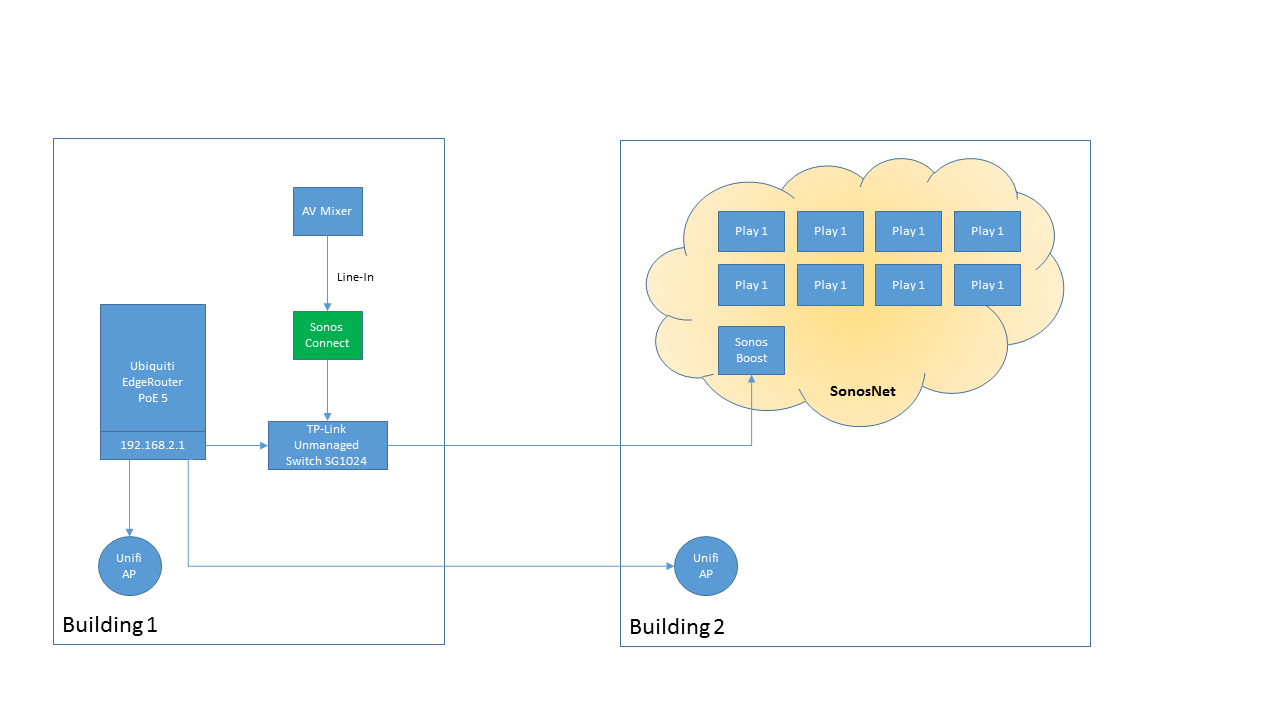


Thanks!
    This topic has been closed for further comments. You can use the search bar to find a similar topic, or create a new one by clicking Create Topic at the top of the page.

    13 replies

    November 3, 2016
    Sounds like it is worth checking the Wi-Fi stuff in detail:

    Make sure the APs and Sonos are on different channels

    Make sure both are limited to channels 1, 6, or 11 so there is no overlap

    Make sure the APs are set to a channel width of 20 MHz NOT 40 MHz and NOT automatic 20/40

    Try to keep the APs and Sonos devices as far from each other as possible

    There has to be a simple cause... hope you find it.
    Local music library with carefully constructed playlists - no shuffling!, Integration with Homeseer Automation, No touch screen devices, No streaming services, No Apple products ever
    FixMeAuthor
    Contributor I
    November 7, 2016
    Well, I was able to fix the issue but I'm not 100% what was the true cause of the problem.

    I completely disabled/powered down the Unifi AP and it didn't improve or change the situation. I did go ahead and make the changes to the settings as mentioned.

    I installed a managed switch with STP support and configured it based on some settings I read on the sonos community board. I wired both the Boost and Connect to it and things started working but still had occasionally drops. I then unplugged power to the Boost and left it unplugged for about 5 mins. During that period I also disabled wifi on the Connect. I plugged power back to the Boost and everything came up and has been solid with no drops.

    I'm not sure if it was the powercycle of the Boost that fixed things or putting in the managed switch or both, but that's what it took to get things working again. I'll keep the managed switch in the event our setup gets any more complicated in the future. Thanks for all the tips and input!
    ratty
    November 7, 2016
    I would guess that disabling the radio on the CONNECT is what helped. What exactly is the wired connection between the two buildings? Ethernet? Roughly how far is it?