
Contributor I
October 30, 2016
Question

Do I have STP issues with a Sonos boost and Connect both hardwired?

Hi,

We have a Sonos setup that is split across two buildings. One building houses audio and networking equipment and building 2 is where the sonos speakers are playing. We have issues where the Sonos Connect sometimes isn't found and doesn't show up on the network. We use the Sonos connect for line-in functionality.

Based on the research I've done, it looks like I might need to disable the wireless on the Connect and/or replace my switch with one that supports STP.

I've attached a diagram for reference, just wanted to get some input before I purchase hardware.
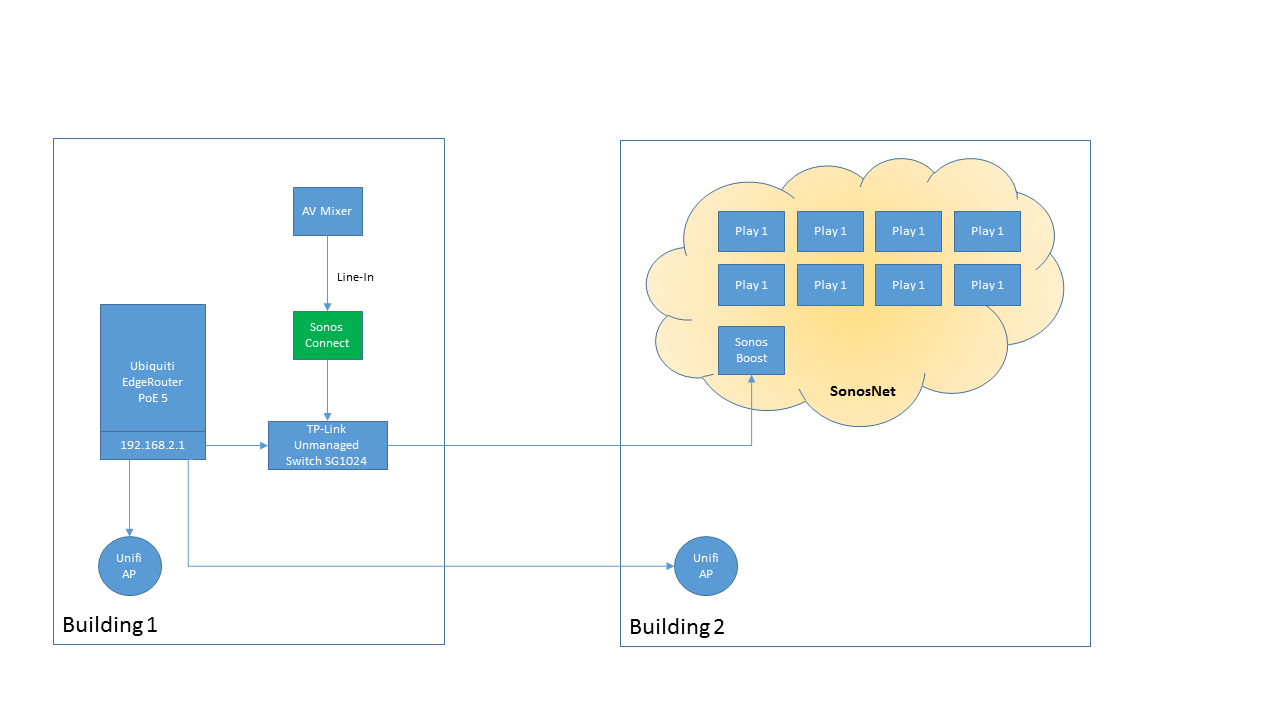


Thanks!
    This topic has been closed for further comments. You can use the search bar to find a similar topic, or create a new one by clicking Create Topic at the top of the page.

    13 replies

    ratty
    October 30, 2016
    There shouldn't be an STP issue with that switch. That said, given your config I'd be inclined to disable wireless on the CONNECT anyway. It's not officially condoned of course.

    When you say the CONNECT doesn't show up on the network, do you mean in a Sonos controller, or are you losing it in a device scan such as with Fing?
    October 30, 2016
    I have used unmanaged TPLink switches without STP issues so I doubt it is that.

    Have you tried using a different wireless channel for your Sonos system? Maybe there is some contention with the APs.

    Have you tried a new patch cable between the Connect and the TPLink switch? A bad Ethernet cable can create some tough to diagnose problems.

    Not a fan of shutting off Sonos radios but you could try it on the Connect just to see if it changes anything.

    Also make sure your DHCP setup is clean with reserved addresses for the Sonos gear and as many other networked items as possible.
    Local music library with carefully constructed playlists - no shuffling!, Integration with Homeseer Automation, No touch screen devices, No streaming services, No Apple products ever
    FixMeAuthor
    Contributor I
    October 30, 2016
    I'm losing it in a device scan as well as it disappearing from the Sonos controller. When I try to ping the IP it just times out.

    I'll try out the options you guys mentioned (e.g, new cable, disable wireless, change wireless channel etc)

    Thanks!
    FixMeAuthor
    Contributor I
    November 3, 2016
    I played around with it some more today and I found that if I disconnect the Boost, the Connect shows up in the controller and is stable. As soon as the Boost is connected to the network (hardwire), the Connect drops from the network (not pingable and can't see it in the controller). It seems like there is some type of contention between the Boost and the Connect.

    I'm tempted to reset all the devices to factory state, forget the current system in the controller, and re-add all the devices starting with the Connect.
    November 3, 2016
    Actually this does sound like an STP thing based on what you are seeing. If you unplug the Boost do you lose all of the players in building 2 or do they still work wirelessly across to the Connect in building 1?

    Or can you go the other way and unplug the Connect from the switch and see if it will reach the Boost wirelessly?

    Also what device are you using to look at the network and where is it located?
    Local music library with carefully constructed playlists - no shuffling!, Integration with Homeseer Automation, No touch screen devices, No streaming services, No Apple products ever
    FixMeAuthor
    Contributor I
    November 3, 2016
    Yes, if I unplug the Boost all the players in building 2 are lost. I think the Connect and the Boost are sufficiently far enough that there is no way the Connect can jump on SonosNet

    Likewise, if I unplug the Connect from the switch it doesn't reach the Boost.

    I'm using a laptop hardwired into the switch in building 1.
    November 3, 2016
    So there is no wireless path between building 1 and building 2 so the contention is not due to multiple routes. I wonder if the Boost is having a problem with Unifi AP? How close together are they? Is there any channel overlap?

    Is there any way to leave the Boost off and temporarily plug one of the Play1s into the Ethernet feed from the switch? This would give you the SonosNet mesh in building 2 without the Boost to see if the problem is the Boost itself or if it happens any time that SonosNet in building 2 is linked to the switch.
    Local music library with carefully constructed playlists - no shuffling!, Integration with Homeseer Automation, No touch screen devices, No streaming services, No Apple products ever
    FixMeAuthor
    Contributor I
    November 3, 2016
    I just moved the Boost and UnifiAP to be next to each other this past weekend. Previously they were about 10-15 feet apart. I'll look into the channel overlap as well.

    I think I have enough length in the Ethernet cable to bypass the boost and go straight to a Play 1. Will give that a try!
    November 3, 2016
    So just to clarify, did things work better before you moved the Boost closer to the Unify AP or did the system never work?
    Local music library with carefully constructed playlists - no shuffling!, Integration with Homeseer Automation, No touch screen devices, No streaming services, No Apple products ever
    FixMeAuthor
    Contributor I
    November 3, 2016
    The system was previously generally working with some occasional drop out in sound. The occasional drop (interruption) in sound is what lead me to believe there might've been STP issues.

    After I moved the Boost (had to unplug and re-plug power) I haven't been able to get the Connect and Boost to co-exist on the network at the same time. Moving the Boost did slightly put it closer to the Connect. It didn't occur to me that moving the Boost might be triggering the problem (e.g, interference with Unifi AP, Connect jumping onto SonosNet - I haven't physically observed this yet)

    Unfortunately this set up is not at my house but at my church so I won't be able to trouble shoot again until the weekend. I drove over there yesterday to play with it based on the initial feedback and that's how I learned a little more.