

Alex Morrison
Trending Lyricist I
July 25, 2021
Answered

Amp + Arc Wired/Wireless Set Up
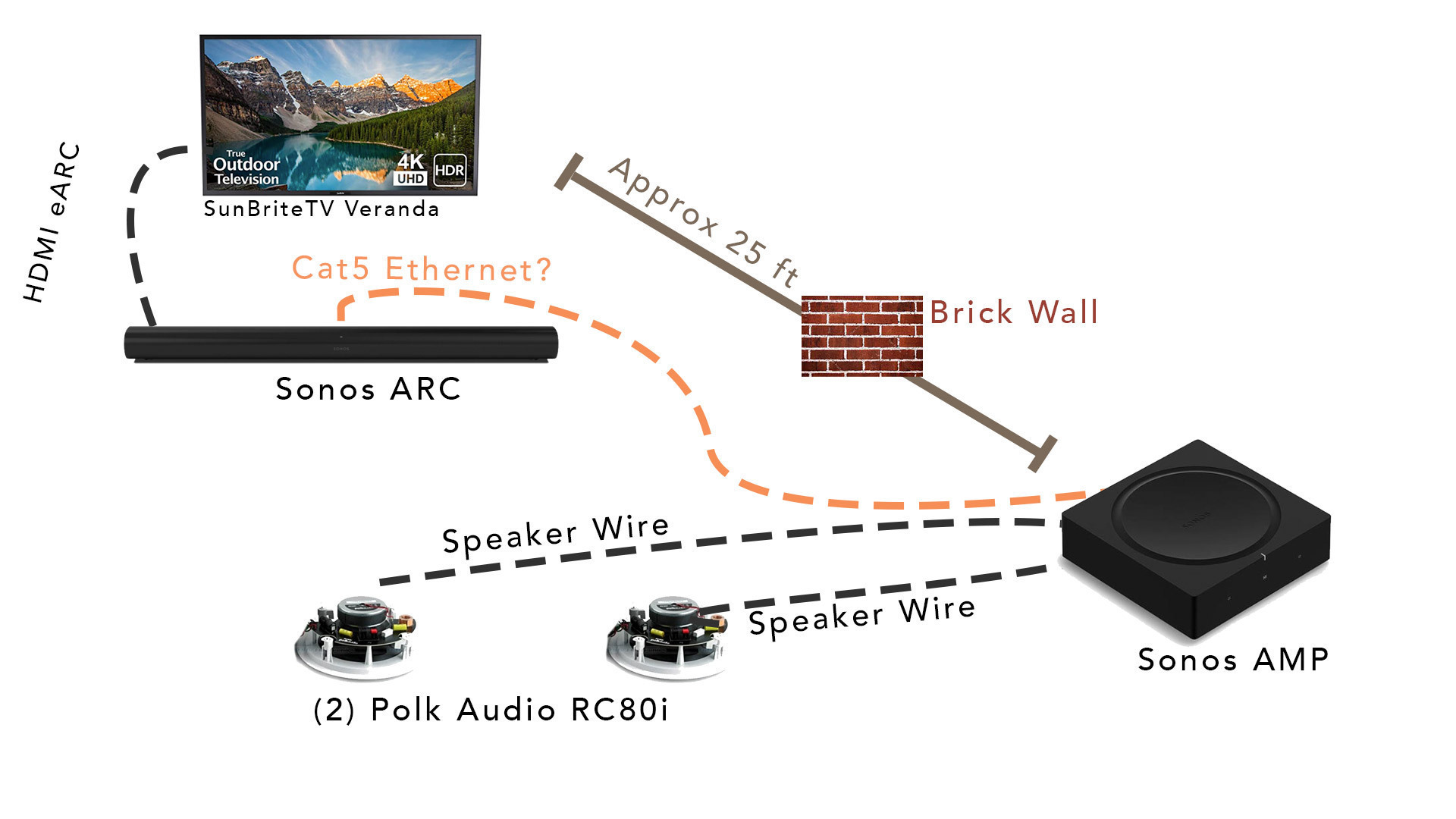
 

This is the set up recently put together but I’m having a hard time setting up the AMP as surrounds. The ARC & TV are outside on a porch. The amp is inside in a basement utility closet. 


If I try to set up the amp as surrounds wirelessly, it doesn’t connect, which I would suspect would happen because it’s in a basement below the Arc and there’s an exterior wall between the two likely interfering the 5Ghz connection the Arc puts out.


However, I ran a CAT6 cable between the Arc and Amp, but when I try to set up the surrounds with that plugged in, it’s still giving a network error. 


Should the Amp be plugged into my wireless router instead? 


I’m stuck! 

 

This topic has been closed for further comments. You can use the search bar to find a similar topic, or create a new one by clicking Create Topic at the top of the page.
Ken_Griffiths
July 26, 2021

Even though this (below link) is in relation to the older Connect:Amp, in your case the same thing applies as the Amp, you say, is too far away for the wireless connection to the Arc. So you need one device wired to the router, my suggestion is to just wire your Arc back to the router and leave the Amp wired to the Arc and it should then work … perhaps see this document:

https://support.sonos.com/s/article/2237

25 replies

Alex Morrison
Trending Lyricist I
August 7, 2021

When I look at the Sonos app when the tv is pushing out audio, it says “stereo pcm” - that could be another clue 

Alex Morrison
Trending Lyricist I
August 7, 2021

That was it- when I played a movie it switched to Dolby.

Ok then!

Alex Morrison
Trending Lyricist I
August 7, 2021

Before, I was testing playing YouTubeTV.. is there a setting that would force audio to come from all the speakers when it’s not Dolby? 

Ken_Griffiths
August 7, 2021

Before, I was testing playing YouTubeTV.. is there a setting that would force audio to come from all the speakers when it’s not Dolby? 

Not for stereo TV audio - that usually only plays on the front HT channels only.

There are some settings you can try though…

Goto "Settings/System/[Arc Room Name] and look in ‘Surround Audio’.

I will perhaps suggest changing the Ambient setting to ‘Full’ for music audio.  Also you can try adjusting the ‘TV Level slider Bar’ and set the distance of the surrounds to a greater value to get more from your rear speakers during both TV and Music playback.

Ken_Griffiths
August 7, 2021

Don’t forget to perhaps also go back and see if the ‘Auto’ sound out works on Apple TV too, as that will give you LPCM audio which is ‘supposedly’ a slightly better quality, but personally speaking I’m happy with the Dolby Digital surround setting.