

Alex Morrison
Trending Lyricist I
July 25, 2021
Answered

Amp + Arc Wired/Wireless Set Up
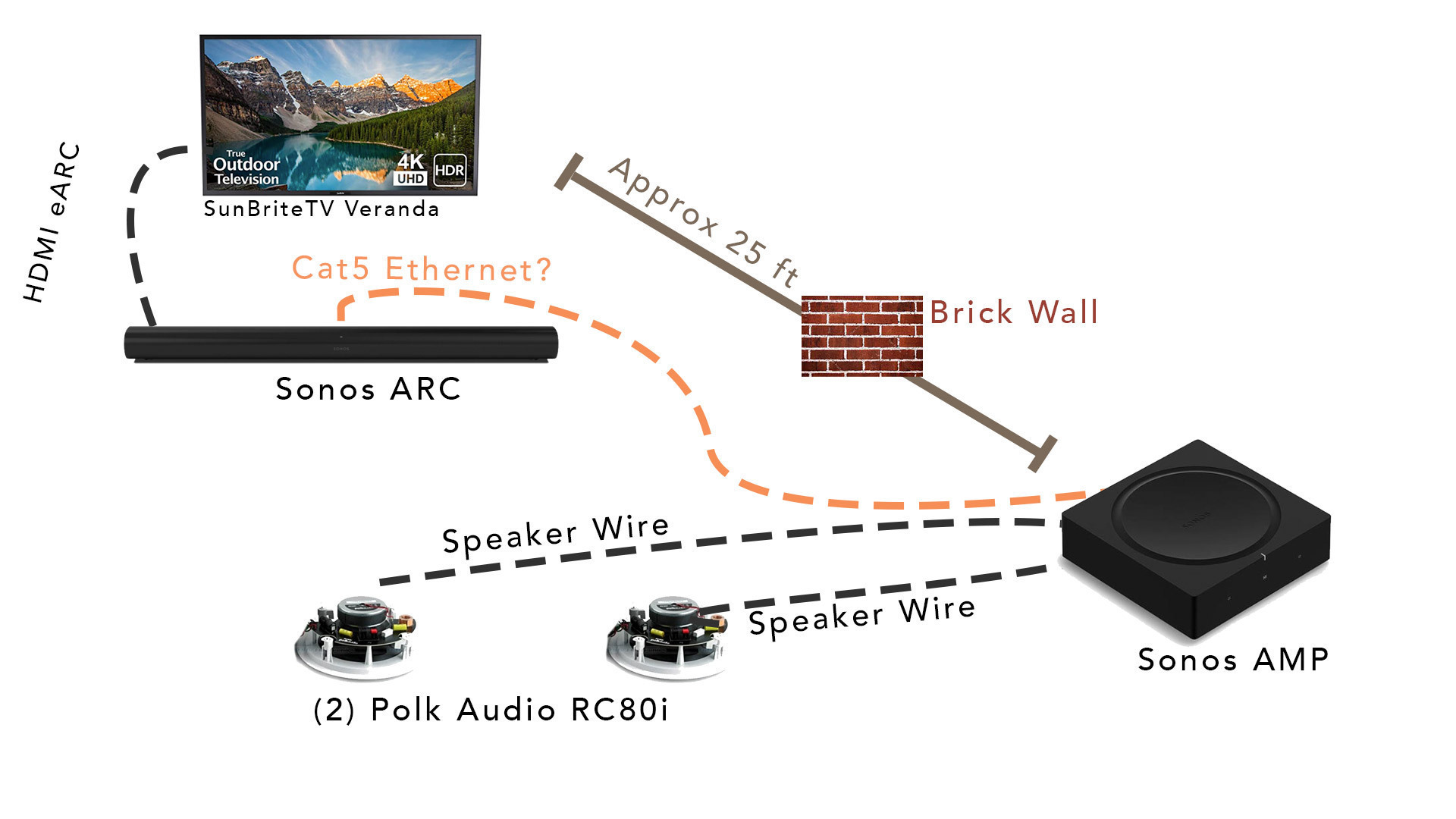
 

This is the set up recently put together but I’m having a hard time setting up the AMP as surrounds. The ARC & TV are outside on a porch. The amp is inside in a basement utility closet. 


If I try to set up the amp as surrounds wirelessly, it doesn’t connect, which I would suspect would happen because it’s in a basement below the Arc and there’s an exterior wall between the two likely interfering the 5Ghz connection the Arc puts out.


However, I ran a CAT6 cable between the Arc and Amp, but when I try to set up the surrounds with that plugged in, it’s still giving a network error. 


Should the Amp be plugged into my wireless router instead? 


I’m stuck! 

 

This topic has been closed for further comments. You can use the search bar to find a similar topic, or create a new one by clicking Create Topic at the top of the page.
Ken_Griffiths
July 26, 2021

Even though this (below link) is in relation to the older Connect:Amp, in your case the same thing applies as the Amp, you say, is too far away for the wireless connection to the Arc. So you need one device wired to the router, my suggestion is to just wire your Arc back to the router and leave the Amp wired to the Arc and it should then work … perhaps see this document:

https://support.sonos.com/s/article/2237

25 replies

melvimbe
August 4, 2021


  1. On my Apple TV, I had to go into it’s own Audio Settings, make sure it’s pushing out Dolby and then, (this is KEY), select the Sonos Room of Arc+Amp as the default speaker AND unselect the TV speakers… otherwise it only pushes audio to the Arc. 


On your Apple TV?  That sounds like you’re using Apple airplay to send the audio rather than the HDMI-ARC connection between the TV and Sonos arc.  

Danny
Ken_Griffiths
August 4, 2021

@Alex Morrison

I agree with Danny, it looks like the ATV is using Airplay to send the audio to the speakers - Once devices are ‘bonded’ as a HT setup it should just show as one ‘Room’ too (whatever Room your Arc is named).

Also, whilst I assume you have your own reasons, however in most use-cases, there is rarely the need to cable the Arc, or the Amp, back to the router - that wired setup is only needed for the older Connect:Amp, which did not have a 5Ghz wireless adapter - the new Amp has a 5Ghz adapter and so can happily ‘bond’ to the Arc over WiFi, unless of course it’s located a fair distance away from the Arc, behind a brick wall, or two, but it’s not normally going to be a ‘typical’ HT setup for others.

edit: I think it’s worth users first considering trying to move the Amp closer to the HT device instead, if they can possibly achieve that.

Alex Morrison
Trending Lyricist I
August 4, 2021

@Ken_Griffiths Right. There is an exterior brick wall in between the Arc & Amp.. plus the Arc sits on top of a stone mantle, so they were never able to connect via their own 5G subnet. 

They are bonded and set up as a single room now, but will only stay bonded via the hardwire. 

Going back to the Airplay discussion - I’ll take a look tonight, but I could’ve sworn it’s just a default “select speaker” option in the Apple TV settings that I changed. Before I changed that, audio would only come through the Arc and not the amp as well. 

Ken_Griffiths
August 4, 2021

@Alex Morrison, 

Just to let you know, that my understanding is, in the widely available ‘public beta’ of tvOS, Apple seemed to have somewhat improved the way the default audio-out to a TV/Receiver is now selected on their ATV device, as there has apparently been some slight confusion in the past over the HDMI connection and those speakers available over Airplay.

IIRC the usual selection on the current v14.7 of tvOS is to select "HDMI” or wording similar to that  - but that’s from memory only and I’m not near my system to be able to check those settings for you.. but it’s worth just checking what you have selected in the ATV settings.

Airgetlam
August 4, 2021

As far as I’m aware, AirPlay 2 can not send a Dolby Digital signal to a Sonos device, only a stereo signal. 

Bruce
Airgetlam
August 4, 2021

Just to clarify further, my understanding is that an Apple Device can send a 5.1 (Dolby Digital) signal to the Apple TV via AirPlay 2.But the signal being sent from an Apple device (the Apple TV in this case) can only send a stereo signal via AirPlay 2 to the Sonos. 

That’s my understanding. AirPlay 2 restricts Dolby Digital to between Apple devices, not Apple devices get only a stereo signal.

Happy to be corrected if my understanding is wrong. 

Bruce
Alex Morrison
Trending Lyricist I
August 7, 2021

Shoot. Y’all were right.

When I go to ATV’s audio settings, I can only select the Sonos room in the “temporary audio output”. The only default is “TV speakers” (which do push out to the ARC, but a signal is not reaching the amp surrounds)

I’m stuck again!

Ken_Griffiths
August 7, 2021

Shoot. Y’all were right.

When I go to ATV’s audio settings, I can only select the Sonos room in the “temporary audio output”. The only default is “TV speakers” (which do push out to the ARC, but a signal is not reaching the amp surrounds)

I’m stuck again!

ATV outputs using LPCM codec by default (which the Sonos Arc does support by the way), but perhaps the connected TV will not ‘pass through’ that codec. What TV make/model is the ATV connected to?

If you goto the ATV "Settings/video and audio” what output do you get if you select the audio format and switch on the ‘change format’ option and turn off the auto option - just see if changing that setting then works for you.🤞

Alex Morrison
Trending Lyricist I
August 7, 2021

Tv model:

SunbriteTV Veranda (2nd gen) 4K UHD HDR LED 55”


The “audio format” was set to auto.. when I changed that I selected Dolby.

restarted Apple TV.. still getting audio to arc, but not amp. :-/


Ken_Griffiths
August 7, 2021

Tv model:

SunbriteTV Veranda (2nd gen) 4K UHD HDR LED 55”


The “audio format” was set to auto.. when I changed that I selected Dolby.

restarted Apple TV.. still getting audio to arc, but not amp. :-/
 

Are you playing a 5.1 audio stream?

Perhaps try a movie from Netflix like ‘6 Underground’ or maybe an episode of ‘Jack Ryan’ from Prime Movies. Then see what your audio output is on the ‘Now Playing’ screen for your Arc in the Sonos App.