
Enthusiast II
September 4, 2017
Question

5 sonos devices on a Ubiquity Unifi network. Matrix looks terrible.

Just brought up a network at home, and the matrix now looks terrible. Details below.

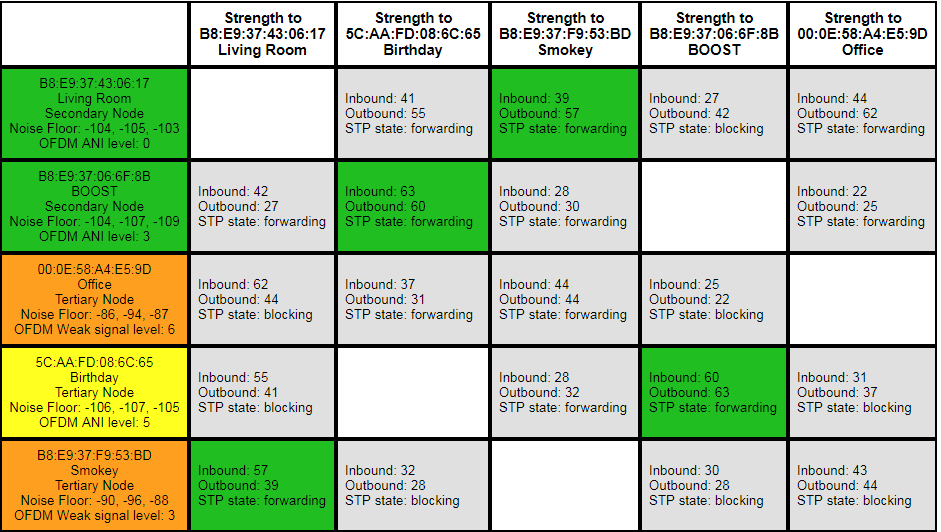
Something is clearly wrong. You can see in the attached matrix that there is no root device, and a lot of STP is blocked. Wired devices are turning up orange.

This Sonos system has “evolved” over 5 years and several routers, bridge swapped for boost, etc. I feel like it maybe needs a factory reset. There are a few settings in there I care about, but could live without (a couple of playlists, DSP tuning of the speakers). Here are the full details:

I'm using Sonos Net for the wireless. Here's the network topology:
Unifi USG router -> Unifi switch 8 (root switch).

root switch -> Sonos Boost.
root switch -> Playbase "Living Room"
root switch -> Unifi switch 8 (secondary switch).

secondary switch -> Sonos Connect (Office).

Sonos Play5 II, wireless, near boost (“Birthday”)
Sonos Play5 I, wireless, near connect (“Smoky”)

The Unifi switches are set up the recommended way for Sonos. Spanning tree is set to STP, and the priority is 4096 on the root switch, and 8192 on the secondary switch.
    This topic has been closed for further comments. You can use the search bar to find a similar topic, or create a new one by clicking Create Topic at the top of the page.

    25 replies

    buzz
    Grand Maestro
    September 29, 2017
    mataglap,

    Yes, SONOS units will always "talk" because they want to keep track of current wireless network conditions -- if only to know which links will not be productive. This is done in order to have the ability to quickly start using an alternate path if a current path goes down. The idea is to be able to find an alternate path without interrupting the music.
    September 29, 2017
    I've been repeatedly told by Sonos support that even in a fully wired network, speakers talk to each other over wifi, and that is used in paired and grouped playback, at the very least.As @buzz said, they stay in touch by sending a few friendly pings. I imagine it must be over SonosNet, not wifi as stated by @mataglap.
    I'm not convinced paired or grouped playback would be fundamentally different in this respect, but I couldn't be totally confident on that.
    September 29, 2017
    @buzz yes I was sloppy in saying "wifi" and not "SonosNet". But I'm not talking about the BDU packets. Can you say authoritatively that SonosNet communication between wired Sonos units is not used for other purposes?

    I've been told that there is active "wireless" (presumably SonosNet) communication between fully wired players in paired and group playback situations. I couldn't get any more detail. Wireless interference has been cited by Support as an issue in my wired network when troubleshooting playback problems from my local library.

    If there are aspects of the Sonos software that use SonosNet even when wired, then the conventional wisdom about turning off the wireless radio when cabled is at best misleading, and potentially introducing more problems.
    Stanley_4
    Grand Maestro
    September 29, 2017
    There are a wealth of statistics available on the Sonos diagnostics pages that you could probably use to see just what is going on with your networking. I'm just not up for that level of effort as long as things are working here.
    buzz
    Grand Maestro
    October 1, 2017
    Can you say authoritatively that SonosNet communication between wired Sonos units is not used for other purposes?
    In some respects this is a trick question.

    SONOS will share its connection with any device plugged into one of its network ports. This could present a security problem if a hacker has physical access to a player because the network ports are on the local subnet. It's also a wonderful opportunity to provide a network connection to a device when there is no easy opportunity to run a wire -- just hook up to the nearest SONOS player. Don't go crazy with this sharing because you could swamp SonosNet with miscellaneous traffic. SonosNet is robust for audio, but shouldn't be used to support a video server with multiple simultaneous clients. I have successfully used SonosNet to support a TV running Netflix when the TV was in a spotty WiFi location.

    A dedicated, well equipped hacker could probably break the SonosNet wireless security, but this is not a piece-of-cake project for the walk-by teen prankster. It would be much easier to prank the local WiFi. An Android device can use SonosNet rather than WiFi (after setup via WiFi).