
Enthusiast II
September 4, 2017
Question

5 sonos devices on a Ubiquity Unifi network. Matrix looks terrible.

Just brought up a network at home, and the matrix now looks terrible. Details below.

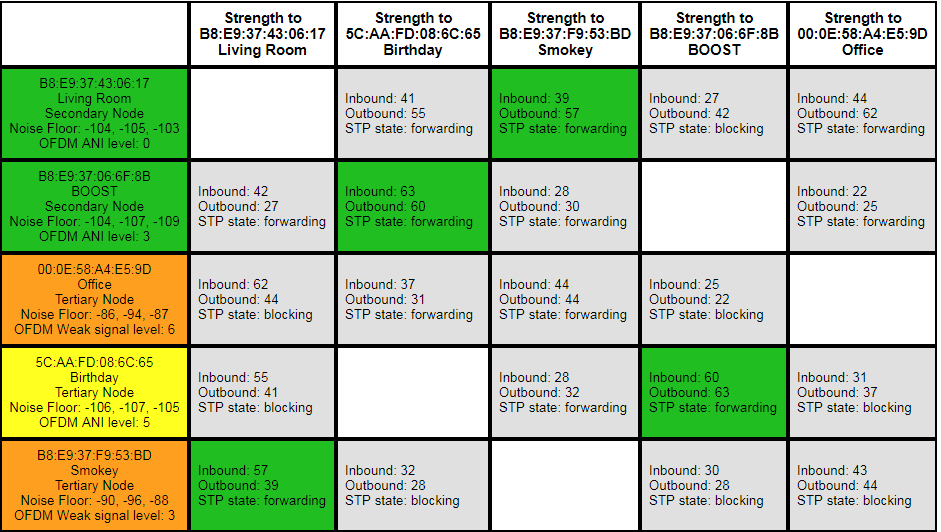
Something is clearly wrong. You can see in the attached matrix that there is no root device, and a lot of STP is blocked. Wired devices are turning up orange.

This Sonos system has “evolved” over 5 years and several routers, bridge swapped for boost, etc. I feel like it maybe needs a factory reset. There are a few settings in there I care about, but could live without (a couple of playlists, DSP tuning of the speakers). Here are the full details:

I'm using Sonos Net for the wireless. Here's the network topology:
Unifi USG router -> Unifi switch 8 (root switch).

root switch -> Sonos Boost.
root switch -> Playbase "Living Room"
root switch -> Unifi switch 8 (secondary switch).

secondary switch -> Sonos Connect (Office).

Sonos Play5 II, wireless, near boost (“Birthday”)
Sonos Play5 I, wireless, near connect (“Smoky”)

The Unifi switches are set up the recommended way for Sonos. Spanning tree is set to STP, and the priority is 4096 on the root switch, and 8192 on the secondary switch.
    This topic has been closed for further comments. You can use the search bar to find a similar topic, or create a new one by clicking Create Topic at the top of the page.

    25 replies

    September 5, 2017
    It isn't ports being blocked it's network loops being prevented
    September 5, 2017
    I think you are wrong about the wired connection being blocked. I think Office is shown as tertiary because it is not getting its data directly from the root (the root switch) but from the secondary switch. The potential wireless paths to Living Room, Smokey and Birthday are all closed, as they should be.
    IMO you are barking up the wrong tree completely with this network matrix stuff. Your real problem is that line-in uncompressed is dropping out, which could happen with the most healthy-looking matrix. The solution is to change to compressed - I bet you don't notice any change in sound quality, other than that caused by expectations bias!
    robokittyAuthor
    Enthusiast II
    September 5, 2017
    I think you are wrong about the wired connection being blocked [...]The solution is to change to compressed - I bet you don't notice any change in sound quality, other than that caused by expectations bias!
    hah - I'll bet you are right about all this. Although I'm still going to stick with uncompressed - it's always worked fine for me in the past. tx again.
    MikeV
    September 5, 2017
    Your matrix looks fine to me. That's what I would expect it to look like with five devices, three of which are wired.

    The yellow and orange in the left column indicate local noise near those devices, but the actual wireless links between devices are in good shape (they're green). While you mention that Smokey is close to Office, one of the links to Living Room is strong enough that it's preferring that route instead of going to Office. Maybe move it closer to one or the other, if possible, so the signals are stronger or weaker. The strong link between Smokey and Living Room is much stronger than the connections to Office... so it might be better to move closer to Living Room.
    The S in IOT stands for Security.
    robokittyAuthor
    Enthusiast II
    September 5, 2017
    I'm getting a lot of good info from anyone. One Q: what does "green" mean in the matrix? Notice that every device seems to have one green path somewhere, except "office" who is wired to the secondary switch.

    If green is good, I would expect office to have a green connection to someone wired (like Living Room, who is on the root switch).
    smile-me
    Contributor I
    September 5, 2017
    AFAIK the colors indicate wi-fi strength only. You don't get the "strength" of a wired connection in the matrix.
    A suggestion (although unsupported, your own risk) would be to switch off wi-fi on the devices which have a permanent ethernet connection. Such devices show up in the matrix with an empty row.
    robokittyAuthor
    Enthusiast II
    September 6, 2017
    AFAIK the colors indicate wi-fi strength only. You don't get the "strength" of a wired connection in the matrix.
    A suggestion (although unsupported, your own risk) would be to switch off wi-fi on the devices which have a permanent ethernet connection. Such devices show up in the matrix with an empty row.


    Thanks! Learning a lot 🙂
    Stanley_4
    Grand Maestro
    September 6, 2017
    Here is a matrix with two radios (Office, Living Room) disabled, they were too close to other WiFi devices and had wired connections easily available.

    Contributor I
    September 29, 2017
    I use managed switches and Unifi access points and have 10 Sonos devices 7 of which are wired and the other 3 are on Sonos Net. I use several switches set up as yours are with my main switch as the root bridge for STP.

    Your Matrix looks fine. The blocking is expected. If there was not blocking you would have a network storm/flooding problem.

    Don't reset anything nor switch the Sonos devices to your wifi! Leave it set up the way it is.

    Are you having specific problems? What are they? If there is a specific issue let's try and solve that.
    September 29, 2017
    I've been repeatedly told by Sonos support that even in a fully wired network, speakers talk to each other over wifi, and that is used in paired and grouped playback, at the very least.