
Enthusiast II
September 4, 2017
Question

5 sonos devices on a Ubiquity Unifi network. Matrix looks terrible.

Just brought up a network at home, and the matrix now looks terrible. Details below.

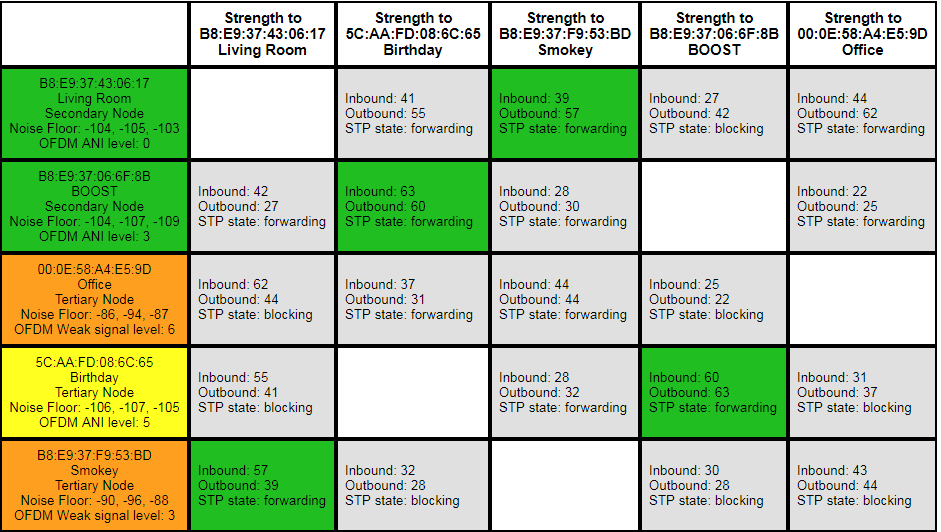
Something is clearly wrong. You can see in the attached matrix that there is no root device, and a lot of STP is blocked. Wired devices are turning up orange.

This Sonos system has “evolved” over 5 years and several routers, bridge swapped for boost, etc. I feel like it maybe needs a factory reset. There are a few settings in there I care about, but could live without (a couple of playlists, DSP tuning of the speakers). Here are the full details:

I'm using Sonos Net for the wireless. Here's the network topology:
Unifi USG router -> Unifi switch 8 (root switch).

root switch -> Sonos Boost.
root switch -> Playbase "Living Room"
root switch -> Unifi switch 8 (secondary switch).

secondary switch -> Sonos Connect (Office).

Sonos Play5 II, wireless, near boost (“Birthday”)
Sonos Play5 I, wireless, near connect (“Smoky”)

The Unifi switches are set up the recommended way for Sonos. Spanning tree is set to STP, and the priority is 4096 on the root switch, and 8192 on the secondary switch.
    This topic has been closed for further comments. You can use the search bar to find a similar topic, or create a new one by clicking Create Topic at the top of the page.

    25 replies

    Collaborator II
    September 5, 2017
    I highly recommend either turn off SonosNet and use your household WiFi, or unplug two of the Connect, Boost or Playbase. You want either a single bridge to your wired network, or them all to run off of your network. The best way to use STP is to just avoid the loops to begin with. 🙂
    robokittyAuthor
    Enthusiast II
    September 5, 2017
    BTW: there used to be posts here on how to reset all of this without doing a factory reset. But it seems that all the URLs changed on this forum, and now all the links to the magic article go nowhere.
    robokittyAuthor
    Enthusiast II
    September 5, 2017
    I highly recommend either turn off SonosNet and use your household WiFi, or unplug two of the Connect, Boost or Playbase. You want either a single bridge to your wired network, or them all to run off of your network. The best way to use STP is to just avoid the loops to begin with. :)

    That's a pretty draconian solution! Don't use all my devices is a non-starter. Don't use Sonosnet is interesting, but runs counter to all the discussion I've seen on this issue. All the posts I've seen claim that Sonosnet is much preferable to WiFi.
    Collaborator II
    September 5, 2017
    That's a pretty draconian solution! Don't use all my devices is a non-starter. Don't use Sonosnet is interesting, but runs counter to all the discussion I've seen on this issue. All the posts I've seen claim that Sonosnet is much preferable to WiFi.I said unplug two of the three - and only from the Ethernet. ;)

    SonosNet is isolated from the household WiFi, so it can work with its modest bandwidth requirements on iffy signals, and most people have poor WiFi coverage using fair to poor routers - that's then shared between all of their much more bandwidth hungry devices. If you don't have that problem (I have four Cisco WAPs... suffice it to say it drowns out anything Sonos can do), then it's really horses for courses. The fact that you have a Ubiquiti solution leads me to believe you're closer to my situation than the average user's. You can also use QoS on the WiFi to ensure a slice of bandwidth is always available to Sonos.
    September 5, 2017
    I think @jec6613's suggestions are very reasonable, but your post prompts a number of thoughts:

    1. Forget factory resetting, which would be utterly pointless in this situation
    2. It is pretty clear that the "root switch" is acting as the root, hence no root in the matrix
    3. No idea what you mean by setting up the switches in the recommended way for Sonos. Recommended by whom?
    4. If you wish to continue to use SonosNet, wire the Boost to the router and go wireless with everything else. Going to standard setup is another possibility, as already mentioned by @jec6613
    5. Nothing wrong with blocking, that is what STP is supposed to do
    6. What channels are your router and SonosNet on?
    7. If the wireless P:5 is close to the Boost, why not wire the P:5 instead of the Boost?
    robokittyAuthor
    Enthusiast II
    September 5, 2017
    ... If you don't have that problem (I have four Cisco WAPs... suffice it to say it drowns out anything Sonos can do), then it's really horses for courses. The fact that you have a Ubiquiti solution leads me to believe you're closer to my situation than the average user's. You can also use QoS on the WiFi to ensure a slice of bandwidth is always available to Sonos.
    Good points! But I still think something is wrong when the matrix is showing bad connections between two wired devices. Really looks like something is going wrong with STP here. I will try WiFi at some point, however.
    September 5, 2017
    And a further question... how is your system actually performng?
    September 5, 2017
    And incidentally, the orange indicates local interference, which, as the devices are wired, isn't really a concern. It would not surprise me if this system is actually functioning OK. What problems are you having?
    robokittyAuthor
    Enthusiast II
    September 5, 2017
    And incidentally, the orange indicates local interference, which, as the devices are wired, isn't really a concern. It would not surprise me if this system is actually functioning OK. What problems are you having?

    Great points. And, I have to admit that as I'm scurrying around setting up network stuff, I haven't listened much today. But since I use the connect only to digitize my turntable and stream it uncompressed to the Play 5-II, I have historically had dropout issues. So I'm paranoid about connectivity to that unit.

    I'm no expert at the "matrix", but all that STP port blockage worries me. I may be wrong, but it looks like STP is preventing the wired connect from using the wire.

    But, yeah, I should just play a few records and see what happens.
    robokittyAuthor
    Enthusiast II
    September 5, 2017
    I think @jec6613's suggestions are very reasonable, but your post prompts a number of thoughts:

    1. Forget factory resetting, which would be utterly pointless in this situation
    2. It is pretty clear that the "root switch" is acting as the root, hence no root in the matrix
    3. No idea what you mean by setting up the switches in the recommended way for Sonos. Recommended by whom?
    4. If you wish to continue to use SonosNet, wire the Boost to the router and go wireless with everything else. Going to standard setup is another possibility, as already mentioned by @jec6613
    5. Nothing wrong with blocking, that is what STP is supposed to do
    6. What channels are your router and SonosNet on?
    7. If the wireless P:5 is close to the Boost, why not wire the P:5 instead of the Boost?


    1,2 - tx.
    3: On the Unify forum (and maybe here?) people say one should set these switches to "STP" rather than RSTP. And that the root switch should have a STP priority of 4096, and the secondary should be 8192.
    4: Boost is on the primary switch, so I could try "unplugging" everything else. By "standard setup" do you mean Wifi rather than Sonosnet?
    6: My Sonosnet is on channel 1, and my AP's are on 6 and 11.
    7: I would very much like to wire my Play 5. It would be physically awkward in my house, but always a possibility.

    thanks for the tips!