
Contributor I
November 3, 2022
Answered

Sonos Beam (gen 2) and Samsung RU8000

  • November 3, 2022
  • 11 replies
  • 714 views

Hello everyone,

I am the owner of a 65-inch Samsung RU8000 (2019 edition). I would like to buy a Sonos Beam (Gen 2) to experience a better audio and the Dolby Atmos experience.
The soundbar will be connected through HDMI ARC.

Before buying, I would like to understand:

1) The compatibility between my TV and the soundbar: are they fully compatible? Will the soundbar turn on automatically when I turn o the tv? Can I control the soundbar using the same TV remote?


2) What are the limitations of my TV in audio terms. For this purpose, I attach you a picture found in this forum about the audio characteristics of my TV. Could you please help me to better understand what can I get from the combination of RU8000 with Sonos Beam (Gen 2)?
As far I have understood, I can get dolby atmos only from Netflix and Prime. But what will be the "experience" with other sources (for instance, for normal TV or by using a Bluray external source)? Will the soundabar work with them?
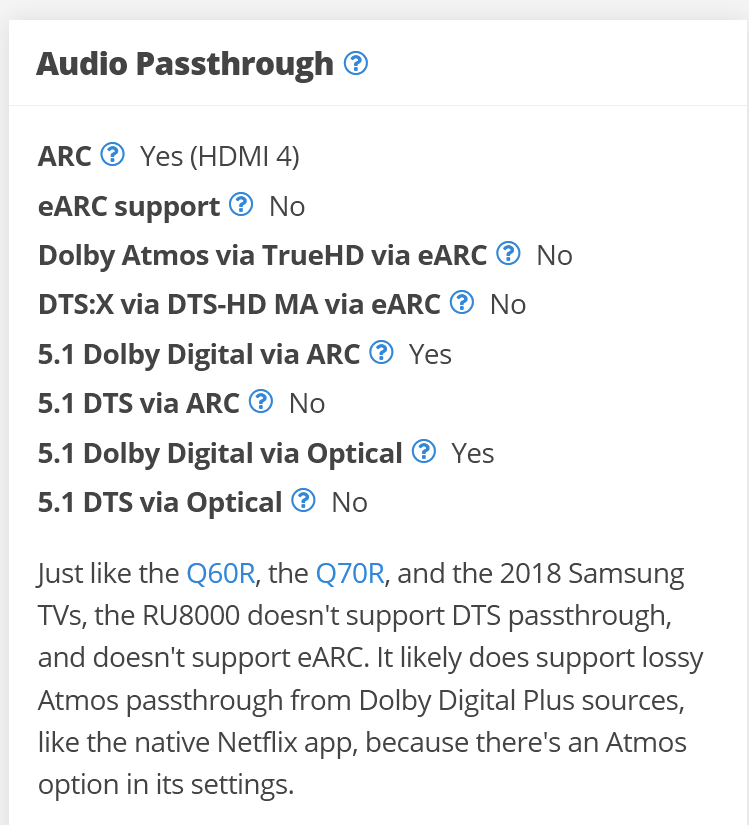
Thank you very much for any help you can provide me.
David

This topic has been closed for further comments. You can use the search bar to find a similar topic, or create a new one by clicking Create Topic at the top of the page.
Best answer by GuitarSuperstar

Yes, your TV will work with the Beam and you will be able to use the TV remote to control the volume on the Beam. When you turn on the TV, the Beam will automatically wake from idle mode once it detects an audio signal.

As you mentioned, your TV should be able to support Dolby Atmos audio from the TV’s native Netflix and Prime Video apps. With other apps that support 5.1 audio, you should get Dolby Digital Plus or Dolby Digital audio. All stereo content will play as Stereo PCM.

There is also a possibility the TV could pass through Dolby Atmos audio from an external streaming device like a Roku Ultra or Nvidia Shield so you can get Atmos from other apps like Disney+ or HBO Max. But you will have to test this yourself.

If you connect a cable box, you should be able to get Dolby Digital audio from 5.1 sources and Stereo PCM from stereo sources.

Because your TV isn’t equipped with HDMI eARC and doesn’t support DTS audio, if you connect a Blu-ray player to your TV, you will either get standard Dolby Digital or Stereo PCM audio from Dolby-encoded Blu-ray discs (hopefully the former) and just Stereo PCM audio from all DTS-encoded discs.

If you watch a lot of Blu-rays and want the highest quality audio like Dolby TrueHD, Dolby Atmos, and Multichannel PCM from your discs, consider getting the HDFury Arcana eARC adapter (or similar device) that will allow any external media device to bypass your TV and send audio directly to the Beam. I use the Arcana with my old plasma TV and Sonos Arc and it works great.

https://hdfury.com/product/4k-arcana-18gbps/

11 replies

Airgetlam
November 25, 2022

You’d probably want to ask Samsung, unfortunately. 

Bruce