
Contributor I
June 1, 2025

Sonos Play:1 won't connect to new wifi network

Hi, I find it impossible to add my Play:1 to a new network or system. I factory reset the speaker. The setup in the app works smooth: It finds the speaker, recognizes the audio PIN, and even prompts for the wifi name and password. However after copy+pasting (!) the password it always returns the same communication error message:

> Your mobile device couldn’t communicate with your Play:1. Check your network connection and try again later.

I’ve been now through the millionth factory reset and setup process in the last week. I uninstalled the (new) Sonos App and restarted the phone. I restarted the router. Nothing helped. The speaker works fine if wired though. And I can setup a new system and add a Sonos One SL easily. But it’s the Play:1 that drives me crazy. It worked though before I moved and I am now wondering if the last setup was done with the old app and whether it’s a problem of the new Sonos App.

Sonos App Info: 80.21.3-release+20250516.6a59431
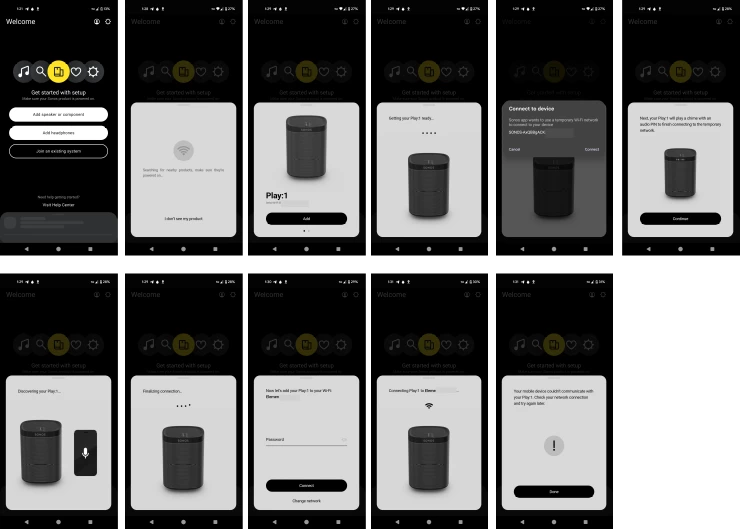
 

Setup process Sonos Play:1


This topic has been closed for further comments. You can use the search bar to find a similar topic, or create a new one by clicking Create Topic at the top of the page.

15 replies

Contributor I
June 6, 2025

It was a Vodafone router. It is probably used in thousands of homes. Default configuration but passwords and SSID (no special characters in the SSID). Channels and wifi protocols are set automatically. The only thing one could in the “Expert mode” was the accepted security protocols (WPA2 or WPA2 + WPA). However, there was a reset-button on the config page for the wifi channels (on the page where all options where disabled for configuration). Pressing it fixed the problem. I have officially no idea what changed. All visible settings were the same. However, adding the Play:1 went as smooth as I was expecting it. thx for all the ideas. I’m sorry that the outcome is somewhat frustrating

Translate
Lyricist I
July 29, 2025

I have the same issue..this is such BS as the speaker is rendered entirely useless. It is now a doorstop.


Like the user above I have done a million resets and the dumb messages are driving me insane...’Something went wrong, try again!’.

Really Sonos, this is the best you can do?

I'm even connecting into the same repeater as the old wifi..so all settings etc are the same. 

Does anyone have an answer for this? This should take 3 seconds to change wifi..

Factory resets, wired connections, useless error messages..cone on Sonos you can do better


Translate
Pools-3015
Prodigy I
July 29, 2025

I have the same issue..this is such BS as the speaker is rendered entirely useless. It is now a doorstop.


Like the user above I have done a million resets and the dumb messages are driving me insane...’Something went wrong, try again!’.

Really Sonos, this is the best you can do?

I'm even connecting into the same repeater as the old wifi..so all settings etc are the same. 

Does anyone have an answer for this? This should take 3 seconds to change wifi..

Factory resets, wired connections, useless error messages..cone on Sonos you can 


Hello ​@nfitzger. I’m sorry to hear you are having connection issues with your speakers. You stated that you use a repeater. This could be the root of your problem:

https://support.sonos.com/en-us/article/sonos-system-requirements

Please try removing the repeater/extender to see if it solves your issues.

Hope this helps.

Translate
Lyricist I
July 29, 2025

Sorry, it makes no difference. It's also been running off this relay for 10 years.

Translate
Stanley_4
Grand Maestro
July 29, 2025

Time to call support and have them look at the internal Sonos data we users can't see.

Get the problem to happen, submit a diagnostic within a couple minutes and CALL Sonos support.

Translate