
Avid Contributor I
December 7, 2023

Sonos customer service hung up, never called back, and my Playbar still cuts out

I’ve posted several times about the horrible Sonos CS. Don’t ever buy anything directly from them because they laid off everyone but two people in logistics. 

But today’s issue is that I still can’t get my Playbar to stop cutting out. I called CS and gave them my diagnostics. They made up a number of things that were the “obvious” problem - turns out every time they were wrong. “Must be Apple Music,” “Must be that you haven’t restarted all your devices in 19 days,” etc. After 45 minutes, they had me swap my Playbar - on the top floor of my townhouse - with my Arc on the main floor. The Arc worked fine in the Playbar’s location and the Playbar worked fine in the Arc’s location, which makes no sense. If interference was the root problem, the Arc would also cut out when placed in the Playbar’s old spot.

I went to look at the Matrix to check out the signal of the Arc when placed in the Playbar’s old spot, but there’s no noise data, which I guess is the result of it being a newer device (because it TOTALLY makes sense to have a diagnostic page that doesn’t have the information necessary to diagnose). Before I could get more info, the CS hung up and sent an email saying it was a pleasure helping me. He never called back even though we were obviously in the middle of diagnosing. I absolutely DESPISE that I get some guy in an Indian call center when trying to deal with a complicated technology. I asked for US support and was ignored.

At this point, I’ve just thrown my hands up. I bought a new Eero mesh network to replace my google mesh. That didn’t help the cause. I then plugged in my main floor Arc and created a Sonosnet. That also didn’t fix the cut outs on the upstairs Playbar.

The matrix is worthless. It has boxes in red where the devices work fine, and boxes in yellow or orange where there are tons of cut outs. It shows that my surrounds connected to my Playbar are green, but my Playbar is yellow, despite being only about 8 feet away. I seriously doubt there is a completely different level of interference in such a short distance. But even if there was interference, it’s clearly not a big deal since the Arc worked fine in the spot the Playbar skips.

I’m so close to selling all my Sonos devices. Customer Service is everything and they are offensively bad at it.


What is left to do to get my system working properly?


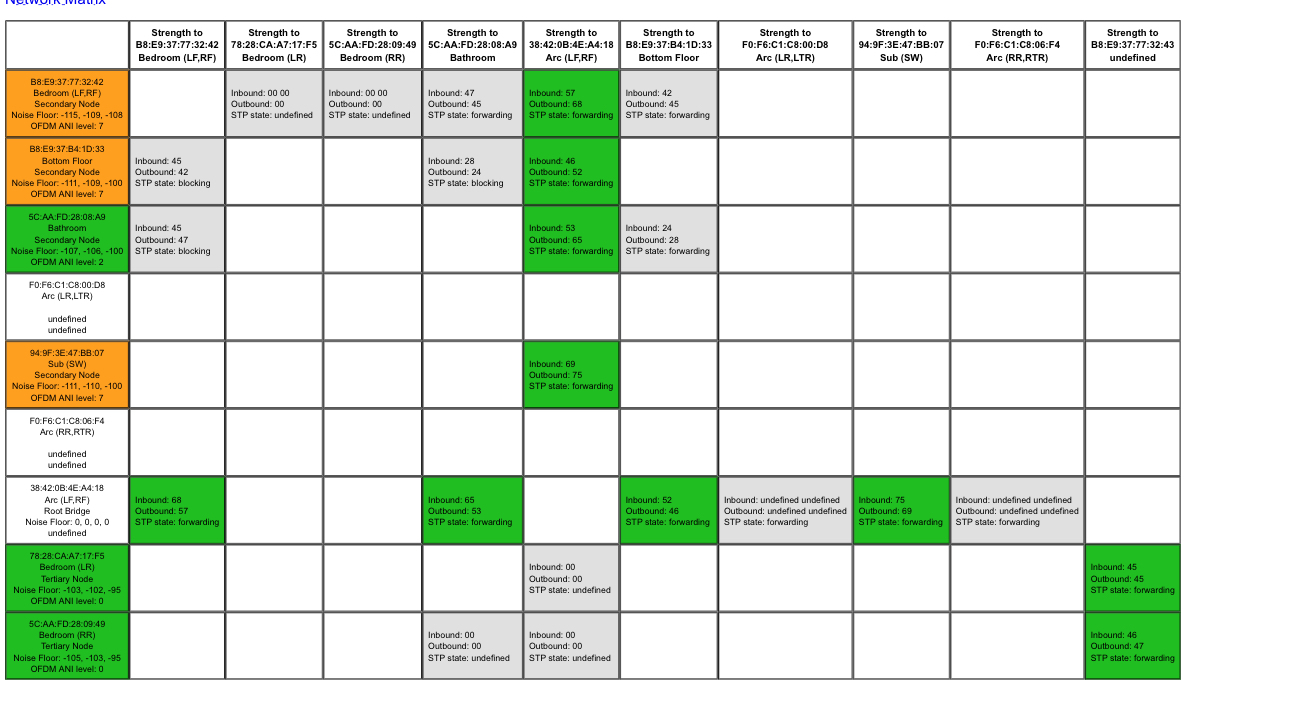
This first matrix is when I moved the Playbar to the main floor and the Arc upstairs. Sucks that I can’t see the Arc color box to compare to the Playbar being in the same location.


This topic has been closed for further comments. You can use the search bar to find a similar topic, or create a new one by clicking Create Topic at the top of the page.

21 replies

Ken_Griffiths
December 8, 2023

The problem is there’s little to be done about interference. The soundbar is going to go under the tv. The TV can’t be moved. There’s nothing else in the area that can be moved, and I’m not even sure what could be causing it. The fact that the Arc works fine tells me the Playbar has some technical issues that the Arc improved upon, but as someone who’s invested a lot in the Sonos ecosystem, I’m not sure how to proceed. Do I really need to spend another $900 on a second Arc?

There are certainly things you can do about interference…

My own choice would be not to wire the Playbar, or any Surround, or Sub (if using) initially, as I would not want it as ‘root bridge‘ for the SonosNet STP… I would aim to wire a non-HT Sonos device direct to the Eero primary Hub instead (Such as a Boost or standalone One, just as examples) …and keeping that wired device at least one metre away from the Hub too.

If there are no Era or Sonos portable Sonos products, it would also be sensible to remove the WiFi credentials from the Sonos App network settings as outlined here…

https://support.sonos.com/en-us/article/remove-a-wifi-network-from-your-sonos-system

I would then scan/discover the Eero 2.4Ghz channels in use and set the SonosNet channel so that it coincides with one that isn’t used, or is least used.

Playbar uses a 2.4Ghz connection to the SonosNet wireless network, so I would set any devices around it like the TV, Fire TV, Apple TV, XBox or PlayStation etc. to all use the Eero 5Ghz band and see that the Playbar and bonded devices use a different ad-hoc wireless channel. 

If there were still issues after this, then because I had wired a Boost, or One, to the Eero router as the root bridge, I would consider purchasing a small switch (unmanaged) and insert that between the Eero primary hub and the wired Sonos device and then (now) wiring the Playbar to that same switch aswell.

The one thing I would not ‘ever’ choose to do, is to wire any Sonos device to the eero satellite hubs. That said, if the Eero satellites were also wired back to the unmanaged switch I mentioned, I might also try the Eero hubs ‘bridged’ to the ISP provided router instead, just to see which router performed best with SSDP multicast device discovery of the Sonos players by the Sonos controller App.

So there are quite a few things to try here, even with an Eero WiFi mesh setup, which it seems is sadly not very user-configurable and maybe not much better than the original Google nest mesh system that was being used before.. actually I’ll take that back, it is better than a Google mesh WiFi setup, but it does lack in user-configurability in some otherwise useful areas of Home networking.

Avid Contributor I
December 8, 2023

The problem is there’s little to be done about interference. The soundbar is going to go under the tv. The TV can’t be moved. There’s nothing else in the area that can be moved, and I’m not even sure what could be causing it. The fact that the Arc works fine tells me the Playbar has some technical issues that the Arc improved upon, but as someone who’s invested a lot in the Sonos ecosystem, I’m not sure how to proceed. Do I really need to spend another $900 on a second Arc?

There are certainly things you can do about interference…

My own choice would be not to wire the Playbar, or any Surround, or Sub (if using) initially, as I would not want it as ‘root bridge‘ for the SonosNet STP… I would aim to wire a non-HT Sonos device direct to the Eero primary Hub instead (Such as a Boost or standalone One, just as examples) …and keeping that wired device at least one metre away from the Hub too.

If there are no Era or Sonos portable Sonos products, it would also be sensible to remove the WiFi credentials from the Sonos App network settings as outlined here…

https://support.sonos.com/en-us/article/remove-a-wifi-network-from-your-sonos-system

I would then scan/discover the Eero 2.4Ghz channels in use and set the SonosNet channel so that it coincides with one that isn’t used, or is least used.

Playbar uses a 2.4Ghz connection to the SonosNet wireless network, so I would set any devices around it like the TV, Fire TV, Apple TV, XBox or PlayStation etc. to all use the Eero 5Ghz band and see that the Playbar and bonded devices use a different ad-hoc wireless channel. 

If there were still issues after this, then because I had wired a Boost or One to the Erro router as the root bridge, I would consider purchasing a small switch (unmanaged) and insert that between the Eero primary hub and the wired Sonos device and then wiring the Playbar to that same switch aswell.

The one thing I would not ‘ever’ choose to do, is to wire any Sonos device to the eero satellite hubs. That said, if the Eero satellites were also wired back to the unmanaged switch I mentioned, I might also try the Eero hubs ‘bridged’ to the ISP provided router instead, just to see which router performed best with SSDP multicast device discovery of the Sonos players by the Sonos controller App.

So there are quite a few things to try here, even with an Eero WiFi mesh setup, which it seems is sadly not very user-configurable and maybe not much better than the original Google nest mesh system that was being used before.. actually I’ll take that back, it is better than a Google mesh WiFi setup, but it does lack in user-configurability in some otherwise useful areas of Home networking.

I already ran a scan last night and found that Channel 1 was the least used, however, that didn’t fix my issue. I also plugged the ethernet into my arc to trigger the Sonosnet and deleted my wifi network from “networks” to ensure everything was using Sonosnet. That didn’t help.

The only other Sonos device I have and could set up is an additional Play:1. I’m not sure what “HT” is, but is a Play:1 part of that? And why would that make any difference vs hooking the ethernet to an Arc?

A tier 3 support rep emailed me today and looked at my diagnostic from last night. He said my TV was putting out packets even though it wasn’t on. Unfortunately, I’d already tested the Playbar in that room without the optical cable attached, so that wasn’t the issue either.

Ken_Griffiths
December 8, 2023

I already ran a scan last night and found that Channel 1 was the least used, however, that didn’t fix my issue. I also plugged the ethernet into my arc to trigger the Sonosnet and deleted my wifi network from “networks” to ensure everything was using Sonosnet. That didn’t help.

The only other Sonos device I have and could set up is an additional Play:1. I’m not sure what “HT” is, but is a Play:1 part of that? And why would that make any difference vs hooking the ethernet to an Arc?

A tier 3 support rep emailed me today and looked at my diagnostic from last night. He said my TV was putting out packets even though it wasn’t on. Unfortunately, I’d already tested the Playbar in that room without the optical cable attached, so that wasn’t the issue either.

HT - ‘Home Theatre’

If the Play:1 is standalone, then yes, I would choose to use that initially as the wired ‘root bridge’ device (set at least 1m away from the Primary Eero Hub), just  to take some network traffic away from the Playbar. That’s mostly applies to any other non-bonded Sonos devices. You can always wire the Playbar too, but make the Play:1 the root bridge in your matrix. You can change its priority, if required, to force it as ‘root bridge’, if you wire both, but just see how it goes.

Note as you change things around too, that what was not using channel 1 last night might be using channel 1 today, after you make a change to your configuration, so be mindful that eero is liable to do what it wants until things have been left to settle fully. 

Avid Contributor I
December 8, 2023

If I had the ability to wire the Playbar, I would’ve done that long ago because then there would be no way interference would affect the speaker. I can only wire the Arc and a Play:1. But why would changing the root bridge make any difference? Seems like the Arc was working fine even when connected to the ethernet.

Ken_Griffiths
December 8, 2023

If I had the ability to wire the Playbar, I would’ve done that long ago because then there would be no way interference would affect the speaker. I can only wire the Arc and a Play:1. But why would changing the root bridge make any difference? Seems like the Arc was working fine even when connected to the ethernet.

If the Sonos Arc processor is busy whilst playing Music, or the more demanding TV audio, then do you really want it also handling the SonosNet network traffic aswell to your Playbar and any other Sonos players, when a standalone Boost or Play:1 can do that instead? - It’s the reasons why I would have personally chosen to wire a Play:1 and have it set as the ‘root bridge’ instead, but it’s entirely up to you.

I would have just simply tried the things mentioned and (if necessary) put the Eero system into ‘bridged mode’ too, especially as Sonos Staff have suggested that Eero configuration in the past, in threads on this forum, but I guess it’s down to which router and configuration works best.

Given the same situation, I would have just tried these things anyway to see what worked best in my Home environment.

As I say it’s really up-to you how far you choose to go with the hardware you have.

Avid Contributor I
December 8, 2023

My frustration with Sonos continues. I tried to reach tier 3 support, and the tier 1 rep put me on hold for 30 min then told me T3 had already gone home. I called at the only time I could, which was 730p PT (read: customer service hours). After 30 mins I said give me tier 2. He transferred me and then it was kicked back to the t1 rep. He said that since it’s now 8p P,  T2 reps had also gone home. Insane. He then refused to help me since I’d already spoken to T3 via email. My starting issue today was that all my devices went offline. I eventually fixed it by unplugging every device, but this rep was very antagonistic.

Back to my initial problem with the cutting out, the T1 rep said only my Arc and 300 surrounds were connected to SonosNet, not the sub in the same HT system or any of my other speakers. The reason was that the rest of my speakers are too far away. That’s odd since my place is only 1400 sq ft and the Arc is about halfway between all the rest of the speakers in the townhouse.

He told me that it’d be best if I wired my Playbar via my google mesh hub, which contradicts the advice above. I did it and it hasn’t cut out yet, but the matrix still shows heavy interference in the bedroom. I asked the rep how to know whether all the devices were on the SonosNet; he said only internal people have the ability to see that. Is that true? I thought the matrix showed it. And the “about” section in the app shows WM:0 for all devices other than surrounds. It does this when I have an Ethernet connected only to the Arc.Hard to troubleshoot if you can’t tell if some speakers are on the SN and others are not, especially when part of the goal is to change the channel to a clear one. 
 

I’m posting the current matrix, which has the Arc wired via router->google mesh-Arc, and the Playbar wired via Google mesh hub → Playbar.  No devices in the matrix are labeled root, but I’d think that’s what the Arc would be.
 

thoughts?


Ken_Griffiths
December 8, 2023

I would not rely entirely on the Sonos matrix for a clear view of what’s happening in your current setup. Modern Sonos devices don’t even report to the matrix any more, such as your Arc, it seems.

You mention using ‘Google’ hubs in your last post - did you mean Eero? I would not go back to using your Google WiFi, you will likely be better off using the Eero mesh instead and a ‘good rule of thumb’ is to never wire anything ‘Sonos’ to a WiFi mesh satellite hub, especially not a HT device as you can’t switch off their radio on most occasions …and you don’t want the network backhaul using SonosNet and slowing everything down if it’s due to go wirelessly via that satellite to the router, which ‘may’ sometimes happen in some circumstances.

Ken_Griffiths
December 8, 2023

If still using Google Mesh @Jonnydrama32, also note that the ‘Nest’ mesh system does not support ‘bridged AP’ mode with multiple hubs (it can only be done with one Hub only, apparently). I only mention that just in case you ever think you might try that setup with those hubs instead. So don’t waste your own time going down that route, although it is perhaps worth a try with the Eero mesh system if your issues do persist, but even in that case I would recommend not using your ISP routers WiFi adapters, so leave them disabled. 

All that said, I don’t see why the Eero mesh setup should not work for your Home and Sonos system here, if configured correctly.

Avid Contributor I
December 8, 2023

If still using Google Mesh @Jonnydrama32, also note that the ‘Nest’ mesh system does not support ‘bridged AP’ mode with multiple hubs (it can only be done with one Hub only, apparently). I only mention that just in case you ever think you might try that setup with those hubs instead. So don’t waste your own time going down that route, although it is perhaps worth a try with the Eero mesh system if your issues do persist, but even in that case I would recommend not using your ISP routers WiFi adapters, so leave them disabled. 

All that said, I don’t see why the Eero mesh setup should not work for your Home and Sonos system here, if configured correctly.

This is where I’m confused. Why is T1 support telling me to connect directly from the Google Mesh hub but you’re saying don’t do that? I can’t connect directly from the Eero, as those hubs (other than the main one), don’t have ethernet ports.

I ended up going back to the Eero anyway, because when I moved over to Google Mesh, half my smart devices in the house wouldn’t reconnect.  The music is still cutting out on the Playbar, and even with the Arc wired, the rest of the house is showing up on wifi. And even when everything was on Sonosnet, the Matrix was showing poor signals in the bedroom still. The T1 rep said whether I wired or not, the interference would be in those areas and likely still cause issues.


I don’t know who’s right here, but I’m so frustrated with Sonos that I’m considering selling all my speakers and just switching over to another company. Customer service is everything and it seems like the lower tier is not properly trained and the upper tier is too hard to get in touch with. 


jgatie
December 8, 2023

This is where I’m confused. Why is T1 support telling me to connect directly from the Google Mesh hub but you’re saying don’t do that? I can’t connect directly from the Eero, as those hubs (other than the main one), don’t have ethernet ports.

I ended up going back to the Eero anyway, because when I moved over to Google Mesh, half my smart devices in the house wouldn’t reconnect.  The music is still cutting out on the Playbar, and even with the Arc wired, the rest of the house is showing up on wifi. And even when everything was on Sonosnet, the Matrix was showing poor signals in the bedroom still. The T1 rep said whether I wired or not, the interference would be in those areas and likely still cause issues.


I don’t know who’s right here, but I’m so frustrated with Sonos that I’m considering selling all my speakers and just switching over to another company. Customer service is everything and it seems like the lower tier is not properly trained and the upper tier is too hard to get in touch with. 


Another company is going to have the very same problems, unless you switch to non-wireless old school amps and speakers.