
Trending Lyricist I
December 19, 2023
Answered

Can start a stream only from one device, others won't start

I have an odd issue which keeps me going crazy for a few months now.


I am using the following devices spread across our house:

  • Play:1 Bathroom
  • Play:1 Office (wired)
  • Play:1 Kitchen
  • Playbar Livingroom (wired)
  • Sub Livingroom


Initially I had only the Playbar wired, the rest connected through WiFi.

As I kept loosing some Play:1 repeatedly, I changed to SonosNet completely. Hence I have removed any WiFi configuration, wired Play:1 in the office too.


All devices show WM: 0 and I never lost any Play:1 anymore.


Unfortunately I have the situation, that I can only start a stream (doesn’t matter if TuneIn Station or Spotify) from Play:1 in the office​​. On any other device I see the “Play Icon” changing for 1 second and going back to Stop immediately.


What I have to do, start the stream in Play:1 office, group the other speakers into it, then remove the Play:1 in the office again. This way I can stream music in the other rooms.


I already have reset all devices and reconfigured them, it didn’t help.

Also I have power cycled them multiple times, also in a “staged” approach so I started with the wired ones and followed the others afterwards.


I am using a HPE 1920 switch that has STP configured according to best practices of SONOS. I don’t think its STP related though, as the problem also occurs if I only power on two devices (one wired and one SonosNet).


Attached you can find the Network Matrix and I’ve ran and submitted diagnostics: 1731400236
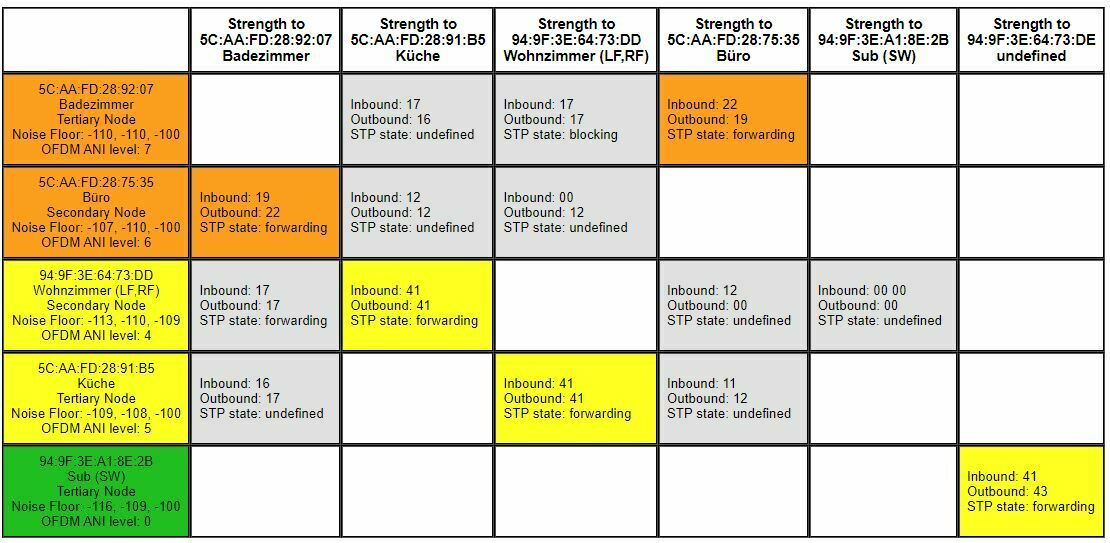
 

Network Matrix capture

Any ideas are highly appreciated.

Thanks


Additional Information: Wireless System is Aruba Instant On (one AP per floor), Firewall Ubiquiti EdgeRouter


This topic has been closed for further comments. You can use the search bar to find a similar topic, or create a new one by clicking Create Topic at the top of the page.
stiAnswer
Trending Lyricist I
December 20, 2023

Hi @Corry P 

Thank you for providing the logs, the actually helped very much!


I’ve noticed that after receiving a Play command, a Pause command is issued. Thanks to the logs I noticed that the source is different than my phone. The system in question is a SmartHome system that monitors the Sonos system too.


I have removed the Sonos integration for testing and now its working stable again.


Appreciate yours and @ratty help on this! Happy Holidays folks


25 replies

ratty
December 19, 2023

Bathroom has a weak connection to Office. Trying to start any group from that is likely to fail. The first node in the group is the Group Coordinator, responsible for fetching the stream and distributing it to the rest of the group. It needs a good connection.

Also, Bathroom and Office see quite a lot of ambient noise. Try alternative SonosNet channels.

stiAuthor
Trending Lyricist I
December 19, 2023

Thanks @ratty - appreciate your ideas!


I’ve tried out the other channels, I moved to Channel 1 and 11, it seems Channel 1 has “better” signal. Would you agree too?

I have - of course - excluded the SonosNet channel from my WiFi-AccessPoints to avoid any interferences.


Do you have an idea why I can’t start a stream from Livingroom? It is wired too, like Office. Unfortunately only Office can start a stream.


Network Matrix Channel 01
 
Network Matrix Channel 11


ratty
December 19, 2023

Channel 1 does look better. Hopefully you’re also using 20MHz channels on your APs, not 40MHz.


Do you have an idea why I can’t start a stream from Livingroom? It is wired too, like Office. Unfortunately only Office can start a stream.

Can’t you start a stream at all on Living Room? Even on its own? Do you get any kind of error message?

Get the IP address of Living Room and go to http://x.x.x.x:1400/tools. Type “spotify.com” into the Nslookup box and hit that button.

stiAuthor
Trending Lyricist I
December 19, 2023

Channel 1 does look better. Hopefully you’re also using 20MHz channels on your APs, not 40MHz.

Alright, I’ll stay on Channel 1 then. Yes, correct, I’m only using 20MHz channels on the APs.


Can’t you start a stream at all on Living Room? Even on its own? Do you get any kind of error message?

No I can’t, I can’t start a stream other than from Play 1 at Office. I also don’t get any error message. The Play Icon changes for a second and immediately goes back to Stop.


Get the IP address of Living Room and go to http://x.x.x.x:1400/tools. Type “spotify.com” into the Nslookup box and hit that button.


I tried that on all of the boxes, the result is everywhere the same:

spotify.com: dns (3 ms) -> 35.186.224.25 mdns (0 ms) -> failed netbios (0 ms) -> failed


Thank you

ratty
December 19, 2023

Okay, so it doesn’t look like a DNS failure. Have you verified your firewall settings?

stiAuthor
Trending Lyricist I
December 19, 2023

I did, nothing specific in its config. I’m allowing anything going from inside to outside.

The Sonos boxes have a DHCP reservation too, so they don’t roam around regarding IP leases.


I’m really running out of ideas to be honest. I was hoping that something is visible in the diagnostic logs I’ve provided.

ratty
December 19, 2023

It most probably is, and back in the day when the diag logs were user-accessible I might have been able to assist. Now it’ll need a member of Sonos staff to take a look. 

stiAuthor
Trending Lyricist I
December 19, 2023

Understood, thanks. Do I have to wait for someone to read to this thread, or is there another way to engage them?


Cheers

ratty
December 19, 2023

I’ve asked ...

stiAuthor
Trending Lyricist I
December 19, 2023

Many thanks @ratty !