Back to that probably boring subject of Reserved IP addresses
I have the same problem as reported elsewhere - the 2 Sonos devices I have (Beam Gen 1 & Sub Gen 2) periodically losing connectivity.
Have finally (after several years!) got around to trying to sort it out.
Having run a network scan some time ago and made a record of the assigned IP for each device, I see now that they have changed, and it's had the predictable effect, not only for these 2 devices but for others.
Am busy fixing IP addresses manually where I can, for infrastructure which is effectively fixed (i.e. not occasional-presence mobiles, other visitors, etc).
Can see on here that setting DHCP Reservations is a suggested resolution to the problem for some, even if others seem to disagree!
It's obviously the best practice for most networks, for servers, printers, switches, routers, etc. Why not for Sonos devices too? It obviously prevents/minimises problems, even if making any changes to the network (such as adding a new router, as thus possibly a new Default Gateway) results in a bit of extra manual work to each device's config if/when that time comes.
I note that the only way to "fix" IP addresses for Sonos devices is to build DHCP reservations. I suppose that someone somewhere must have thought this was a good idea...
Question re building the reservations though.
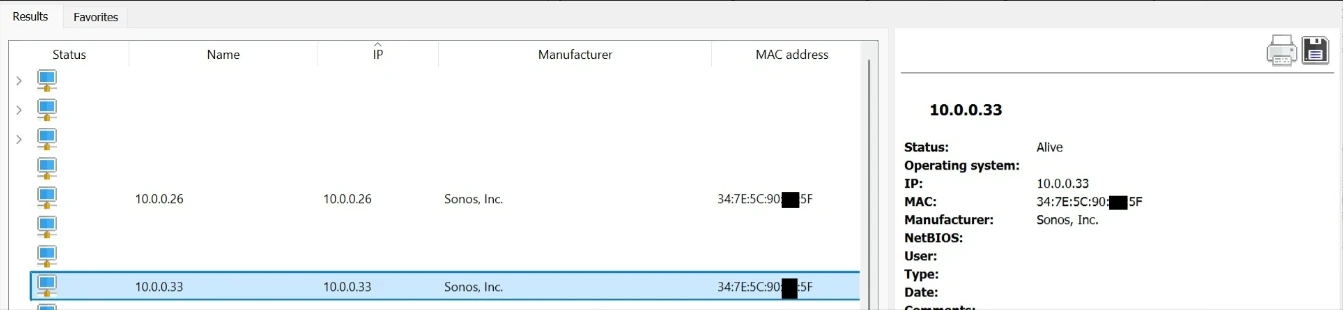
Although the port scan reveals the 2 Sonos devices with separate IP addresses, it also shows them as having the same MAC address, which presumably will lead to DHCP reservation creation problems (?). Or at least implementation problems.
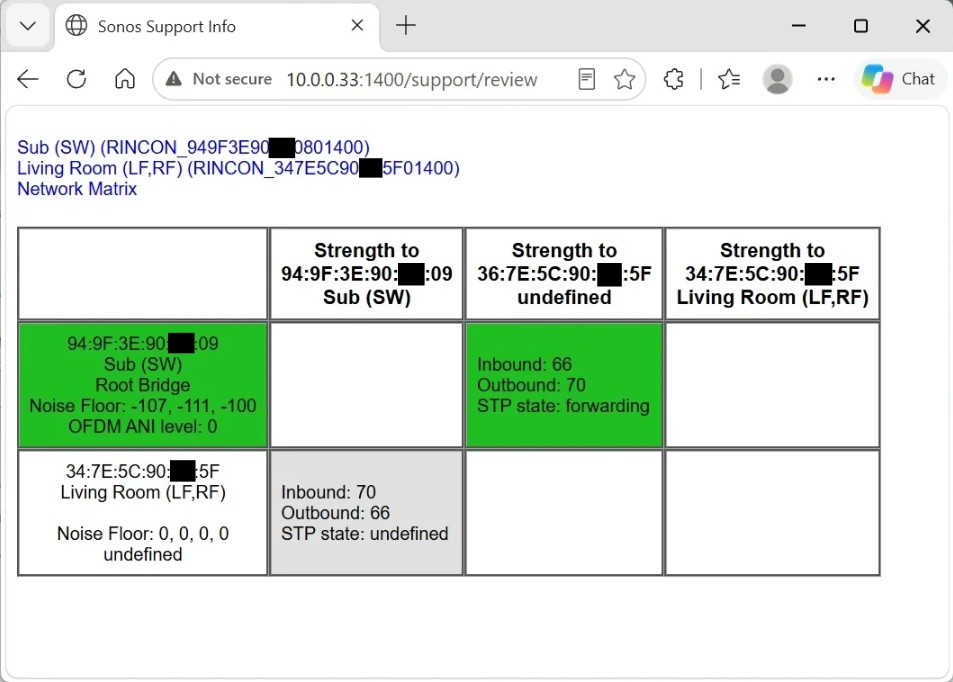
Have looked for further info about each device using the http://<YOUR_SONOS_IP>:1400/support/review link, although the web browser (Edge) reports that support for XSLT will be removed very soon, and Brave doesn't support it at all.
Unfortunately, the results for each device's Network Matrix don't shed as much light on the differences as I'd hoped. Or at least those differences simply raise another question.
Although the report for each device has 4 columns and 2 rows of data (plus the header row), and the upper row in one report is the lower row in the other, the information in each of the cells is the same.
The 3 columns have 3 different MAC addresses. The column with the MAC address reported by the Port Scanner has empty cells. The other two columns - the columns whose cells contain data in one of those cells, each have different MAC addresses. Presumably (?) these are the "hidden" MAC addresses for each of the 2 devices?
Is each one the MAC address to build into the DHCP reservation for each device?
The problem here would seem to be that the DHCP Server on the router does not "see" these MAC addresses. At least not judging by the entries in the ARP Table on the router, where the MAC address for each IP address is the same as the one seen by the Port Scanner.
Or do I just use the same MAC address for each reservation, and leave the Sonos to sort it out? Will it accept 2 reservations/IP addresses on the same MAC address? Perhaps the results so far suggest that it does...
Screenshots attached.
Would anyone with experience of dealing with this please shed some light on this apparent dilemma?
Best regards
"Frank"