
Trending Lyricist I
Jan 2, 2023 8:03 PM UTC
Answered

Audio drops out in 10 speaker setup but network matrix is green

Hello!

I have 10 Sonos speakers spread across my less than 1000 SQ ft one level house. I have a beam gen 2, sub, five, and two Symfonisk picture frames in the living room all grouped together. I have 2 one sls in the kitchen with another picture frame. And a picture frame and a one SL in the bathroom. I have plaster walls with metal mesh. I am using sonosnet and audio drops on some of the speakers farthest from my beam gen 2 (my wife's speaker for sonosnet). I also have a sub gen 3 and a five hardwired with Ethernet but have WiFi disabled to avoid any loops. My house 2.4ghz wifi is on channel 1 and my sonosnet is on channel 11. 


My audio drops on random speakers mainly when I force an action (like click next, or when I click pause not all the speakers will stop immediately) some times for 20+ seconds. Sometimes audio drops mid song without me touching anything on the farthest speakers and then comes back on. I am playing Spotify at 320kbps.


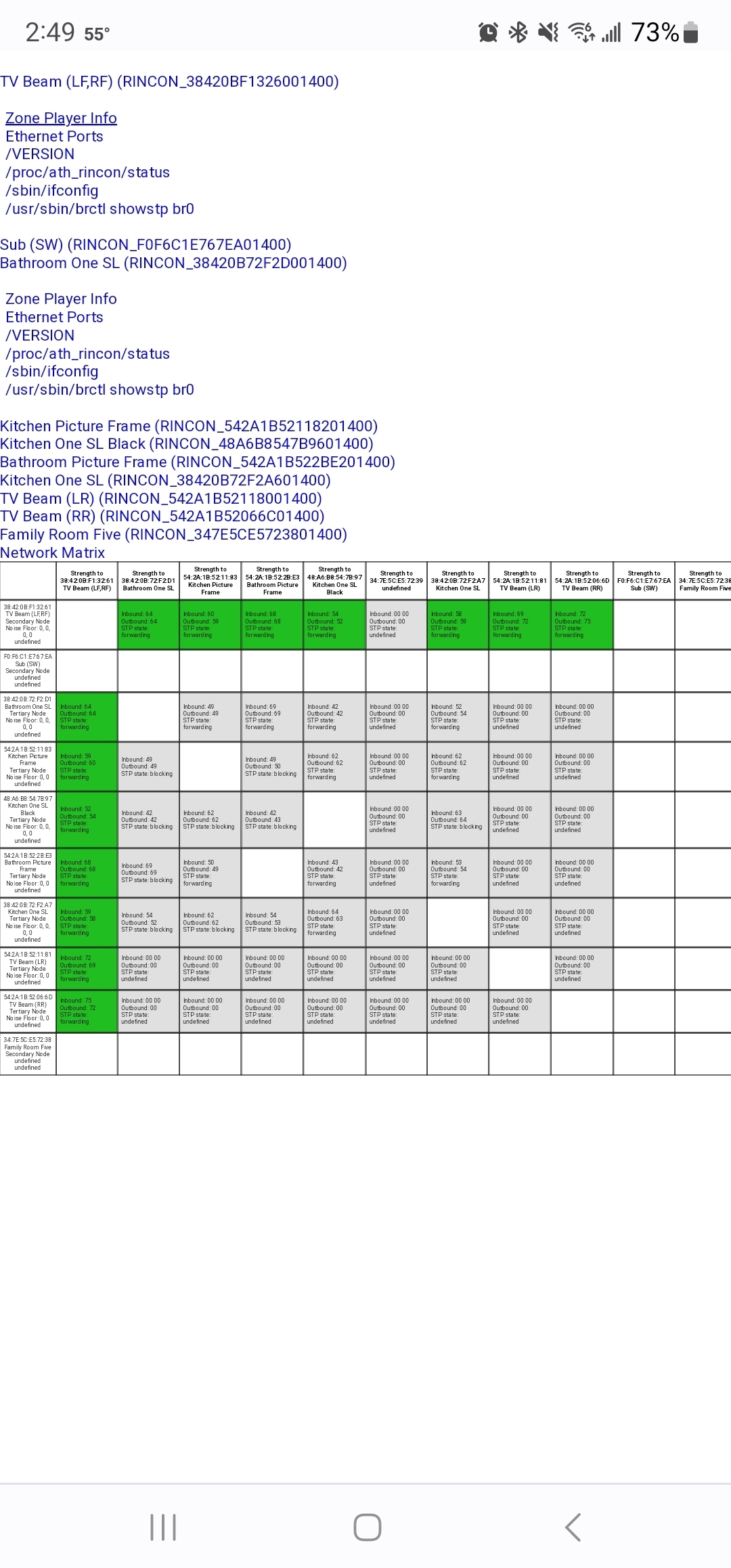
I ran a network matrix but everything is green. I really don't know how to read it. It also doesn't include noise level which I found odd. Can someone please help me understand what could be going on? I am going to upgrade my router to an orbi and connect the speakers back to WiFi from sonosnet to see if that helps. I have gigabit fiber connection. In the meantime, I'd anyone can help me troubleshoot my sonosnet issues, that would be much appreciated! Let me know if you need any other information. 

Network matrix posted below.

Thanks!
 

This topic has been closed for further comments. You can use the search bar to find a similar topic, or create a new one by clicking Create Topic at the top of the page.
Goldenr44Answer
Trending Lyricist I
Jan 3, 2023 4:13 AM UTC

Solved! I tried to get off sonosnet to see what would happen. I rebooted the router and did a sequential reboot of all speakers. Then plugged 3 speakers into Ethernet and disabled wifi so sonosnet would not start. And everything works! No lag or drops at all! Sonosnet was not superior to WiFi in this case. The router is nothing special, just the one that came from my isp (Verizon FiOS). Thanks all, hope this helps others, rebooting the router and then rebooting the speakers one by one did the trick. 

20 replies

Lead Maestro
Jan 2, 2023 8:47 PM UTC

Keep the Subs and any surround speakers wireless. All other speakers can remain wired. Most importantly, keep WiFi enabled on ALL speakers in the Sonos app.

Translate
"Receive with simplicity everything that happens to you." - Rashi
Goldenr44Author
Trending Lyricist I
Jan 2, 2023 8:51 PM UTC

GuitarSuperstar,

Thanks for your reply! Sonos support advised me to enable WiFi on all speakers as you did and I still have the issue. I just unplugged my Ethernet on the sub and I still have the issue. Anything else you would suggest I try?

Thanks again!

Translate
Mr. T
Jan 2, 2023 8:56 PM UTC

Newer Sonos speakers no longer report the noise level in the matrix.

For the speakers that drop, is there anything nearby that could be causing any wireless interference ?

Translate
Goldenr44Author
Trending Lyricist I
Jan 2, 2023 8:59 PM UTC

Mr. T,


Thanks for your reply! Well in the kitchen, all speakers cut out but the one that does so consistently is next to my microwave. But I don't use the microwave often and also, my five has direct line of sight to that speaker, no walls or anything. My picture frame and one SL in the bathroom have the issue, there is a plaster wall in between the beam (closest hardwired speaker), and the one SL and picture frame. Everything in my living room works like a charm, they all have direct line of sight to my five and beam and are maybe 10 ft apart from each other.

Translate
Mr. T
Jan 2, 2023 9:07 PM UTC

Mr. T,


Thanks for your reply! Well in the kitchen, all speakers cut out but the one that does so consistently is next to my microwave. But I don't use the microwave often and also, my five has direct line of sight to that speaker, no walls or anything. My picture frame and one SL in the bathroom have the issue, there is a plaster wall in between the beam (closest hardwired speaker), and the one SL and picture frame. Everything in my living room works like a charm, they all have direct line of sight to my five and beam and are maybe 10 ft apart from each other.

Your matrix shows all your speakers (other than the Five) are communicating with the Beam as you have disabled WiFi on the wired Five.

Translate
Goldenr44Author
Trending Lyricist I
Jan 2, 2023 9:10 PM UTC

I just changed it based on Guitarsuperstar's suggestion. Here is the new matrix:


Translate
Goldenr44Author
Trending Lyricist I
Jan 2, 2023 9:15 PM UTC

I'm a mess and new to this interface, I clicked your post as best answer but didn't mean to, do you know how I can undo it? Ha, sorry. 

Translate
Mr. T
Jan 2, 2023 9:32 PM UTC

You should be able to amend the Best Answer to another post. If not, a mod can remove/change.

Now the Five is communicating with the kitchen speakers, are you still getting dropouts? (When microwave is not on)

If so, then you could switch SonosNet channel. Try it on 1 or 6 and change your router channel to 11 instead.

Translate
Goldenr44Author
Trending Lyricist I
Jan 2, 2023 9:37 PM UTC

You should be able to amend the Best Answer to another post. If not, a mod can remove/change.

Now the Five is communicating with the kitchen speakers, are you still getting dropouts? (When microwave is not on)

If so, then you could switch SonosNet channel. Try it on 1 or 6 and change your router channel to 11 instead.

Unfortunately I am still getting the dropouts. Less so I think? Might be placebo. I cannot access the settings to change the channel on my router (FiOS), I have to call them to change it, so will try that when I have some time and then change sonosnet. Any other suggestions? According to my wifianalyzer app, channel 11 has the least access points on it and that is what sonosnet is set to. My neighbors houses are pretty far away. There are two other channel 11 wifi signals near me but they are -80 dbm. 

Translate
Mr. T
Jan 2, 2023 9:51 PM UTC

Unfortunately I am still getting the dropouts. Less so I think? Might be placebo. I cannot access the settings to change the channel on my router (FiOS), I have to call them to change it, so will try that when I have some time and then change sonosnet. Any other suggestions? 

When you group speakers, start with either the TV Beam room or the Family Room Five. The first room becomes the group controller when you add additional rooms, so you want that to have the best connection, and both of those rooms are wired.

Translate