
Contributor I
January 6, 2017
Question

Can't add iTunes Music Folder to my Sonos application

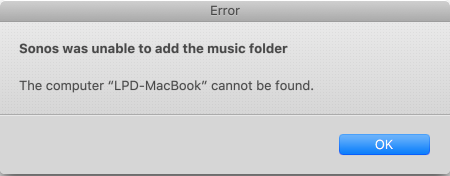
I have a MacBook Air with Mac OS Sierra 10.0.2. I have installed the Sonos app on my laptop and successfully added all my desired music sources. Except one: While following the directions to a tee, I cannot add my iTunes music library. I get this error and no, the name of my computer is not over 18 characters. Can someone advise on what is going on and the steps to successfully do this?
    This topic has been closed for further comments. You can use the search bar to find a similar topic, or create a new one by clicking Create Topic at the top of the page.

    11 replies

    Jeff S
    Retired Sonos Staff
    February 27, 2017
    Jeff S, thanks for the response. I did verify that my user id - and actually "everyone" - has read access to my music folder and all of its content. I do recall there previously being a specific "Sonos user" on my system, but do not see that user id now. my diagnostics confirmation number is: 7137404. Thanks!

    It looks like your diagnostic report was sent from a Mac. Please try removing the music share from your Sonos system, then add it back using the HP's Sonos app. If you get another error, please send in a report from the HP and reply with the confirmation number.
    Help others find useful content by clicking the like button and selecting the best answer to your question.