
Contributor I
December 7, 2020
Answered

Voice assistant not working when playing music

I've just got a sonos move.  All was great until I tried to use voice assistant during playback, you know to change the volume etc!  


Voice works fine until music is playing and then the sonos just doesn't pick up the prompt (alexa, or hey google).  Its the same if I'm using Alexa or Google VA and also however music is being played, e.g. Spotify or tunein etc.  


Pause the music and it works fine again.
This topic has been closed for further comments. You can use the search bar to find a similar topic, or create a new one by clicking Create Topic at the top of the page.
masheriAnswer
Lyricist I
December 28, 2020

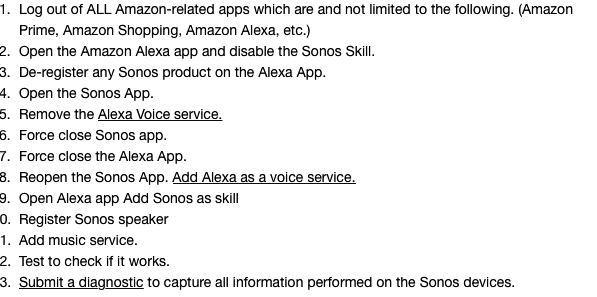
nealth...I found the following instructions somewhere in the Sonos Community and it solved my issue with Alexa not acknowledging the command to stop playing the music once the music started playing.  At first it was only following the first command to play music but not stopping it or pausing etc...try these steps, hope it helps!


17 replies

Lyricist II
December 30, 2020

Diagnostic report 977081723 submitted

Contributor I
December 30, 2020

Hi, I am also having this problem with Google Assistant and Alexa on my brand new Move (bought today). When music is playing, even at low volume, it doesn't respond to the wake word.

I've submitted a diagnostic report (766649220). 

Lyricist I
December 30, 2020

I am also having the exact same issue with a new Sonos Move using Spotify and the Google Assistant. Works fine when nothing is playing but as soon as something is playing it doesn’t respond. I’ve tried disabling Trueplay and re-enabling but that hasn’t resolved the issue.

 I’ve submitted a diagnostic report (992164650).

Headliner I
December 31, 2020

This happens spontaneously on occasion for reasons unknown. It usually goes away after a day or two, or you can try the full remove and restore voice assistant procedure.

Normally the Sonos speaker is able to pick out your voice saying “Alexa” or “Hey Google” over the music because it subtracts the sound of its own speaker from what the microphone is hearing. Maybe something goes wrong with that.

Lyricist I
January 10, 2021

Hi,

I am also having this problem with Google Assistant on my brand new Move (bought today). When music is playing (using Spotify), even at low volume, it doesn't respond to the wake word.

I’ve submitted a diagnostic report (1940956658).


Headliner I
January 10, 2021

I’ve noticed something odd about my Sonos One stereo pair lately. I also have an Echo Dot in the room, so I can run Google Assistant on the Sonos speakers and still use Alexa for other things that are unique to Alexa. If the Sonos speakers are playing music, I can say “Hey Google” at normal speaking volume, and GA on the Sonos speakers will hear me over the music and respond, due to the sound cancellation technique that the speakers use. As expected, I have to say “Alexa” much louder in order for the Echo Dot to hear me over the music when it’s not the Echo Dot speaker that’s playing the music.  

Here’s the strange thing: when I say “Alexa” loud enough to get the attention of the Echo Dot over the music playing on the Sonos speakers, the Sonos speakers go quiet for a few seconds to allow me to say the follow-up command, just as if I had said “Hey Google” to get the attention of Google Assistant on the Sonos speakers.  

So how does that happen? Sonos is set as the default music speaker for the room in the Alexa settings. Is Alexa smart enough to notice that the Sonos speakers are playing from another source and quiet them momentarily? That’s smarter than I would have expected, but it’s the most likely explanation. If the Sonos speakers were recognizing the word “Alexa” even though not currently set to use Alexa as the voice assistant, then I wouldn’t have to shout to be heard.

JamesDan
Prominent Collaborator I
January 10, 2021

I’ve noticed something odd about my Sonos One stereo pair lately. I also have an Echo Dot in the room, so I can run Google Assistant on the Sonos speakers and still use Alexa for other things that are unique to Alexa. If the Sonos speakers are playing music, I can say “Hey Google” at normal speaking volume, and GA on the Sonos speakers will hear me over the music and respond, due to the sound cancellation technique that the speakers use. As expected, I have to say “Alexa” much louder in order for the Echo Dot to hear me over the music when it’s not the Echo Dot speaker that’s playing the music.  

Here’s the strange thing: when I say “Alexa” loud enough to get the attention of the Echo Dot over the music playing on the Sonos speakers, the Sonos speakers go quiet for a few seconds to allow me to say the follow-up command, just as if I had said “Hey Google” to get the attention of Google Assistant on the Sonos speakers.  

So how does that happen? Sonos is set as the default music speaker for the room in the Alexa settings. Is Alexa smart enough to notice that the Sonos speakers are playing from another source and quiet them momentarily? That’s smarter than I would have expected, but it’s the most likely explanation. If the Sonos speakers were recognizing the word “Alexa” even though not currently set to use Alexa as the voice assistant, then I wouldn’t have to shout to be heard.

I noticed this too with an Echo Dot! The Sonos speaker seems to be smart enough to know that, but only when using Alexa unfortunately. If I have Google Assistant enabled on Sonos (or Alexa, or no voice assistant at all, as linking your Sonos account to the voice assistants seems to be enough) and have a separate Google Nest Mini nearby and speak to it, the volume on the Sonos speaker doesn’t quietly down temporarily. I really do hope this gets fixed, I doubt it will though.